User Tool API
UserTool
- class UserTool
This class describes the interface of a user tool.
In order for ecu.test to recognize a class as a user tool, the class must meet the requirements of this interface. In addition, the
MODULE_TYPEmust be set toUSER_TOOL.import ... MODULE_TYPE = 'USER_TOOL' class UserTool: def __init__(self, properties: dict[str, str | bool]) -> None: ...- __init__(properties)
- Parameters:
- properties : dict[str, str | bool]
Dictionary with the properties from the test bench configuration for this tool and the configured values. The possible properties are defined by the return value of the
GetProperties()method.
- classmethod GetToolName()
- Returns:
The name of the tool. This name is displayed in the test bench configuration.
- Return type:
str
- classmethod GetPorts()
Optional (does not have to be implemented)
Provides a list of ports offered by this user tool. These ports can be selected in the test bench configuration when a new port is created for the user tool.
Port classes must fulfill a certain interface in order to be accepted by ecu.test.
- Returns:
List of supported port classes.
- Return type:
list[type[UserPort]]
- classmethod GetProperties()
Optional (does not have to be implemented)
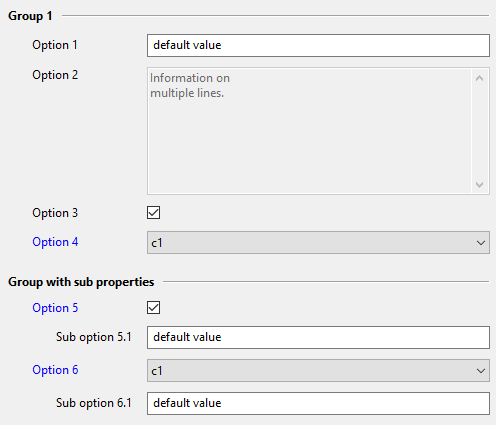
Properties of the tool. These properties can be configured in the test bench configuration. The configured properties are passed to the user port when the configuration is started. Available property types are STRING, TEXT, BOOL and CHOICE. Properties may be sorted into groups to improve visual separation in the test bench configuration. Informational properties can be marked readonly. For BOOL and CHOICE properties, it is possible to define properties that are only available for a given property value. Each property can optionally be given a display name. This is useful, for example, if you want to define properties with the same display name for each option of a CHOICE property. If no display name is set, the property name is used.
Example:
@classmethod
def GetProperties(cls) -> dict[str, dict]:
    return {
        'Group 1': {
            'Opt1': {
                'Description': 'This is Option 1',
                'DisplayName': 'Option 1',
                'Type': 'STRING',
                'Default': 'default value',
            },
            'Opt2': {
                'Description': 'This is Option 2',
                'DisplayName': 'Option 2',
                'Type': 'TEXT',
                'ReadOnly': True,
                'Default': 'Information on\nmultiple lines.\n',
            },
            'Option 3': {
                'Description': 'This is Option 3',
                'Type': 'BOOL',
                'Default': True,
            },
            'Option 4': {
                'Description': 'This is Option 4',
                'Type': 'CHOICE',
                'Choices': ['c1', 'c2', 'c3'],
                'Default': 'c2',
            },
        },
        'Group with sub properties': {
            'Option 5': {
                'Description': 'This BOOL option has a sub property',
                'Type': 'BOOL',
                'Default': True,
                'Children': {
                    'Sub option 5.1': {
                        'Description': 'This option is visible if Option 5 is checked',
                        'Type': 'STRING',
                        'Default': 'default value',
                    },
                },
            },
            'Option 6': {
                'Description': 'This CHOICE option has a sub property',
                'Type': 'CHOICE',
                'Choices': {
                    'c1': {
                        'Sub option 6.1': {
                            'Description': 'This option is only visible for choice c1',
                            'Type': 'STRING',
                            'Default': 'default value',
                        },
                    },
                    'c2': {
                    },
                },
                'Default': 'c2',
            },
        },
    }
The above example will generate the following properties:
- Returns:
Dictionary with properties of the user tool.
- Return type:
dict[str, dict]
- classmethod GetJobs()
Optional (does not have to be implemented)
Provides a list of methods that are offered in ecu.test as a tool job for this user tool.
Info
The properties of the tool job are generated using the docstring and the Python type hints of the method.
..example:
.. code-block:: python @classmethod def GetJobs(cls) -> list[Callable]: return [cls.MyToolJob] def MyToolJob(self, param1: str, param2: int) -> bool: ''' :param param1: description of param 1 :param param2: description of param 2 :return: description of the returned value ''' return True- Returns:
List of job methods.
- Return type:
list[Callable | type[UserJob]]
- GetVersion()
Version of the external tool. This version will be documented in the test report.
- Returns:
version
- Return type:
str
- IsBroken()
Optional (does not have to be implemented)
Indicates a broken tool state. Called before test execution and on configuration window update. Should return True if any of the external tools used by this user tool cannot be used anymore (e.g. connection lost, tool locked up).
Otherwise or if no external tool is used, False should be returned.
- Returns:
True if tool is broken (not usable), otherwise False.
- Return type:
bool
- Dispose()
Optional (does not have to be implemented)
Gracefully terminates the connection to the external tool and/or other shutdown sequences.
Is called when the configuration is stopped in ecu.test.
UserPort
- class UserPort
This class describes the interface of a user port. Classes that fulfill this interface can be used as port of a user tool.
- __init__(tool, properties)
- Parameters:
- tool : UserTool
Tool providing this port. Can be used to query the properties of the tool, for example.
- properties : dict[str, str | bool]
Dictionary with the properties from the testbench configuration for this port and the configured values. The possible properties are defined by the return value of the
GetProperties()method.
- classmethod GetPortType()
Returns the type of the port. This type defines which interface the port must fulfill and therefore which range of functions it offers. Valid types are
BASE (must fulfill the
UserPortinterface)IMAGE (must fulfill the
UserImagePortinterface)MODEL (must fulfill the
UserModelPortinterface)
- Returns:
Type of the port.
- Return type:
Literal[‘BASE’, ‘IMAGE’, ‘MODEL’]
- classmethod GetImplementationType()
Optional (does not have to be implemented)
Returns the implementation type of the port.
By setting an implementation type, several ports of the same type (see
GetPortType()) can be offered with different implementations.- Returns:
implementation type of the port
- Return type:
str
- classmethod GetProperties()
Optional (does not have to be implemented)
Properties of the port. These properties can be configured in the test bench configuration. The configured properties are passed to the __init__ method when the configuration is started. Available property types are STRING, TEXT, BOOL and CHOICE. Properties may be sorted into groups to improve visual separation in the test bench configuration. Informational properties can be marked readonly. For BOOL and CHOICE properties, it is possible to define properties that are only available for a given property value.
Example:
@classmethod
def GetProperties(cls) -> dict[str, dict]:
    return {
        'Group 1': {
            'Option 1': {
                'Description': 'This is Option 1',
                'Type': 'STRING',
                'Default': 'default value',
            },
            'Option 2': {
                'Description': 'This is Option 2',
                'Type': 'TEXT',
                'ReadOnly': True,
                'Default': 'Information on\nmultiple lines.\n',
            },
            'Option 3': {
                'Description': 'This is Option 3',
                'Type': 'BOOL',
                'Default': True,
            },
            'Option 4': {
                'Description': 'This is Option 4',
                'Type': 'CHOICE',
                'Choices': ['c1', 'c2', 'c3'],
                'Default': 'c2',
            },
        },
        'Group with sub properties': {
            'Option 5': {
                'Description': 'This BOOL option has a sub property',
                'Type': 'BOOL',
                'Default': True,
                'Children': {
                    'Sub option 5.1': {
                        'Description': 'This option is visible if Option 5 is checked',
                        'Type': 'STRING',
                        'Default': 'default value',
                    },
                },
            },
            'Option 6': {
                'Description': 'This CHOICE option has a sub property',
                'Type': 'CHOICE',
                'Choices': {
                    'c1': {
                        'Sub option 6.1': {
                            'Description': 'This option is only visible for choice c1',
                            'Type': 'STRING',
                            'Default': 'default value',
                        },
                    },
                    'c2': {
                    },
                },
                'Default': 'c2',
            },
        },
    }
The above example will generate the following properties:
- Returns:
Dictionary with properties of the user port.
- Return type:
dict[str, dict]
- classmethod GetJobs()
Optional (does not have to be implemented)
Provides a list of methods that are offered in ecu.test as a port job for this user port.
Info
The properties of the tool job are generated using the docstring and the Python type hints of the method.
Example:
@classmethod def GetJobs(cls) -> list[Callable]: return [cls.MyPortJob] def MyPortJob(self, param1: str, param2: int) -> bool: ''' :param param1: description of param 1 :param param2: description of param 2 :return: description of the returned value ''' return True- Returns:
List of job methods.
- Return type:
list[Callable | type[UserJob]]
- IsBroken()
Optional (does not have to be implemented)
Method to indicate a broken port state. Called before test execution and on configuration window update. Should return True if any of the external tools used by this port cannot be used anymore (e.g. connection lost, tool locked up).
Otherwise or if no external tool is used, False should be returned.
- Returns:
True if tool is broken (not usable), otherwise False.
- Return type:
bool
- OnStart()
Optional (does not have to be implemented)
Method to handle preparatory steps before test execution,
Is called right after a package has been started.
- OnStop()
Optional (does not have to be implemented)
Method to handle finalizing steps after test execution.
Is called after the execution of the package has been completed.
- Dispose()
Optional (does not have to be implemented)
Gracefully terminates the connection to the external tool and/or other shutdown sequences.
Is called when the configuration is stopped in ecu.test.
UserImagePort
- class UserImagePort
Bases:
UserPort- ReadImage()
Reads an image from e.g. an external source and makes it available as a numpy array.
- Returns:
Tuple of two numpy arrays. The first contains the image data, the second contains alpha values or None. Note that if alpha values are returned, the array must have the same size as the image data array.
- Return type:
tuple[NDArray[Any], NDArray[Any] | None]
- GetTouchInput()
Optional (does not have to be implemented)
Returns an object that provides the interface for processing touch inputs. Implementing this method indicates that this port supports touch input test steps. Can be omitted if the port does not support touch input.
- Returns:
Object that fulfills the
UserTouchInputinterface.- Return type:
- StartRecording(recordingId)
Optional (does not have to be implemented)
Starts a recording. For recording to work, both
StartRecording()andStopRecording()must be implemented.Example:
def StartRecording(self, recordingId: str) -> None: # Start recording within the user tool self._myUserToolApi.StartRecording()- Parameters:
- recordingId : str
Identifier for the recording to be started. Correlates with a recording group in ecu.test.
- StopRecording(recordingId)
Optional (does not have to be implemented)
Stops the recording for the given recordingId. Should return the path of the created recording file. For recording to work, both
StartRecording()andStopRecording()must be implemented.Example:
def StopRecording(self, recordingId: str) -> str: # Stop the recording on your tool recordingFilePath = self._myUserToolApi.StopRecording() return recordingFilePath- Parameters:
- recordingId : str
Identifier for the recording to be stopped. Matches with the recordingId the recording was previously started for.
- Returns:
Path to a video file
- Return type:
str
UserTouchInput
- class UserTouchInput
Describes the interface for touch inputs.
A class that fulfills this interface can be used to extend a
UserImagePortto allow touch inputs.- GetScreenResolution()
Returns the resolution of the screen.
- Returns:
Width and height of the screen (width, height).
- Return type:
tuple[int, int]
- PerformTap(action)
Optional (does not have to be implemented)
Performs the “Tap” action. Implementing this method indicates that the “Tap” action is supported by this port.
- Parameters:
- action : dict[str, int | float]
Dictionary that contains parameters for the “Tap” action:
posX: x coordinate in pixelsposY: y coordinate in pixels
- PerformHold(action)
Optional (does not have to be implemented)
Performs the “Hold” action. Implementing this method indicates that the “Hold” action is supported by this port.
- Parameters:
- action : dict[str, int | float]
Dictionary that contains parameters for the “Hold” action:
posX: x coordinate in pixelsposY: y coordinate in pixelsholdDuration: hold duration in seconds
- PerformMultiTap(action)
Optional (does not have to be implemented)
Performs the “MultiTap” action. Implementing this method indicates that the “MultiTap” action is supported by this port.
- Parameters:
- action : dict[str, int | float]
Dictionary that contains parameters for the “MultiTap” action:
posX: x coordinate in pixelsposY: y coordinate in pixelscount: number of consecutive tapsinterval: interval of consecutive taps in seconds
- PerformSwipe(action)
Optional (does not have to be implemented)
Performs the “Swipe” action. Implementing this method indicates that the “Swipe” action is supported by this port.
- Parameters:
- action : dict[str, int | float]
Dictionary that contains parameters for the “Swipe” action:
posX: x coordinate of the start position in pixelsposY: y coordinate of the start position in pixelsswipedPosX: x coordinate of the end position in pixelsswipedPosY: y coordinate of the end position in pixelsswipeDuration: duration of the swipe movement in seconds
- PerformMultiSwipe(action)
Optional (does not have to be implemented)
Performs the “MultiSwipe” action. Implementing this method indicates that the “MultiSwipe” action is supported by this port.
- Parameters:
- action : dict[str, int | float]
Dictionary that contains parameters for the “MultiSwipe” action:
posX: x coordinate of the start position in pixelsposY: y coordinate of the start position in pixelsswipedPosX: x coordinate of the end position in pixelsswipedPosY: y coordinate of the end position in pixelsswipeDuration: duration of the swipe movement in secondsfingerCount: number of parallel fingers that perform the actionfingerDistance: distance between two parallel fingers
- PerformHoldAndSwipe(action)
Optional (does not have to be implemented)
Performs the “HoldAndSwipe” action. Implementing this method indicates that the “HoldAndSwipe” action is supported by this port.
- Parameters:
- action : dict[str, int | float]
Dictionary that contains parameters for the “HoldAndSwipe” action:
posX: x coordinate of the start position in pixelsposY: y coordinate of the start position in pixelsswipedPosX: x coordinate of the end position in pixelsswipedPosY: y coordinate of the end position in pixelsholdDuration: duration of the initial hold in secondsswipeDuration: duration of the swipe movement in seconds
- PerformPinch(action)
Optional (does not have to be implemented)
Performs the “Pinch” action. Implementing this method indicates that the “Pinch” action is supported by this port.
- Parameters:
- action : dict[str, int | float]
Dictionary that contains parameters for the “Pinch” action:
finger1PosX: x coordinate of the first finger in pixelsfinger1PosY: Y coordinate of the first finger in pixelsfinger2PosX: X coordinate of the second finger in pixelsfinger2PosY: Y coordinate of the second finger in pixelspinchDuration: duration of the pinch movement in secondsscaleFactor: a factor < 1 means that the fingers are moving towards each other (zoom out) and a factor > 1 means that the fingers are moving away from each other (zoom in).
- PerformRotate(action)
Optional (does not have to be implemented)
Performs the “Rotate” action. Implementing this method indicates that the “Rotate” action is supported by this port.
- Parameters:
- action : dict[str, int | float]
Dictionary that contains parameters for the “Rotate” action:
finger1PosX: x coordinate of the first finger in pixelsfinger1PosY: Y coordinate of the first finger in pixelsfinger2PosX: X coordinate of the second finger in pixelsfinger2PosY: Y coordinate of the second finger in pixelsrotationDuration: duration of the rotate movement in secondsrotationAngle: rotation angle in degrees
UserModelPort
- class VariableInfo
Bases:
TypedDictSet of variable specific information that must or can be provided.
- Type : Literal['Signal', 'Parameter']
Type of the variable.
Signal: Variable is read-only
Parameter: Variable can be read and written
- Representation : Literal['Physical', 'Text']
Representation of the variable value.
- Unit : NotRequired[str]
Unit of the variable.
Default:
None
- Description : NotRequired[str]
Description of the variable.
Default:
None
- class UserModelPort
Bases:
UserPortThis class describes the interface of a user model port. Classes that fulfill this interface can be used as model port of a user tool.
- GetAcquisitionRates()
Optional (does not have to be implemented)
- Returns:
List of available acquisition rates
- Return type:
list[str]
- GetDefaultAcquisitionRate()
Optional (does not have to be implemented)
- Returns:
Default acquisition rate
- Return type:
str
- classmethod GetModels()
Optional (does not have to be implemented)
This method is called to get all available models for test configuration. If it’s implemented, a new property “Model” will be added to your port properties which contains a selected model from this list.
- Returns:
list of available models.
- Return type:
list[str]
- classmethod GetPathDelimiter()
Optional (does not have to be implemented)
Character or string to be used for splitting the variable path into its components.
Example:
Delimiter:
#Path:
A#B#CComponents:
A,B,C
If this method is not implemented,
/is used as the default delimiter.- Returns:
Delimiting character or string
- Return type:
str
- classmethod GetRecorder()
Optional (does not have to be implemented)
Class which takes care of the recording of one or more variables.
- Returns:
Class which fulfills the
UserRecorderinterface- Return type:
type[UserRecorder]
- classmethod GetSimulationManager()
Optional (does not have to be implemented)
Class that manages the simulation.
- Returns:
Class which fulfills the
UserSimulationManagerinterface- Return type:
type[UserSimulationManager]
- GetVariables()
Returns all available variables of the port.
The key of the dictionary must be the path of the variable.
The value of the dictionary contains information about the variable.
Example:
{ 'a/b/c/var': { 'Type': 'Signal', 'Representation': 'Physical', 'Unit': 'km/h' } }- Returns:
All Variables
- Return type:
dict[str, VariableInfo]
- GetVariablesHash()
Optional (does not have to be implemented)
This hash is intended to provide information on whether the list of variables for this port has changed. The hash is used to decide whether the created cache of model variables needs to be recreated.
If this method is not implemented, the available variables are queried each time the configuration is started.
- Returns:
Hash that represents all variables
- Return type:
str
- Read(path)
This method is called to read the value of a variable.
Info
Currently only scalar values are supported.
- Parameters:
- path : str
Path of the variable
- Returns:
Current value of the variable
- Return type:
str | int | float | bool
- RegisterVariable(path)
Optional (does not have to be implemented)
This method is called for each variable that is used in a test case. It is called before the test case execution.
- Parameters:
- path : str
Path of the variable that is used
UserRecorder
- class RecordingVariable
Bases:
TypedDictSet of information that is provided for a variable that is to be recorded.
- Path : str
Path of the variable.
- AcquisitionRate : str
Acquisition rate at which the variable is to be recorded.
- class UserRecorder
Bases:
objectDescribes the interface of a user recorder. Is used to record one or more variables.
- __init__(port, variables)
- Parameters:
- port : UserModelPort
Port providing this user recorder. Can be used to query the properties of the port, for example.
- variables : list[RecordingVariable]
Variables to be recorded by this recorder.
- Start()
Starts the recording of all variables of the recorder. Can be called several times in a test case.
- Stop()
Stops the recording of all variables of the recorder. Can be called several times in a test case.
- Returns:
List with paths to the recording files
- Return type:
list[str]
- Dispose()
Optional (does not have to be implemented)
Ends the recorder gracefully.
Is called when the recorder is no longer in use.
UserSimulationManager
- class UserSimulationManager
Bases:
objectDescribes the interface of a user simulation manager. Is used to manage the simulation.
- __init__(port)
- Parameters:
- port : UserModelPort
Port providing this user simulation manager. Can be used to query the properties of the port, for example.
- GetTime()
Returns the current simulation time.
- Returns:
Simulation time in seconds
- Return type:
float
- Step(timeDelta)
Optional (does not have to be implemented)
Executes a sufficient number of simulation steps to increase the simulation time by the given time delta.
Info
This method must be implemented to support the stepwise execution in simulation time.
- Parameters:
- timeDelta : float
Time delta in seconds by which the simulation time will be increased.
- SetUpdateTimeCallback(callback)
Optional (does not have to be implemented)
The callback passed to this method can be used to send an update of the simulation time in seconds to ecu.test.
Info
This method must be implemented to support the continuous execution in simulation time.
For example, this method can be executed for every simulation step. However, this method can also be executed only every nth simulation step, for example to reduce the load.
- It is important to note that ecu.test expects an update every 120 seconds at the latest
(real time).
- Parameters:
- callback : Callable[[int | float], None]
Function with an input parameter. The current simulation time in seconds must be passed to this function.
- Start()
Optional (does not have to be implemented)
Starts the simulation.
Info
This method must be implemented to support the continuous execution in simulation time.
- Pause()
Optional (does not have to be implemented)
Pauses the simulation.
- Dispose()
Optional (does not have to be implemented)
Gracefully terminates the simulation.
Is called when the configuration is stopped.
UserJob
- class UserJob
This class describes the interface of a user job. It should be used if the list of possible values or the default value of one or more parameters must be determined dynamically.
- Call(...)
This method is executed when the job is executed in ecu.test.
Info
The tooltip in ecu.test of the tool job is generated using the docstring and the Python type hints of this method.
- classmethod GetCategory()
Optional (does not have to be implemented)
Method to return a job category. Jobs of the same category are grouped together in the ecu.test job panel. Categories can be minimized and expaned for better overview.
- Returns:
String representing the job category.
- Return type:
str
- GetDynamicParameterInformation()
Returns the dynamically determined information for parameters of the
Call()method.Info
Not all parameters of the
Call()method need to be included. It is sufficient if only parameters with dynamic values are included.def GetDynamicParameterInformation(self): choices = [chr(i) for i in range(ord('a'), ord('z') + 1)] return { 'param': { 'Choices': choices, 'Default': choices[0] }, }- Returns:
Dictionary where the key represents the parameter name and the value contains the dynamically determined values.
- Return type:
dict[str, DynamicParameterInformation]