ecu.test 2026.1 Release Notes
Release date: 03.03.2026
Overview
ecu.test 2026.1 continues to drive forward modern testing processes for SDV, cloud, and AI scenarios: platform independence (Linux, ARM), significantly faster infrastructures, AI assistance for everyday use, and numerous improvements in the integration, analysis, and visualization of test data. The most important new features at a glance:
Environments & Infrastructure
- ecu.test Linux GUI
Complete graphical user interface under Linux: testing without a Windows detour. - ecu.test Linux Runner & Runner for ARM (sneak preview)
Efficient test execution on Linux and ARM resources.
AI & Assistance
- ecu.test agent
The agent can now be used to generate trace steps. - ecu.test agent chat (preview)
Planned co-pilot for workflows: pattern recognition, reviews, library packages, and collaboration with the test.spec agent. - test.spec agent (Preview)
Generates test specifications from requirements. - TouchInput with AI prompt
HMI interactions via voice prompt instead of coordinates.
Analysis & Diagnostics
- CheckResponse
This function facilitates time checks in trace analysis. - J1939 DM services (preview)
Symbolic, generic diagnostic test steps analogous to OBDonUDS, without additional database.
Everyday performance
- Parallel tool start shortens the start-up time of extensive TBCs.
- CAN-FD Timing Helper automatically determines missing timing parameters and simplifies CAN-FD configuration.
- ecu.test code
- is now available via PyPI.
- now enables direct package calls.
All other numerous new features and enhancements are described in detail below.
Highlights
ecu.test Linux GUI
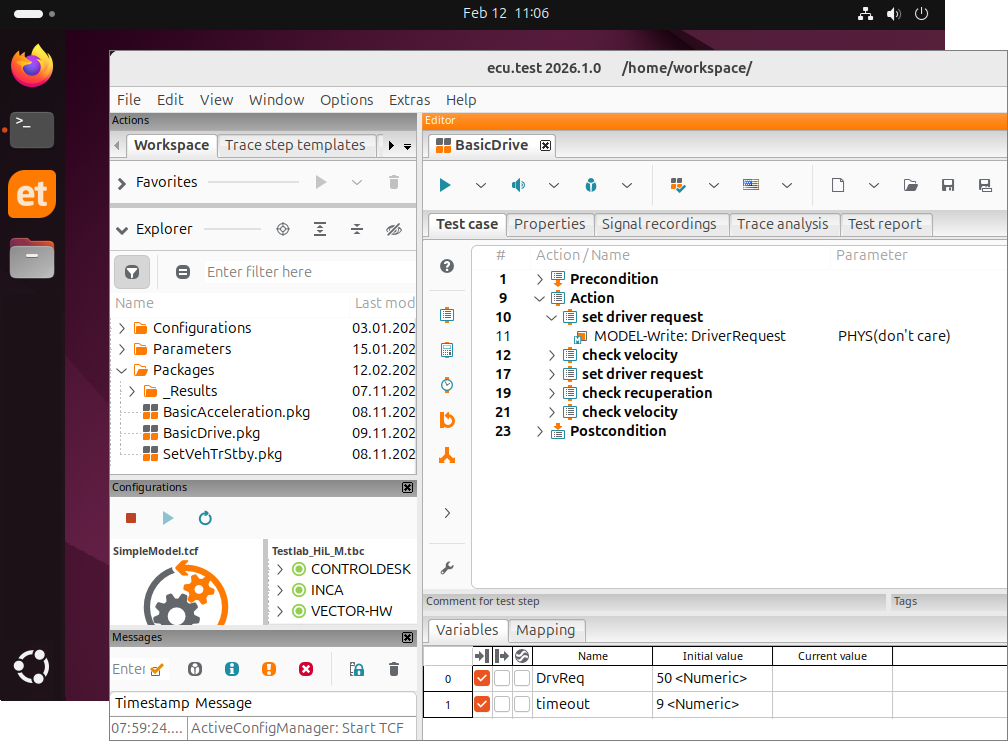
ecu.test is now available for Linux with a full graphical user interface, in addition to Windows. This allows users to create, execute, and evaluate tests directly in their Linux environment, without switching to Windows to make additional adjustments to tests and configurations.
The ecu.test Linux GUI is available for Ubuntu 24.04 and, together with the ecu.test Linux Runner, simplifies development and validation while enabling more efficient use of existing Linux infrastructure.
CAN-FD Timing Helper
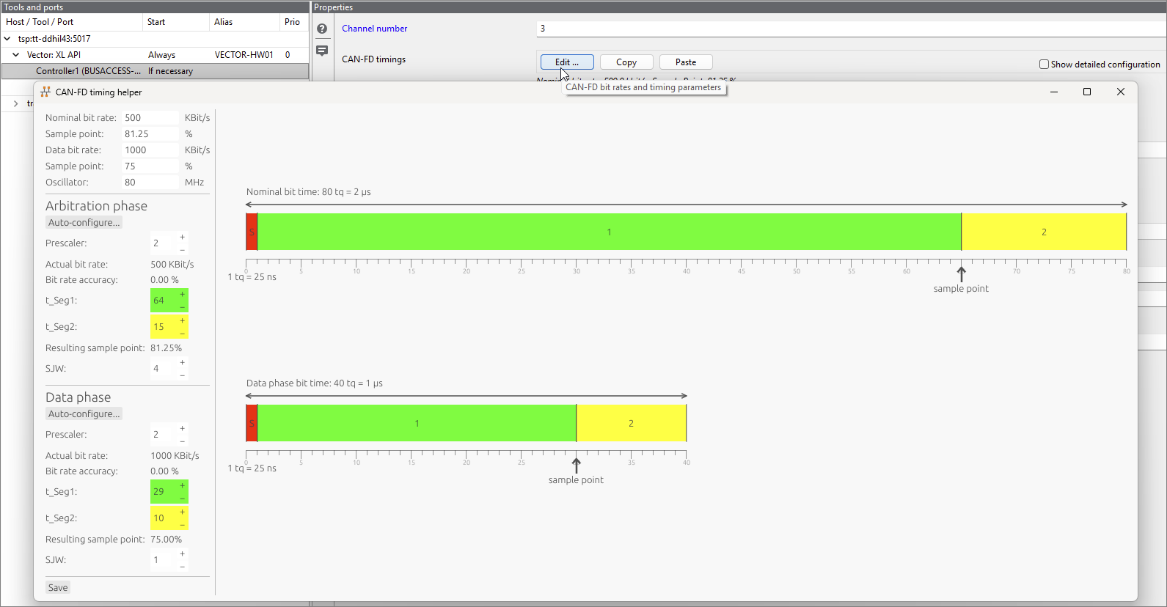
The new CAN-FD Timing Helper utility simplifies test bench configuration for CAN-FD-capable bus hardware.
Based on the parameterization of bit rates, sample points and oscillator frequency, the missing parameters – synchronization jump and time segments – are automatically determined and visualized.
Although manual parameterization in the TBC with deviating values is still possible, it is no longer mandatory.
In addition, once values have been determined, they can be copied as a whole at the touch of a button and pasted onto other ports.
Parallel tool start
Operating the test infrastructure involves high costs. The time spent configuring the test bench and its tools must be subtracted from the valuable test time and, although the configuration start is necessary, does not contribute to the actual tests.
Especially with extensive test bench configurations involving many tools, the start of the configuration can be time-consuming. The start-up time of a tool depends heavily on the configuration steps required, the scope of the configuration, and the individual implementation of the tool and its API.
Previously, all tools in a TBC were started sequentially. With ecu.test 2026.1, the tools are now started in parallel, which results in substantial time savings. The individual start-up priority set by the user for each tool is, of course, still taken into account.
ecu.test code now available on pypi.org
ecu.test code is now available via the Python Package Index PyPI. Provided PyPI is accessible, installation is now very easy via:
pip install ecutest_code
Provision via email and Seafile link will be discontinued at the same time.
Package execution for ecu.test code
For certain tasks, helper packages might already exist, or expressing a subtask as a package might be more concise.
From now on, ecu.test code can call packages that respect certain limitations. Parameters can be passed in, return values can be passed out, and the evaluation of the package execution (SUCCESS, FAILED, etc.) can be queried.
Of course, package calls can also be used in conjunction with access to test signals.

CheckResponse simplifies time checks in trace analyses
Previously, it was difficult to model typical temporal relationships between two signals in trace analysis without using trace step templates.
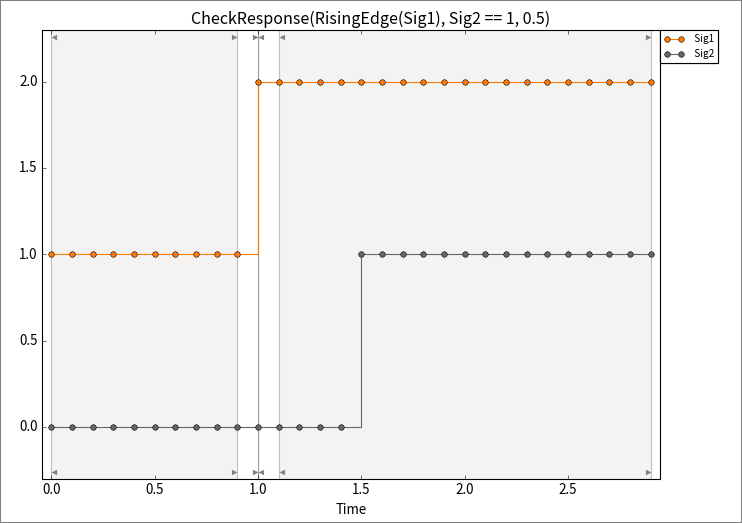
The CheckResponse function is now available for calculation steps and trigger blocks. It significantly simplifies temporal checking by requiring only two signals and a timeout parameter.
If the value of the first signal is true at a given point in time, CheckResponse checks that the second signal also becomes true within the timeout period. It is good practice to specify an edge function for the first signal, as the state change of a signal usually serves as the activation condition:
CheckResponse(RisingEdge(Sig1), Sig2 == 1, 0.5)
The optional useHoldValue parameter can be used to address special cases where the second signal is rarely sampled and may have already been in the desired state before the activation time.
Sneak Preview
ecu.test Runner for ARM
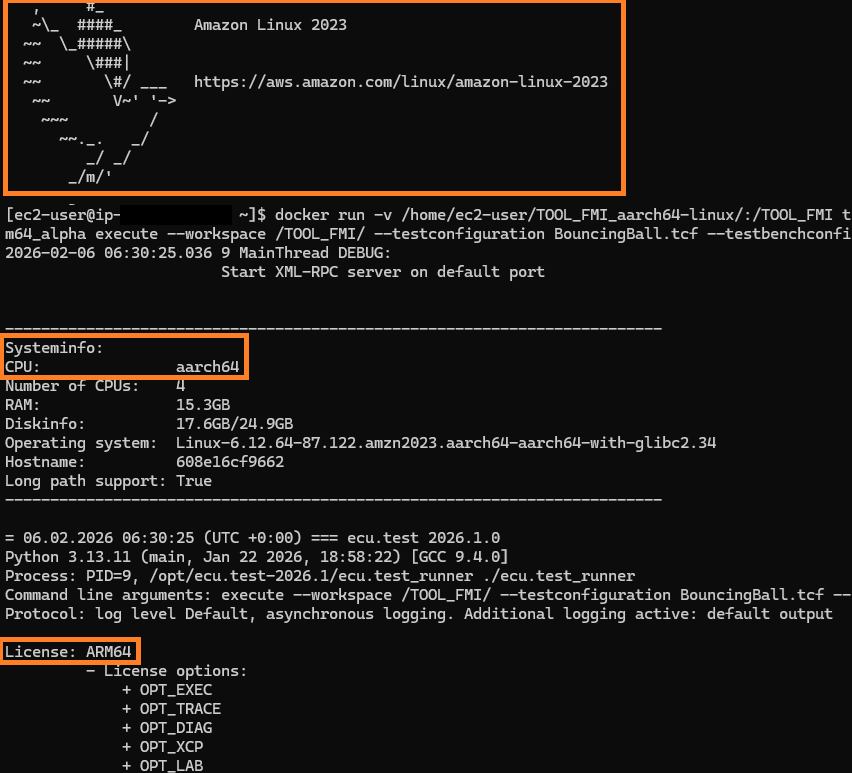
ecu.test Linux Runner is now also available for ARM platforms. One of its key features is the efficient execution of FMU-based tests via FMI on ARM, enabling vECU Level 4 testing in an ARM-on-ARM scenario.
This allows users to test their virtual control units directly on ARM hardware – without the need for additional bridges or translation layers, making it particularly efficient.
Native use on ARM cores gives users better energy efficiency and lower infrastructure and operating costs – both in their own data centers and in the cloud. The ecu.test Runner can be run directly on ARM resources in AWS and other cloud environments, enabling a scalable, high-performance, and resource-efficient test environment.
Additional use cases and application scenarios:
- Execution of package checks and generators
- Performing trace analyses and file conversions
- Operation on embedded hardware for dedicated test or analysis tasks or for test bench automation/monitoring (e.g., via ecu.test lab)
ecu.test agent chat – your ecu.test co-pilot
In the last two releases, we introduced the ecu.test agent and have been continuously improving it ever since. At the same time, we are working on the next big highlight – the ecu.test agent chat, a kind of co-pilot for ecu.test.
- Finding similar implementations in test cases and automated derivation of library packages
- Support for signal recording for optimized merging of test case and trace analysis generation
- Reviewing a test case: The agent points out shortcomings and differences between the specification and implementation
- Actions within the scope of an ecu.test project: e.g., adding parameter sets from attached files
- Communication with the test.spec agent so that new specifications can be derived from requirements
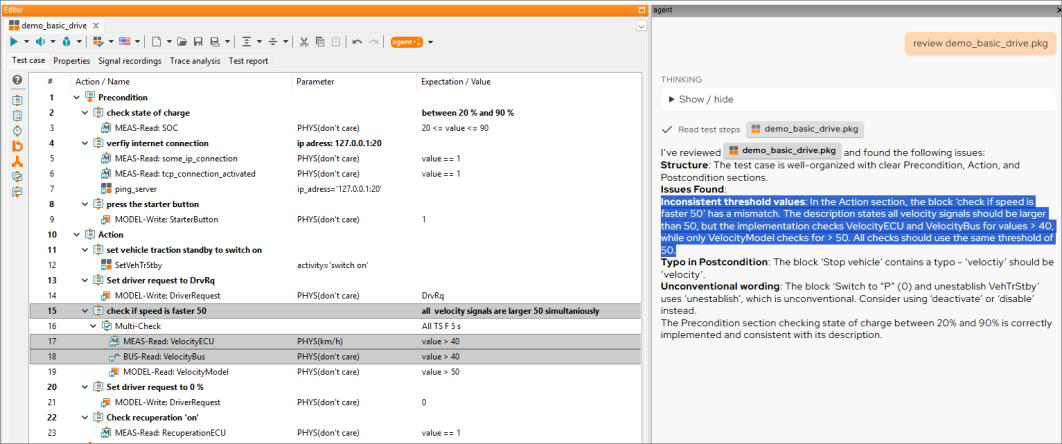
These lists are examples. Let's talk about your workflows together. Where do you lose the most time?
In ecu.test 2026.1, the ecu.test agent chat is already available on request. Please feel free to contact us at support@tracetronic.com.
test.spec agent
With the current release, the test.spec agent has undergone consistent further development. The focus was on improving the quality of the entire Agentic workflow. Now, specifications are generated more consistently. Test methodologies, such as positive/negative tests and equivalence classes, are automatically considered. Rules for generating specifications can be specifically defined and selectively applied.
Another new feature is the ability to connect to Codebeamer, which allows requirements from the ALM system to be integrated directly into the specification process.
Outlook:
- Planned release at the end of June
- Closer interaction between the test.spec agent and the ecu.test agent to generate consistent test cases
- Editor optimizations to efficiently maintain specifications
- Initial functions to support trace analysis and quality assessment of requirements and specifications
Take advantage of the preview phase to evaluate the test.spec agent in your tool landscape and experience how it reduces the time it takes to create specifications from hours to minutes. We are happy to assist you with the first steps and look forward to your inquiry!
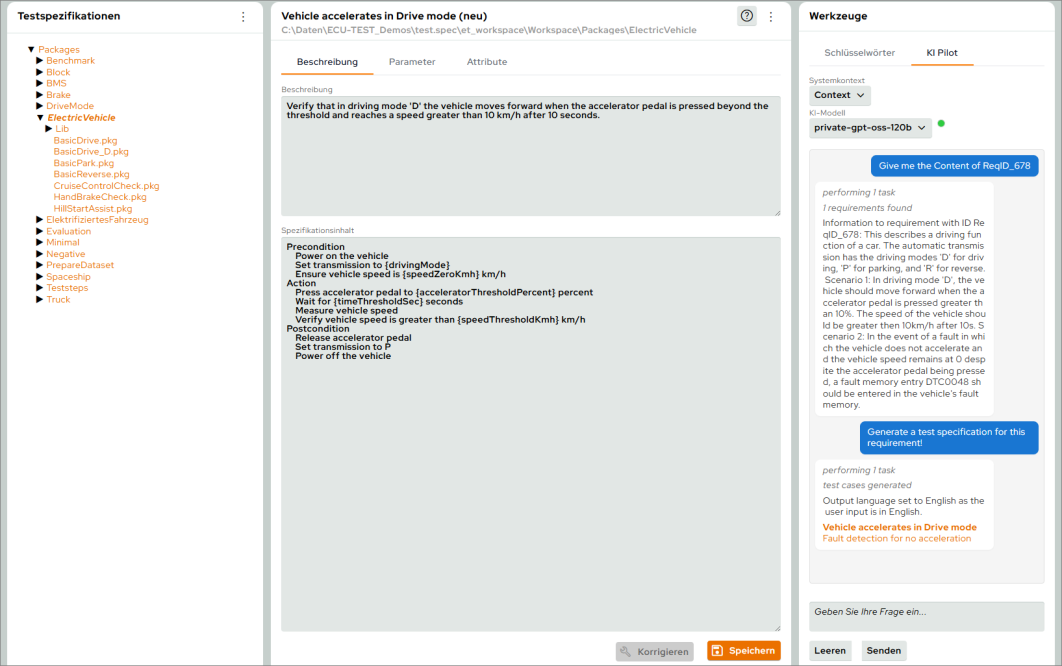
TouchInput with AI prompt
With the TouchInput test step, ecu.test already offers the option of performing various actions (clicking, swiping, rotating, etc.) to interact with an HMI or a website. Until now, however, fixed coordinates had to be specified.
This approach is not particularly robust, especially when testing HMI elements. If the positions and sizes of the elements change during development, manually created test cases must be laboriously adjusted.
The new AI function in the TouchInput test steps allows prompts to be used instead of coordinates. For testing an HMI, for example, the following prompts are conceivable:
- Press the "Radio" button.
- I want to make a phone call.
- I want to listen to music.
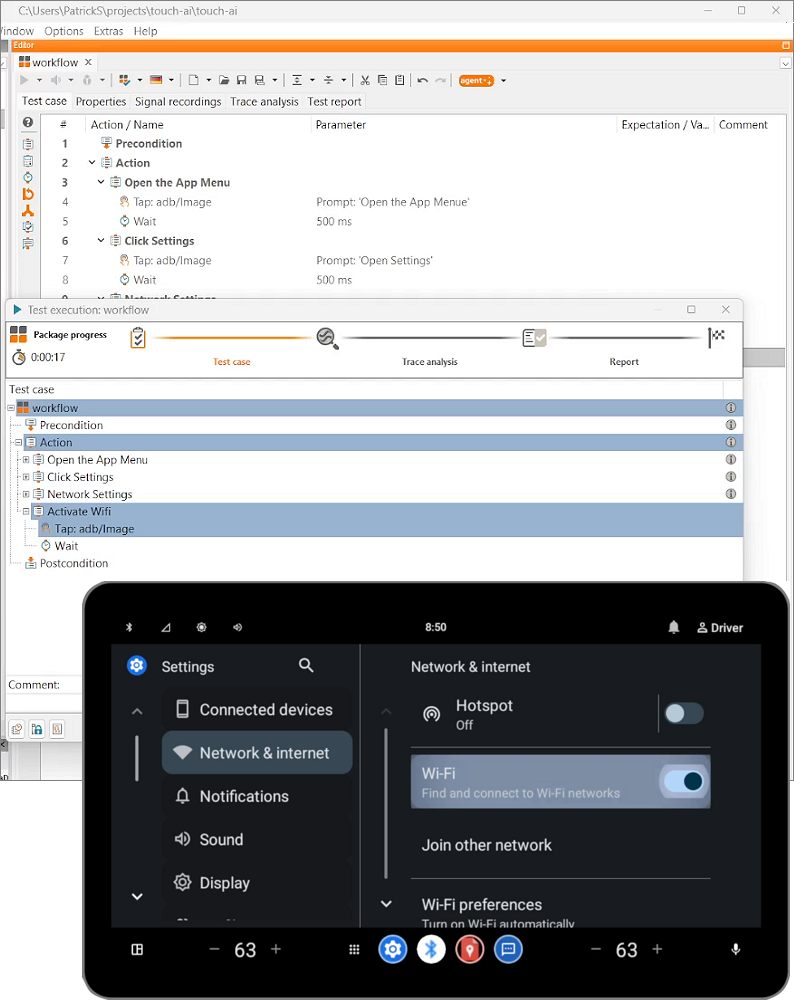
The model analyzes the image and returns the coordinates regardless of the language setting, element arrangement, or displayed content. This enables the creation of robust test steps.
The model is connected via the ecu.test agent connector and can be customized to individual needs. We have had positive experiences with both Claude 4.5 and ChatGPT. Would you like to try out the new feature now? Please contact your tracetronic representative or our support team.
J1939 as symbolic test steps
In the context of J1939, the most important services are probably the DM services. These services are defined and equivalent to OBD-UDS in the context of UDS.
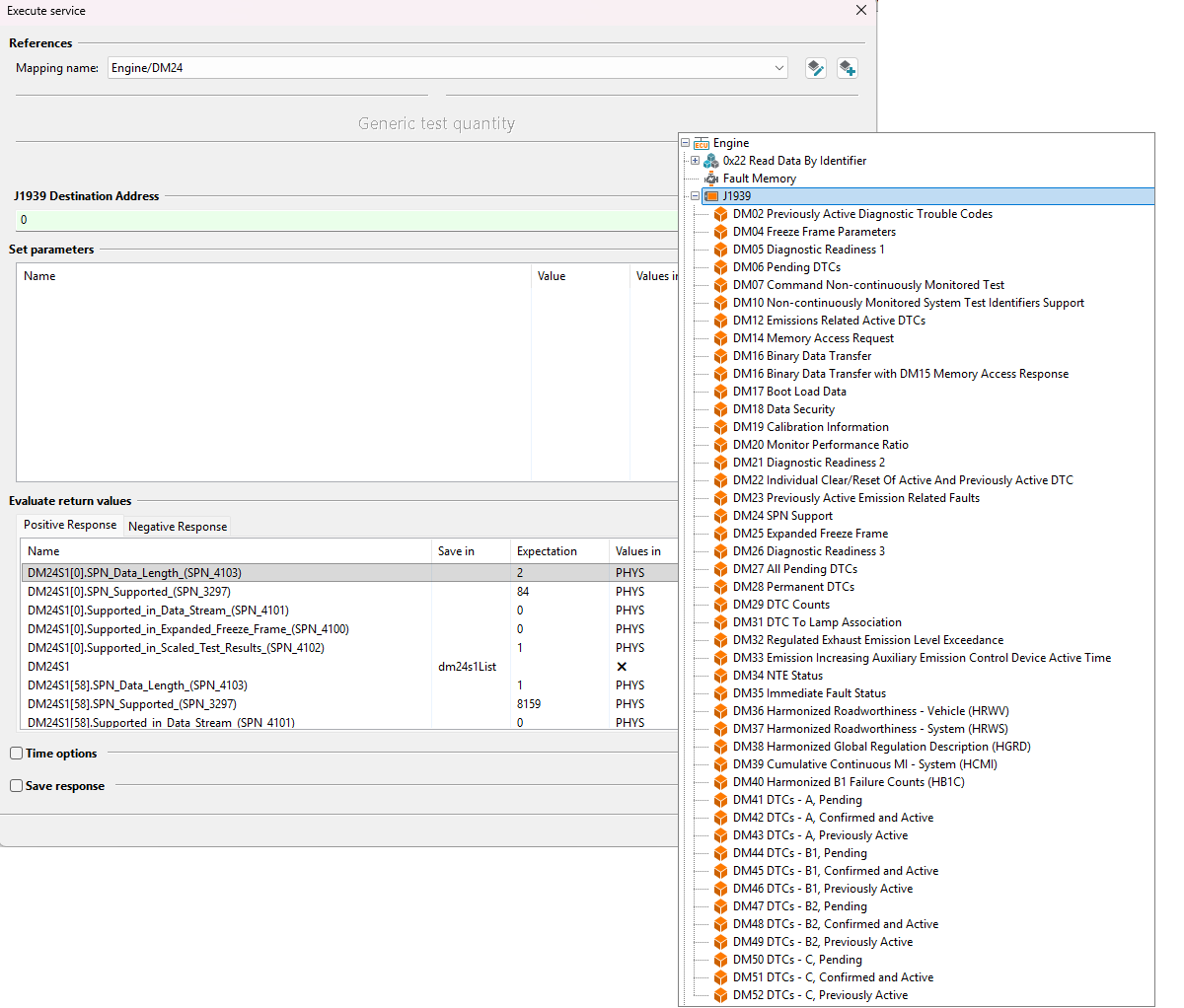
Due to their large scope and complexity, especially regarding the return parameters, we are experimenting with symbolic support for J1939 DM services. Similar to OBDonUDS, they appear as generic diagnostic test steps in the Diagnostics tab after activation. A database is not necessary.
Activation is available upon request and requires a license ecu.test diagnostics.
ecu.test extras
ecu.test agent
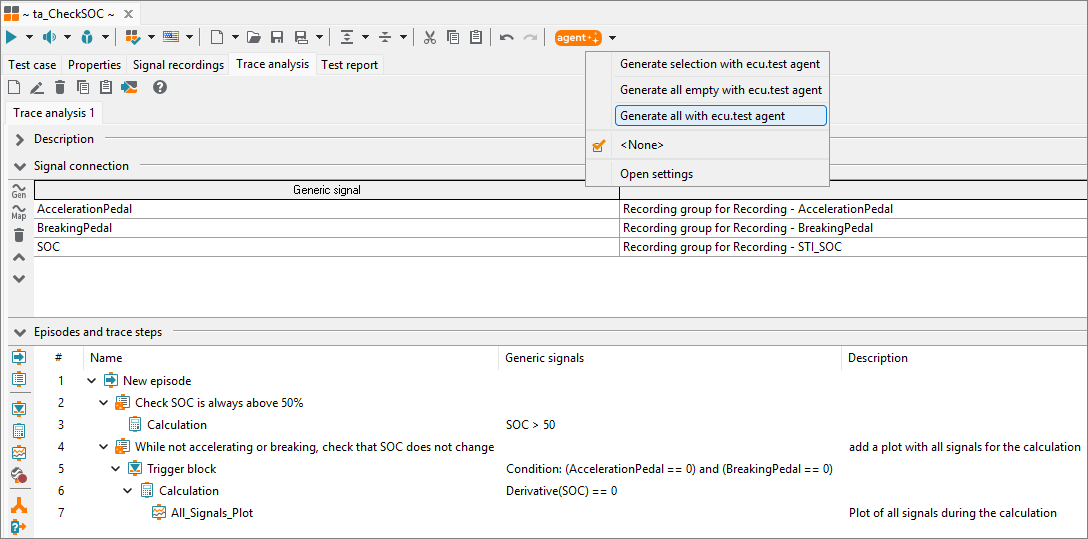
Support for trace analysis
In the last release, the generation of trace steps was available as a preview, but this feature is now officially available.
The ecu.test agent generates content for blocks on request. Currently, trigger blocks, calculation steps, and plots are currently supported.
Similar to test cases, blocks with generated content are marked with a small symbol:  .
Optimizations and support for further test steps
The current ecu.test release, 2026.1, includes numerous optimizations for generating test cases. These include, among others:
- Values from enumerations are taken into account during generation
- Test steps from unsupported reference implementations are generated as ToDo steps
- The time options "Wait until true," "Wait for at least," and "Polling cycle" are included in the generation
- Optimization in the generation of tool and port jobs
ecu.test also supports the following test steps:
- Exit
- Comment
ecu.test calibration
Simultaneous recording of a bus and a calibration port for CAN(-FD)
Records for bus and XCP communication often have to be made using the same controller as the measurement hardware. This was previously possible and resulted in an error message. As of this release, this restriction no longer applies.
ecu.test drive
Shortcuts to pause and cancel test cases
You can now pause a test execution by pressing Space and cancel a test case by pressing Esc.
ecu.test lab
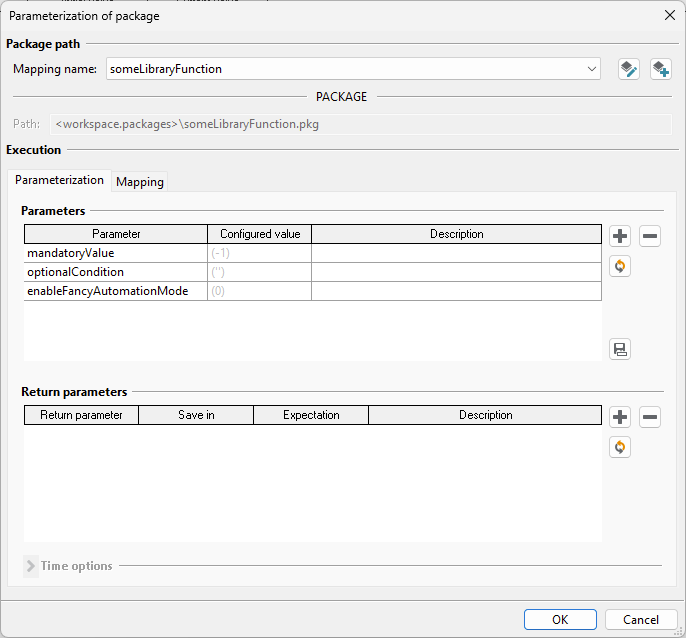
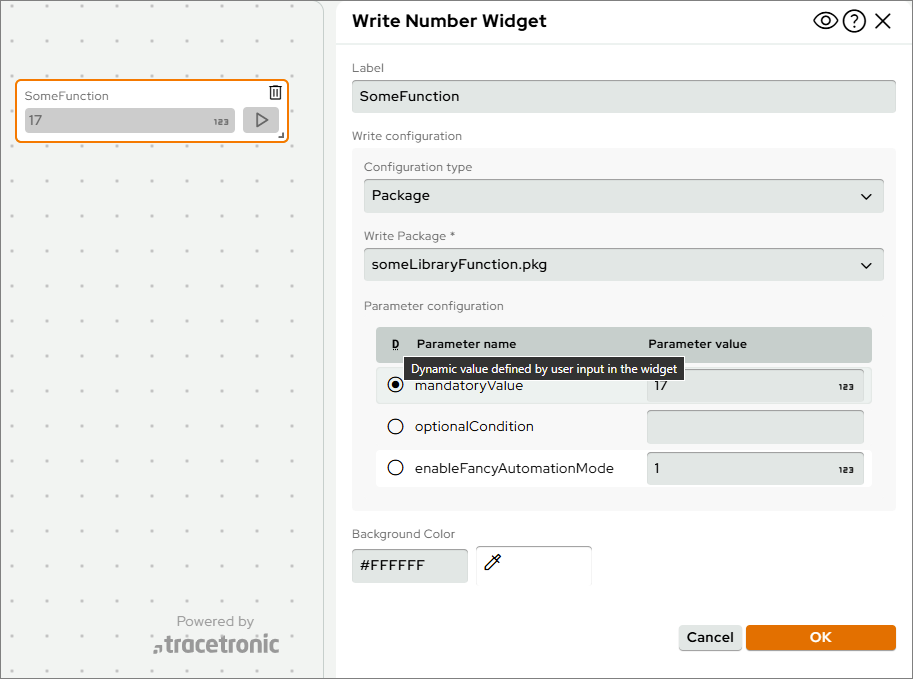
Parameterizing all parameters of a package
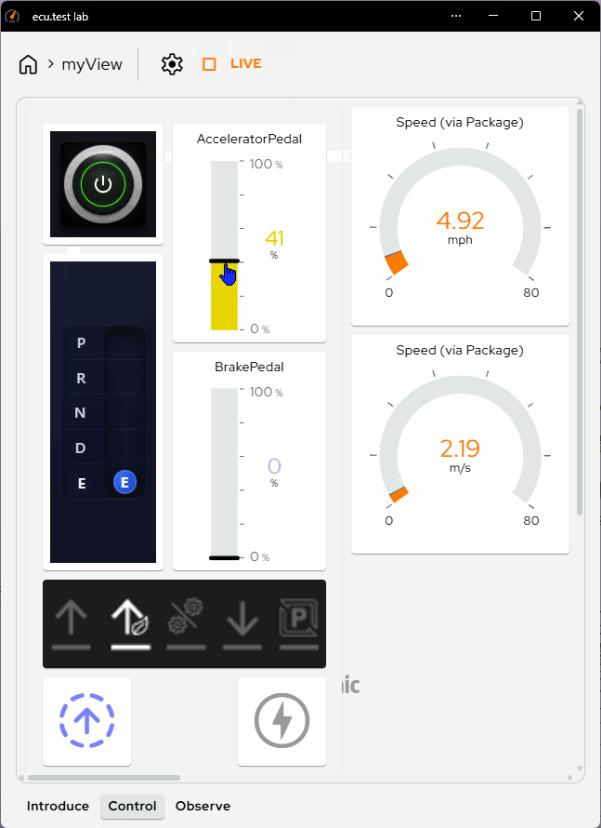
Previously, only a single parameter could be assigned in write widgets for a stored package.
With this version, all parameters can now be taken care of. In most cases, this means that one parameter is assigned dynamically by operating the widget, and the remaining parameters are either assigned static values or deliberately executed with the initial value stored in the package.
For reading widgets, packages previously only offered the option of selecting the return value. In this case, the parameters can now also be configured statically.
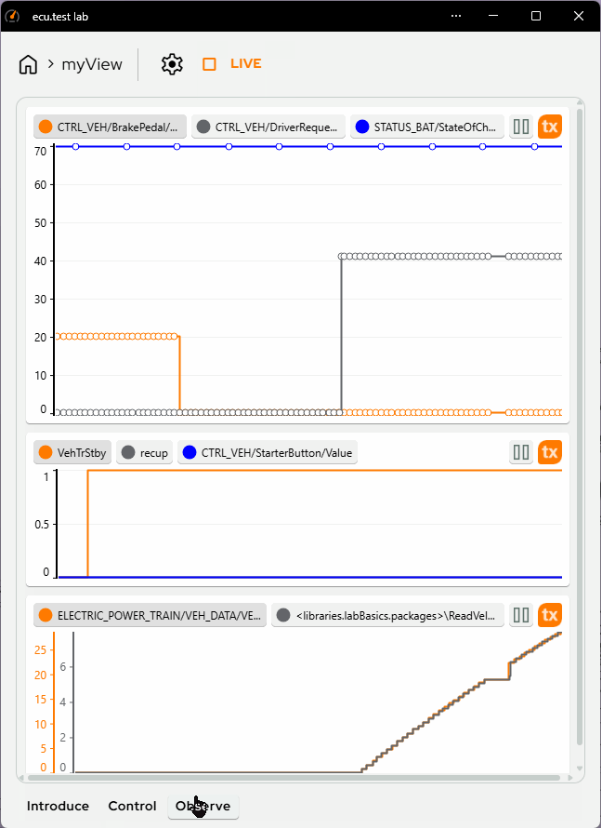
New widget: Signal Graph
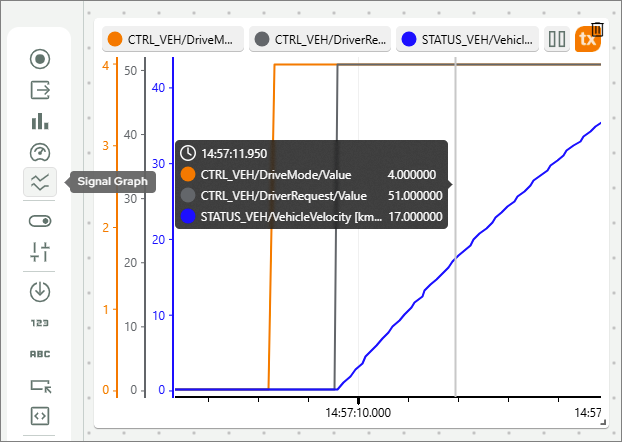
Ever since ecu.test lab was launched, there has been a demand for signal curves to be displayed. With ecu.test 2026.1 and our new Signal Graph widget, we are now able to meet this request.
The widget is based on the signal visualization of the trace.xplorer and can show up to four signals in one graph. You can configure whether these signals share a common Y-axis or each have their own axis. Optionally, markers for signal values and interpolated curve plotting can be activated.
During execution, you can display the signal values at the cursor position by clicking on the graph. Signals can be temporarily hidden for a better overview. In addition, the drawing of the waveform can be paused if necessary and resumed later (without loss of values).
Multiple pages for each view
To increase the available workspace and improve its structure, we have added tabs (or pages) to the views. This allows multiple pages to be filled with widgets and initialized and used simultaneously.
This eliminates the need to stop monitoring mode and to change the view.
 |
 |
|---|---|
Usability
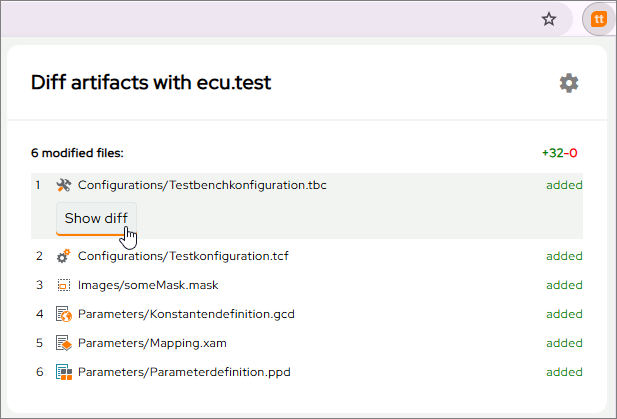
Browser extension "Open with ecu.test diff"
Open with ecu.test diff allows you to open changes to ecu.test artifacts in the ecu.test Diff Viewer directly from your browser.
The newly released version 1.1.0 now supports BitBucket Cloud in addition to GitHub and GitLab. Furthermore, the setup and some error messages have been improved. The extension is available from the Firefox and Chrome store.
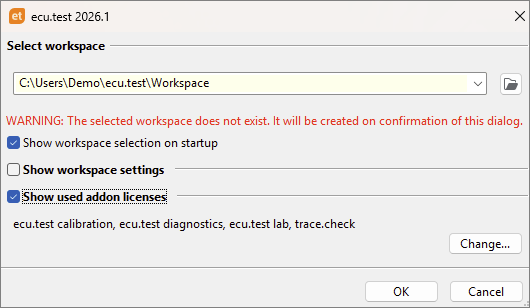
Workspace selection dialog: Licenses for ecu.test extras
In the workspace selection dialog, before ecu.test is fully started, the licenses used for the ecu.test extras can be displayed and, if necessary, configured directly in the License Manager.
Test aspects
HiL
Support for Intrepid CAN(-FD) bus hardware connection
All features of hardware-related bus connections, including ecu.test diagnostics and ecu.test calibration, can now be used with CAN and CAN-FD-capable measurement hardware that can be controlled in conjunction with the Intrepid neoVI API.
ETAS INCA: Revised handling of data sets
The INCA .tbc-option Handling of existing project for application ports determines which of the configurations for project (A2L file) and data set (HEX file) in ecu.test and INCA are used when opening the INCA experiment.
Since there can be a variety of requirements depending on whether a data set exists and which data set should be prioritized, the selection options have been fundamentally revised and documented. Details can be found in the user documentation.
Test management
Sample workflow for PTC Codebeamer
Based on the new User Test Management API, there is an initial sample workflow for importing packages and projects from PTC Codebeamer.
Together with the tractronic Codebeamer client, you get full access to the Codebeamer REST API. The purely Python-based solution can be easily adapted to your individual workflows.
Trace analysis
Access to enum values in trace step templates
It is now possible to access the enum values of a signal via the API in event-based Python and array-based NumPy trace step templates.
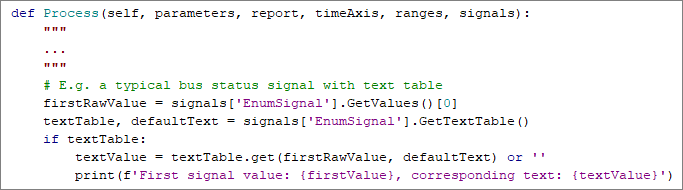
New standard trace step template: CalculateInterpolatedSignal
Rarely sampled signals from originally continuous (analog) measured quantities often make robust testing difficult. By default, signal values are mapped to a common time axis with other signals using sample-and-hold. However, the use of the Hose function, for example, requires individual interpolation.
The new standard trace step template CalculateInterpolatedSignal allows you to linearly interpolate the values of a signal onto the time axis of a reference signal. This makes it easy to implement many use cases.
Further test aspects
Improved support for measurement lists
The current version builds on the option introduced in ecu.test 2025.4 to use XAM files as measurement lists for signal groups and offers further practical improvements.
- Integrated library workspaces: XAM files can now be imported directly from library workspaces.
- Reporting: For better traceability, measurement lists used for recording are documented.
- Easy configuration: Measurement lists can now be easily configured using drag-and-drop.
Tools and Interfaces
New tools and versions
| Provider | Website | System | Product name | Version | |
|---|---|---|---|---|---|
| 1 | Accurate Technologies Inc. | Release link | Calibration and data acquisition tool | ATI VISION | 7.0 |
| 2 | Lauterbach | Release link | Tool for analyzing, optimizing, and certifying embedded systems | TRACE32 | R.2025.2 |
| 3 | PLS | Release link | Tool for debugging, tracing, and testing embedded software | UDE | 2025.2 |
Discontinuations
Discontinued features and incompatibilities in this version
Python 3.13
ecu.test 2026.1 is based on Python 3.13.
According to current estimates, the switch should have little impact on existing ecu.test workspaces.
However, you should check your own Python code in packages, user libraries, and external Python libraries for compatibility with Python 3.13 and update it if necessary.
You can check if your code locations are affected by removals using the following link:
Helpful information about switching can be found in the
Port BUSACCESS – GENERIC_MAPPINGFILE
The newly introduced port type, BUSACCESS - MODEL BASED, is much more flexible, maintainable, and intuitive to configure.
To clarify the available options and guide users to the best solution, the BUSACCESS - GENERIC_MAPPINGFILE has been removed from ecu.test 2026.1.
FEP2 connection
The FEP2 connection has been removed from ecu.test 2026.1.
Ubuntu 20.04 LTS and 22.04 LTS
Support for Ubuntu 20.04 LTS and 22.04 LTS has been removed from ecu.test 2026.1.
Playbook-Export from ecu.test to test.guide
With ecu.test 2026.1, the playbook export from ecu.test to test.guide has been removed.
Supported versions of MATLAB/Simulink in Linux
Following the discontinuation of support for older versions of Ubuntu with ecu.test 2026.1, support for MATLAB/Simulink up to and including R2023b has been removed under Linux, as these versions do not offer support for Ubuntu 20.04. Support for Windows remains unchanged for versions from R2015b onwards.
ICMP-RAW port
For the Ethernet, XL-API and SIL-Kit tools, the ICMP-RAW port has been removed without replacement, as announced.
Alternative report directory for separate subproject execution
When executing separate subprojects, it was possible to specify the report folder. This feature was removed in ecu.test 2026.1.
Discontinued features in future versions
KS: Tornado only via ASAM ACI
The tool connection will be removed with ecu.test 2026.2. It will be replaced by the new connection based on ASAM ACI, which is available since ecu.test 2023.3.
TRF files can no longer be generated for project reports
With the introduction of the PRF format for project reports, the TRF format has become obsolete. Although the TRF format could be activated via the workspace settings during the migration phase, this fallback setting is expected to be removed in ecu.test 2026.3. Until then, based on feedback received, work is underway to improve some workflows with and without test.guide.
This discontinuation only affects project reports. Package executions will continue to be saved in the TRF format.
Interface TmUserAdapter
The following interface methods will be removed with ecu.test 2026.2:
GetPackageFromTmsGetProjectsFromTms
These newly introduced methods serve as replacements:
FetchChildrenForPackageImportFetchChildrenForProjectImport
Despite the change, the familiar tree structure of the test management system is still present in the import dialogs.
Import in connection with CustomChecks
Custom tests may use a module that has been moved. Therefore, check the imports and adjust them if necessary.
- old:
tts.core.common.check.Constants - new:
tts.interface.customCheck.Constants
Jama Connect
The integrated test management adapter for Jama Connect will be removed with ecu.test 2026.2.
As a replacement the user defined test management adapters can be used. These adapters offer significantly more flexibility and enable optimal adaptation to the respective workflow.
A sample workflow is provided to assist with your own implementation.
Jobs RequestSeed und SendKey
The RequestSeed and SendKey jobs are replaced.
RequestSeed→SecurityAccessRequestSeedSendKey→SecurityAccessSendKey
The new jobs also support the Seed & Key DLLs.
Real-time package references
dSPACE has changed its interface for controlling the real-time environment with ControlDesk 2024-B. Since this dSPACE release, it is no longer possible to execute real-time package references with ecu.test.
Due to the lack of user feedback on this issue, we assume that this feature is rarely used and will remove it with ecu.test 2026.3.
Attention: The discontinuation only applies to real-time package references. Other features related to real-time testing (RTT) are not affected.
Bus monitoring test steps
The bus monitoring test steps used to check timings and DLC can be implemented much more effectively with trace analysis and the provided analysis modules.
Starting with ecu.test 2026.3, support for inserting new test steps will be discontinued. Support for execution will be removed in ecu.test 2027.1 at the earliest.
Basler: Pylon
Basler cameras are compatible with the GenICam standard, which eliminates the need for a separate tool connection. For this reason, the Basler: Pylon tool will be removed from ecu.test 2026.3.
When using a Basler camera, the GenICam tool connection can be used as an alternative.
Siemens Polarion
The integrated test management adapter for Siemens Polarion will be removed with ecu.test 2027.1.
As a replacement the user defined test management adapters can be used. These adapters offer significantly more flexibility and enable optimal adaptation to the respective workflow. A sample workflow is provided to assist with your own implementation.
IBM Rational Quality Manager (RQM)
The integrated test management adapter for IBM Rational Quality Manager (RQM) will be removed with ecu.test 2027.1.
As a replacement the user defined test management adapters can be used. These adapters offer significantly more flexibility and enable optimal adaptation to the respective workflow. A sample workflow is provided to assist with your own implementation.
HP Application Lifecycle Management (ALM)
The built-in HP Application Lifecycle Management (ALM) test management adapter will be removed in ecu.test 2027.1.
For continued interaction with HP Application Lifecycle Management (ALM) after that release, a user-defined test management adapter needs to be implemented using the ecu.test Test Management API.
PTC Integrity
The built-in PTC Integrity test management adapter will be removed in ecu.test 2027.1.
For continued interaction with PTC Integrity after that release, a user-defined test management adapter needs to be implemented using the ecu.test Test Management API.
Interactive test execution in ecu.test
The use cases for interactive test execution within ecu.test and the web application ecu.test drive largely overlap.
ecu.test drive is the significantly more flexible solution.
- More intuitive user guidance
- Better adaptability to the areas of application in the vehicle
- Usability with runner and remote through decoupling from ecu.test GUI
We will therefore focus on this solution in the future and will remove interactive test execution with ecu.test 2027.1.