test.guide
ecu.test has an interface to test.guide, which allows to export test reports to test.guide and to color packages in the workspace explorer according to the result of the latest run whose report was exported to test.guide. Furthermore projects that adhere to a certain structure can be exported as a playbook to test.guide. That allows them to be executed distributed over several testbenches if necessary.
Warning
Exporting a project as a playbook (to test.guide) is deprecated and will be removed in 2026.1.
Settings
Connection Settings
The settings pages for configuring the interface can be found under or . The connection settings that need to be set in ecu.test can be found in test.guide under .
The icon  in the status bar of ecu.test shows a dialog
with the current connection state.
in the status bar of ecu.test shows a dialog
with the current connection state.
A new authentication key can be generated in the personal test.guide profile under .
The authentication key can be stored in encrypted form in the workspace settings using the corresponding button. It is automatically decrypted when it is used. However, this mechanism is intended solely to avoid having to store the key in plain text or even version it. However, full protection against unauthorized use is not given.
Additional Settings
You can decide whether reports are automatically uploaded to test.guide immediately after executing the project or package.
Furthermore, you can select if the information bar is to be shown in every test report, and you can configure the ATX generator, which converts ecu.test test reports into the ATX format. The meaning of the individual options is explained directly in the settings dialog.
Report
Uploading reports manually
Instead of the automatic upload, you can also call a dialog via , which allows you to transfer test reports individually or collectively to test.guide. There you first choose a folder and are presented with the contained test reports. Then you can upload these to test.guide, provided a connection to the server is available.
Also, in the report viewer, you can click
to send the currently opened test report
to test.guide.Mapping of report elements to ATX elements
Since the names used by ecu.test for the report elements are not the same as the ATX standard uses, the report elements are mapped according to the following table:
Name in ecu.test
ATX element
project
TestExecutionPlan
package (or parameter set)
TestCase
testbench and test configuration
TestEnvironment
package and project attributes
Attributes
global constants
Test-Constant
result
Verdict
When converting a report from a single package execution, a TestExecutionPlan “SinglePackageExecution” is created.
When using parameter sets (individual or generated by a parameter set generator), you can choose in the ATX generator settings whether the package name or the parameter set name is to be used as the test case name.
Packages not containing any test steps (i.e. completely empty packages, or packages containing only trace analyses) are discarded by the generator. However, for packages containing both test steps and trace analyses, the results of the trace analyses are also carried over to the ATX format.
Playbook
To create a playbook for distributed test execution, a new playbook project can be created using the project templates in ecu.test.
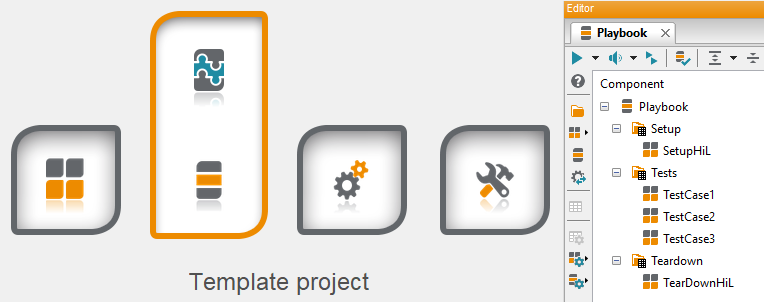
Existing projects can also be treated as playbooks, as long as they correspond to the following scheme:
Setup
The optional projects and packages listed in this folder will be executed once on the testbenches this playbook addresses. These can be used to prepare the test environment.
Tests
The projects and packages listed in this folder describe the actual tests and should be able to run in parallel on the testbenches addressed by this playbook. They should therefore not depend on each other or alternatively address only one testbench.
TearDown
The optional projects and packages listed in this folder can be used to clean up the testbench after the tests.
Info
These folders can also be parameterized, e.g. for variant handling. The parameters specified here are available as global constants during the execution of the packages and projects contained in them.
A project that meets these conventions can be exported as a playbook. For this purpose, the following export options are available in the context menu of the playbook project:
Export as playbook (deprecated, removal in 2026.1)
Here a playbook is created as a file in the file system so that it can be manually adjusted if necessary. This file can then be manually uploaded to test.guide as a playbook.
Info
More information about the Playbook JSON format is available in the test.guide Execution API documentation.
Export as playbook to test.guide (deprecated, removal in 2026.1)
A playbook is also created here, but it is uploaded directly to the configured test.guide.
When exporting, in addition to a name that is to be used in test.guide for the playbook, also the workspace source information can be stored to check out the workspace on the testbench from SCM or to retrieve it as an test.guide artifact. Furthermore, requirements (XiLConfigRequirements) can be set for the testbenches themselves. These requirements are used by test.guide to select suitable testbenches for test execution. Currently only the XiL type is supported here. The catalog of possible requirements is obtained directly from test.guide.