Real-Time Testing
A real-time test is a software test running on a real-time system. Real-time tests are primarily executed in environments including HiL platforms due to the existence of a real-time system hosting the real-time model. Both the real-time test and model are executed concurrently on the real-time platform. In every simulation step one or several instructions of the real-time test might be executed:
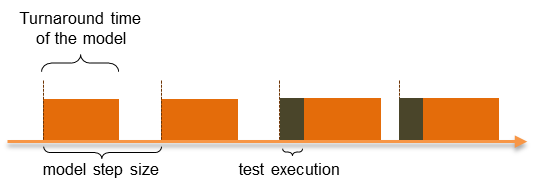
The great advantage of real-time tests compared to non-real-time tests is, that more than just one instruction can be executed before the model time proceeds. The maximal amount of instructions executable in each simulation step is limited by the turnaround time of the model and the simulation’s step size.
Implementing Real-Time Tests
Real-time tests are implemented and executed in ecu.test as normal test packages. To execute a package in real-time it must simply be referenced as “real-time reference” or “parallel real-time reference”.
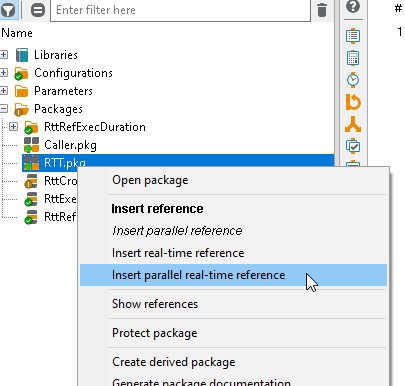
So the package itself is not marked as real-time package, but the type of reference it is called by. Therefore, it is possible to execute the same package both in real-time and in non-real-time.
The person implementing real-time tests must be aware of the fact, that the real-time test might cause the model to miss its real-time requirements. To face this problem the execution must be guaranteed to the model timely. There are several ways in achieving this:
insert wait test steps or test steps including a wait-until-true option (every explicit wait time within the test case leads the model to progress the corresponding model time)
use “No report” and “No report for…” within the RTT package. Collecting and streaming report data requires additional execution time on the real-time pc. Therefore, the “No report” feature (especially when used on loops) can reduce computation time drastically.
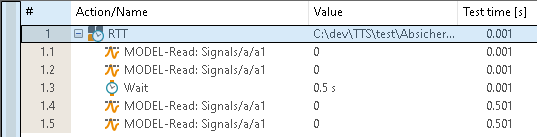
The first two test steps will be executed in the same simulation step. During the wait test step the execution time will be given to the real-time model. Correspondingly the last two test steps will share the same simulation step as well.
Executing Real-Time Tests
ecu.test supports the execution of real-time tests with HiL platforms from dSPACE. To run a real-time test, a model port for ControlDesk must be connected in the active test bench configuration. Help on creating test bench and test configurations can be found at Test configuration editor and Test bench configuration editor, respectively.
The execution of a real-time reference will always be transferred to a real-time platform. Parallel real-time packages will always run asynchronously to the main package’s thread. Synchronization with such a parallel thread will only happen when the test case finishes or if a return value of the RTT package is used in the main package. Synchronous real-time tests on the other hand will always be synchronized with the main package. So ecu.test will wait for such a real-time package to terminate before heading on to the next test step.
On dSPACE processor boards, ecu.test creates so called real-time sequences for every real-time package reference. A real-time sequence can be understood as an executable routine waiting for its starting command. Creating the real-time sequences is handled during the initialization of the main package and will not slow down the general test execution. Each real-time reference can be executed as often as desired. One only has to make sure, that the real-time sequence has terminated before the next sequence assigned to the same real-time reference is started. This should be illustrated by the following example:
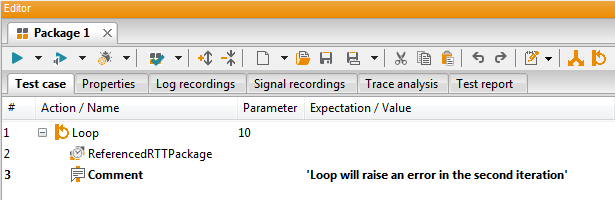
The example shows a package executed ten times in a loop via a parallel real-time reference. Executing this example will surely lead to an error, because the second time ecu.test tries to execute the package the first real-time sequence is still running. Using a synchronous reference will prevent this error.
Bus access
ecu.test supports access to model-based bus ports in real-time packages. Note that bus test steps are converted to corresponding model test steps before execution. The resulting test report then contains one or more model test steps instead of the original bus test step.
Requirements
In order to be able to run real-time tests under Linux with ecu.test, a Java Runtime Environment 17 or higher must be installed on the ecu.test computer. For Windows, the JRE-17 is already included in the ecu.test installation. Futhermore, a valid real-time testing license has to be available on the tool host machine.
At the moment ecu.test exclusively supports running real-time tests on HiL platforms from dSPACE. In order to execute a real-time test, a model port must be connected to ControlDesk. However, note as of dSpace ControlDesk 2024-B, real-time testing is no longer supported. If you need help creating appropriate test and test bench configurations have a look at Test configuration editor and Test bench configuration editor respectively)
Limitations
These are the currently existing limitations for real-time testing with ecu.test:
Not every test step available in ecu.test can be used in a real-time test. Supported are the following:
If-Then-Else
Loops
Blocks
Wait
Calculation (but without time options)
Comments (will be ignored and do not have effect on the real-time test)
Read and write model (at which reading test steps are allowed to have time options)
Read and write bus (must be model-based bus access)
Multi-Check (with time options)
Return
Only numeric and string test case variables are supported.
Referencing packages inside a real-time package is not allowed.
“No report” respectively “No report for…” works only for (container) test steps within the RTT package and doesn’t prevent the RTT package to propagate its verdict to higher level packages.