Global mapping
Using the global mapping, access to test quantities and package references can be managed beyond the scope of a single package. This can highly improve maintainability and readability of test cases.
Changes in names and paths of test quantities or package paths can be handled flexibly.
Short and easy-to-remember identifiers usually prove quite helpful when working with frequently-used mapping targets.
Using global mappings, it is possible to create test cases independently of the simulation model, the program status or the bus simulation. If, for example, a different model will be used for testing, it will suffice to enter the new path of the model variable into the mapping list.
Globals mappings are saved in separate files (file extension .xam). These can be set in the test configuration and in project parameterizations. It is also possible to load global mapping files at runtime.

Scope
A package references the local mapping assigned to the mapping name. If there is a global mapping with the same name, it overwrites the local mapping. If the mapping name occurs in several global mapping files the first file (leftmost tab) is used to resolve the mapping.
Additional information on local and global mappings can be found in the Mapping concept.
Info
Global mappings are highlighted in the Mapping section of the test report.
Add a mapping element
To add a global mapping you can either drag a quantity from the action tab into the global mapping window or right-click an entry in a local mapping and choose Add to global mapping. In the submenu you can choose the target global mapping file. Next to the active global mapping, which is currently shown, you can select a specific mapping file that is currently loaded.
Check mapping
The button Check mapping can be used to find invalid mapping entries in the currently selected mapping file. On activation, the button opens a dialog, similar to the one from Check package. It lists all invalid mapping items together with an error text. A double click on an element selects it in the global mapping.
Edit mapping elements
A non-existent mapping can be replaced by an existing variable by means of clicking and dragging. Simply drag the new variable from one of the action tabs onto the defective mapping. The test case is updated automatically.
Info
With some tools, the physical unit is queried from the tool. Since this can take a long time for mappings with many entries, the unit “?” is displayed first. To determine the unit of individual mapping elements, the settings dialog of those mapping elements can be opened.
A double click on a mapping entry opens the settings dialog.

The dialog contains general settings for mapping elements as well as specific settings subject to the target type.
General settings
Mapping name:
Identifier to map test steps to test quantities
Changes in the local mapping will directly adopted by the test steps
There is the additional possibility of taking over any changes of names in all packages of the package directory, and all (other) mapping files of the workspace
Category:
Name to group mapping elements in local and global mappings as well as in the editor
Description:
Description text that is shown in the local and global mapping as well as in the editor
Automatically managed:
Defines whether the mapping element should be deleted automatically if it is not used by any test step (only in the local mapping)
Aquisition rate
The measuring raster of test quantities that use a acquisition rate can be defined here. The displayed measuring rasters are supported by the tools concerned and directly requested from them. If the connection to the tool is not established, the desired acquisition rate can be typed directly as free text.
Choosing the acquisition rate “Port-Default” leads to the use of the default setting of the application port.
By using the option “Allow alternative acquisition rate” can be decided whether all affected test steps will be rated ERROR if the acquisition rate is invalid or full. Otherwise another acquisition rate is used and documented in the report.
Enumeration
The enumeration button allows to view the enumeration information read from the used data base for the selected variable. In case the variable in question is a generic or model variable without given enumeration information, the following dialog allows to manually define it.
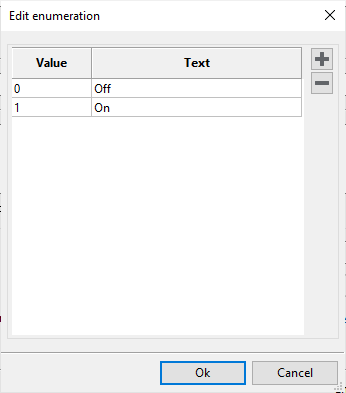
It is possible to define the values for the physical representation in column Value and their textual counterpart in column Text. For generic test cases this assignment is used to support different models. If for instance in the above example “On” is not represented with 1 but with another value for an alternative model, the test case has not to be manipulated, but only the enumeration information. Alternatively, replacing the mapping of generic and model variables inherits the enumeration of the old variable if the new variable does not contain one. Thus, it is possible to create generic test cases without knowing the specific model or when not connected to the model tool, respectively. With an enumeration defined, the texts are suggested using the textual representation in read/write test steps.
Info
Defining enumerations in model variables is only possible if the enumerations are not yet determined by the model description.
Manipulation
For bus signals, the checkbox Read and record via the manipulation port can be used to specify whether the signal should be read or recorded via the port of the Active node or for Manipulation.
Switching to the port of the Active node has no effect on the writing of individual signals, such as via a connected residual bus simulation or as is necessary for a manipulation gateway. The manipulation port is always used when writing.
Also see Bus access tab in the test configuration.
Info
If the manipulation is active, not every supported tool allows read access. In this case another mapping element with the same target link but without the manipulation option has to be created and used for reading.
Alternative package representation
In addition to the name of a package mapping, an alternative call representation can be specified, which may contain placeholders. These are automatically resolved when the mapping is inserted into a test case.
Further information on alternative package representation can be found at Keyword-Based Testing or in the corresponding Tutorial.