Mapping concept
In ecu.test exists a mapping layer that allows that test quantities can be exchanged within test cases, without modifying the test case. For this a universal identifier (containing mapping name, reference) is mapped to a concrete quantity (the mapping target).
Different ways to determine the mapping destination (ordered by priority):
Parameterized Mapping (Package references mapping)
A Local mapping is created automatically when a test quantity or a package reference is added to the test case. It can be used to edit the access of all test steps using this mapping within this Package.
Info
Every package has its own local mapping. The local mapping has no influence on the content of referenced packages.
Possible settings in the mapping:
Mapping name
Path to target
Measurement acquisition rate
Meta data: description and category
The Global mapping allows to modify mapping targets in multiple packages at the same time. The settings that can be be manipulated in the global mapping are the same as in the local mapping. The mapping information defined by the global mapping is used for all test steps that reference mappings of the same mapping name. If a global mapping is active for a test step, it is marked with the letter M on its icon.
An arbitrary number of global mappings can be loaded at the same time. Their order defines their priority and which entry is being used if multiple mappings with the same name exist.
A target can be modified during test execution by passing the mapping targets to the package when calling it.
The subsequent example shows the connection of mappings in ecu.test.
Example
A test quantity is read in the test case. The test step only contains the mapping name (e.g. “Rpm”).
The mapping layer connects the mapping name to the target (e.g. the bus signal “A-CAN/PT_DATEN/ENG_RPM”).
The access to “A-CAN” happens according to the settings in the test configuration where additional information for the test quantity are available from the referenced description file (e.g. bus database).
The access to the test bench is finally realized using the port from the test bench configuration which is selected in the test configuration.
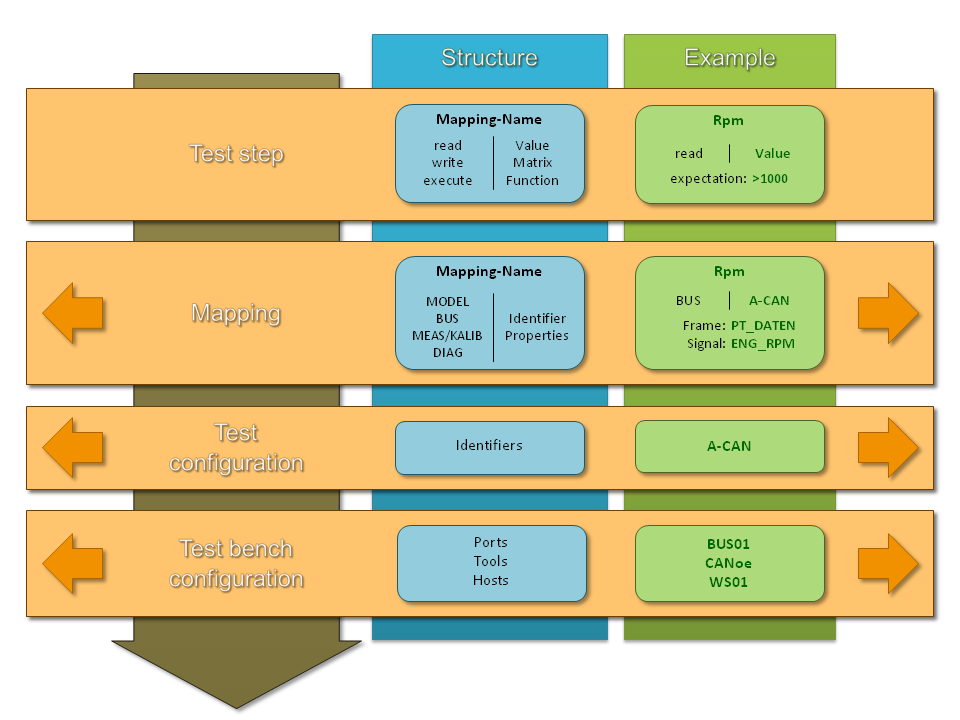
Due to the connection using mappings it is possible to manipulate the used test quantity without changing the test case. If the signal providing the engines Rpm is changed from “ENG_RPM” to “ENG_SPEED”, there is no need to adopt the test case, but only to reassign the mapping target.
Parameterized mapping in packages
(see Package references)
The parameterized mapping can only be used if a package is called from another package. In the parameterization dialog of the package reference the mapping items of the called package can be overwritten via drag and drop.
This concept is helpful to create package libraries containing packages that use generic operations on test quantities. By doing this the same package can access different test quantities, depending on the package callee.
Parameterization in projects
(see Package reference)
In a project, mappings or mapping files can be defined in two ways:
In parameter sets of a Package reference.
In the default parameterization of folders or the project root node.
These parameterizations are especially useful where a test case can be executed for multiple similar mapping targets.
Global mapping
(see Global mapping)
If a mapping item has to be changed that is used in several packages, the usage of the global mapping is recommended. More details can be found in . Mapping items can be added to the global mapping in different ways, e.g.:
Via dragging and dropping test quantities or packages from the actions windows
Via dragging and dropping from a local mapping
Global mappings are stored in a *.xam file and can be loaded automatically when a test configuration
is started (see Common tab).
Local mapping
(see Local mapping)
A mapping entry exists for every test quantity or package reference that is used in a package. It is created automatically if,for example, a model quantity to be read or written is inserted into the package. A mapping name is generated that is similar to the used test quantity or package. The name can be changed by double-clicking the entry in the mapping tab.
Priorization of mappings
If a mapping name exists in multiple mappings, the mapping item with the highest priority is used. The following list summarizes the priorization from highest to lowest.
Package reference in package
Mapping reference in mapping assignment tab
Project
Parameter set in package reference
Paramaterization on project folder
Parameterization on project root node
Test configuration
Global mapping files with high priority (shown on the left or top position)
Global mapping files with low priority (shown on the right or bottom position)
Package
Local mapping
The general rule: if a mapping item is defined in a more specific execution context, its priority is considered higher.