Temporal behaviour: Real time and simulation time modes
ecu.test supports different time modes for the test execution. The time mode specifies the time source that is used in the test case (e.g. by Wait test steps). This can be either the local system clock or the simulation time of a simulation tool. Furthermore, the time mode determines whether the simulation runs step by step, driven by the test execution or continuously and parallel to the test execution. The characteristics of the various time modes are explained below. Details on activation and configuration of a specific time mode can be found in the chapter on the Execution tab of the test configuration.
Real time
If a test case is executed in real time, ecu.test expects all other tools to also run under real time conditions. No synchronization of time stamps between ecu.test and the tools is executed. Wait test steps lead to an active delay of the configured duration in real time. This mode is best used in environments with real hardware which is also bound to real time.

In MiL and SiL environments it is hardly possible to achieve real time conditions. If ecu.test delayed in real time, this would result in heavily different durations in simulation time. How much faster time passes in the the running simulation compared to real time can be described with a speedup factor for a specified time range: duration in real time * speedup factor = duration in simulation time.
ecu.test offers means to execute the test case bound to simulation time instead of real time:
Stepwise execution in simulation time
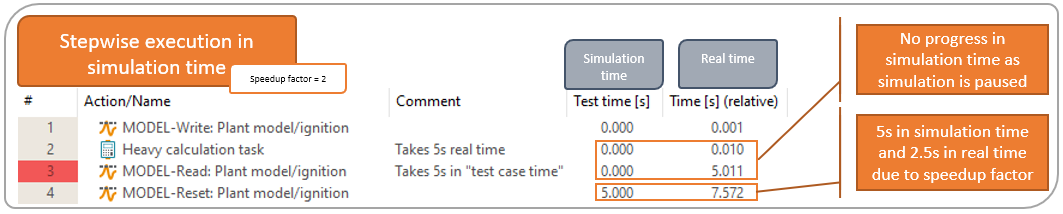
This mode uses the simulation time as the time base of the test case. The simulation is constantly being paused and stepped, depending on the action in the test case. Explicit actions like Wait test steps and time option in read test steps lead to stepping of the simulation. Other actions like calculation test steps are executed while the simulation is paused.
Info
Some tools support the evaluation of “wait for condition” time options on the tool side, which results in a better performance.
I/O test steps are executed while the simulation is paused. To make sure that stimulations are effective or to achieve a system behaviour closer to real time, it might be beneficial to step the simulation after each read /write test step. This is possible using the option Waiting time after every I/O test step on tab Execution tab of the test configuration.
Continuous execution in simulation time
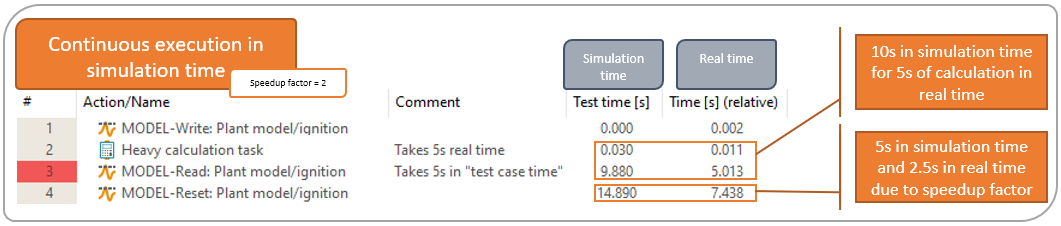
This mode uses the simulation time as the time base of the test case. ecu.test constantly reads time stamps from the configured port and uses them just like real time time stamps. In contrast to the stepwise execution, it never pauses the simulation. All actions in the test case are therefore executed while the simulation time proceeds. This can lead to very different durations of actions which are not part of the simulation, depending on the system power and load as well as the speedup factor of the simulation.
Info
It is not recommended to use the parallel package execution while using a simulation time mode.