Filter
The filter may be used for selecting specific elements and supports auto completion.
Simple Filter
Simple filters allow searching for files, whose name contains a certain string.
Wildcards
- ‘?’
represents an arbitrary character
- ‘*’
represents any number of arbitrary characters
Examples
Data:
Testcase123.pkg
Testcase236.pkg
Testcase366.pkg
Testcase499.pkg
Filter by file name:
Test            --> [Testcase123.pkg, Testcase236.pkg, Testcase366.pkg, Testcase499.pkg]
23              --> [Testcase123.pkg, Testcase236.pkg]
Testcase*6      --> [Testcase236.pkg, Testcase366.pkg]
Testcase1?3     --> [Testcase123.pkg]
Extended Filters
Extended filters allow searching files, based on file properties and attributes. Multiple filter criteria can be combined using operators.
Keywords
Keywords can be used to to address a specific property of files and allow for that property to be used in a filter query.
Keyword |
Type |
Description |
|---|---|---|
PATH |
String |
Path of file in workspace |
NAME |
String |
Name of file in workspace |
TEST_MANAGEMENT_ID |
String |
Test management ID of the package or project |
VERSION |
String |
Version of the package |
DESCRIPTION |
String |
Description |
TODO |
String |
TODO of the package |
VARIABLE_NAME |
String |
Name of a variable |
PARAMETER_NAME |
String |
Name of a parameter |
RETURN_PARAMETER_NAME |
String |
Name of a return parameter |
KEYWORD_ID |
String |
ID of the keyword inside the package |
FILE_REFERENCE |
List(String) |
File reference inside the package |
IS_TEST_CASE |
Boolean |
Indicates whether the package represents a test case |
Compatibility |
String |
Minimum ecu.test version with which the artifact is compatible |
In addition to predefined keywords, the attributes of files (e.g. projects and packages) can be used to define filter queries.
Info
Keywords have to be enclosed by single or double quotes, if they contain spaces.
Wildcards
- ‘?’
represents an arbitrary character
- ‘*’
represents any number of arbitrary characters
Operators
- ‘=’
checks for equality
- ‘!=’
checks for inequality
Operators for numeric attributes
‘<’, ‘<=’, ‘>=’ and ‘>’ can be used to compare numbers.
Operators for lists
- ‘has’
checks whether a list of values contains a certain element
- ‘hasnot’
checks whether a list of values does not contain a certain element
Operators for complex expressions
- ‘and’
AND operator: Both expressions have to be fulfilled
- ‘or’
OR operator: One expression has to be fulfilled
Examples
Data:
Testcase123.pkg:
  "Tester": "John Doe"
  "Status": "Draft"
  "Testlevel": ["System", "SubSystem"]
  "Estimated Duration [min]": 2

Testcase236.pkg:
  "Tester": "Peter Smith"
  "Status": "In Review"
  "Testlevel": ["SubSystem"]
  "Estimated Duration [min]": 5

Testcase366.pkg:
  "Tester": "Peter Jones"
  "Status": "Ready"
  "Testlevel": ["Component"]
  "Estimated Duration [min]": 8

Testcase499.pkg:
  "Tester": "Peter Jonas"
  "Status": "In Review"
  "Testlevel": ["System"]
  "Estimated Duration [min]": 8
Filtern by file name (equivalent to a simple filter):
NAME = "*Testcase*"     --> [Testcase123.pkg, Testcase236.pkg, Testcase366.pkg, Testcase499.pkg]
NAME = "*23*"           --> [Testcase123.pkg, Testcase236.pkg]
NAME = "*Testcase*6*"   --> [Testcase236.pkg, Testcase366.pkg]
NAME = "*Testcase1?3*"  --> [Testcase123.pkg]
Filter by text attributes:
"Tester" = "John Doe"     --> [Testcase123.pkg]
"Tester" = "Peter Jon?s"  --> [Testcase366.pkg, Testcase499.pkg]
"Tester" = "Peter*"       --> [Testcase236.pkg, Testcase366.pkg, Testcase499.pkg]

"Status" != "Ready"       --> [Testcase123.pkg, Testcase236.pkg, Testcase499.pkg]
Filter by numeric attributes:
"Estimated Duration [min]" = 8   --> [Testcase366.pkg, Testcase499.pkg]
"Estimated Duration [min]" < 5   --> [Testcase123.pkg]
"Estimated Duration [min]" <= 5  --> [Testcase123.pkg, Testcase236.pkg]
"Estimated Duration [min]" > 8   --> []
"Estimated Duration [min]" != 8  --> [Testcase123.pkg, Testcase236.pkg]
Filter by list elements:
"Testlevel" has "System"                         --> [Testcase123.pkg, Testcase499.pkg]
"Testlevel" has "*System"                        --> [Testcase123.pkg, Testcase236.pkg, Testcase499.pkg]
"Testlevel" hasnot "System"                      --> [Testcase236.pkg, Testcase366.pkg]
Filter by boolean properties:
IS_TEST_CASE = True                                --> [Testcase123.pkg, Testcase499.pkg]
IS_TEST_CASE = False                               --> [Testcase236.pkg, Testcase366.pkg]
Combination of filter expressions:
"Tester" = "Peter*" and "Testlevel" has "System"                                  --> [Testcase499.pkg]
"Tester" = "John Doe" or "Status" = "In Review"                                   --> [Testcase123.pkg, Testcase499.pkg]
"Tester" = "John Doe" or "Status" = "In Review" and "Testlevel" has "System"      --> [Testcase123.pkg, Testcase499.pkg]
"Tester" = "John Doe" or ("Status" = "In Review" and "Testlevel" has "System")    --> [Testcase123.pkg, Testcase499.pkg]
("Tester" = "John Doe" or "Status" = "In Review") and "Testlevel" has "System"    --> [Testcase499.pkg]
Info
The AND operator is always evaluated prior to the OR operator. This can be influenced by bracketing.
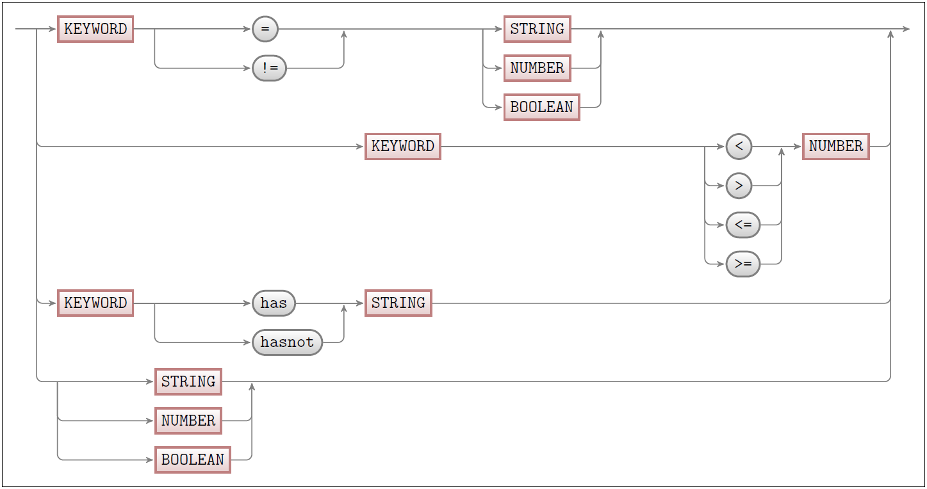
Formal definition
The filter language is defined as follows: