Tutorial
Before you start
This section provides a structured introduction to working with ecu.test. The goal is to get to know the basic workflow and to implement your first examples independently.
The training can be completed independently and guides you step by step through the key topics. It is structured into two chapters:
By completing the sections one after another, you build a solid understanding of typical tasks in ecu.test without having to cover every concept in full detail right away.
What is ecu.test?
ecu.test supports you in creating and managing test cases, executing them, and generating test documentation and reports.
In addition, ecu.test can be connected to test management tools so that requirements can be assigned to test cases and defect management can be integrated. During the continuous development of ecu.test, current standards such as ASAM and ISO are taken into account. In addition, proprietary interfaces to widely used software tools in the field of testing automotive control units are available.
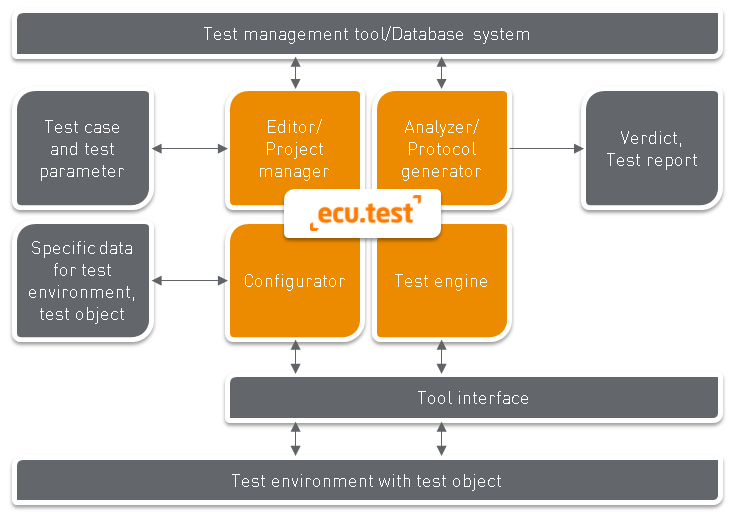
How is ecu.test structured?
ecu.test consists of several abstraction levels that work together to ensure easy configuration and smooth execution on different platforms.
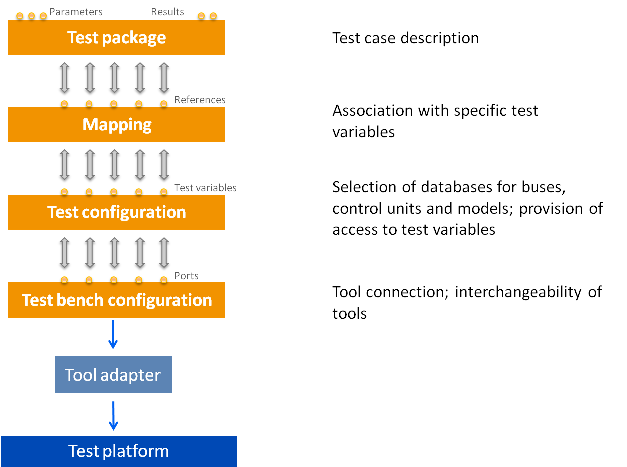
The consistent separation into these levels allows the same test cases to be executed in different environments without needing to adapt them. This facilitates collaboration on the same test cases and reduces the effort required when moving to new environments.
The most important building blocks include:
- Mapping
Assigns functional names to concrete access paths.
- Test configuration
Describes the system under test.
- Test bench configuration
Provides technical access via hosts, tools, and ports.
You get to know how these concepts interact step by step in the tutorial, especially in Lesson 2 and Lesson 4.
Resources
A sample workspace is provided as a resource. It contains the required data and example artifacts so that you can follow the introduction in a practical way.
Prerequisites
ecu.test is installed successfully.
A valid ecu.test license is available.
For more information, see:
Linux installation and Linux licensing: ecu.test on Linux
License Manager: License Manager
System requirements for Windows and Linux: System requirements
Training format
This section is designed as a self-study introduction. It is suitable for a quick overview and first practical steps.
Depending on your use case, tool landscape, and desired depth, individual training is often more effective and offers, among other things, the following benefits:
Focused priorities for specific tools and use cases
Tailored examples from your own project environment
Structured deepening of key concepts
Space for questions and discussion