User-defined utilities
At present there are two kinds of utilities: AXSUtility and UserUtility. They
are Python modules whose structure will be explained in more detail below. To be used, the utilities
have to be saved in the utilities directory (as shown in the menu )
or a sub-directory of that. You can find examples of the respective kinds of utilities in the ecu.test
installation directory at Templates/DefaultData/Utilities/ExampleUtilities. You can have
the basic structure of a utility generated by means of the Utility wizard.
AXSUtility
An AXSUtility can be inserted as a test step. For doing so the utility is mapped on itself i.e. the AXSUtility provides the interface and the implementation.
The advantage is that with such a utility the user just has to write the interface and implement the run () method. The interface describes the input parameters and the return values. Then the parameters can be accessed within the run () method by reading and writing. Everything else (dialog, serialization, reporting etc.) is generated automatically by ecu.test.
Example supplied
In tab Utilities there is, at examples, the AXSUtility “SimpleCalculationExample” for demonstration. Should that example not yet be available they can be copied into the selected workspace as described in the chapter Workspace creation.
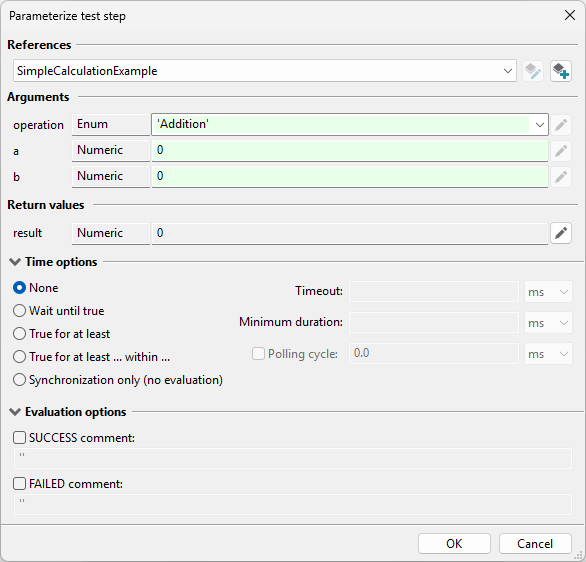
In the operation there is a choice between addition, subtraction, multiplication and division. The operation selected will be applied in execution to the two operands a and b.
By a right click on “SimpleCalculationExample” you can select to have a look at implementation. Alternatively, that editor can also be reached by the Utility Wizard.
Generation of an AXSUtility
The second entry in the Utility Wizard:
Interface definition
In method GetInterface(cls) the interface of the AXSUtility must now be defined. The arguments
and return values are described as constraints.
At present it is only possible to work with scalar values (that is with simple types of data such as numbers or texts).
NumericType
a number with an optional physical unit. The constructor expects four parameters:
def __init__(self, name, min, max, step)The first parameter defines the name. Additional optional parameters define a lower limit, an upper limit and an increment which have to be complied with later on. If
Noneis passed the limitation does not apply.Then the unit can be specified via the method
def SetUnitFromStr(self, unitName)using the units text representation as displayed in ecu.test.
The initial value to be shown if the utility is added to the test case can be specified using the method
def SetDefaultValue(self, defaultValue)If the value is not specified explicitly, the minimum value or 0 is used.
TextType
A text value. The constructor expects only the name as a parameter.
def __init__(self, name)There is the possibility of indicating a range for the selection of a value by means of
def AddTextEntry(self, entry)The possible selection is shown in the dialog by a combo box.
The initial value to be shown if the utility is added to the test case can be specified using the method
def SetDefaultValue(self, defaultValue)If the value is not specified explicitly, the first text value or an empty string is used.
The interface will get the argument constraints via
def AddArgument(self, argument)
and the return constraints via
def AddReturn(self, returnValue).
Implementation
Within the method
def OnRun(self, userExcInst, testEngine)
the user can access via the object userExcInst the input parameters by reading, and the return
parameters by writing. userExcInst is an instance of the UserExecInst class which provides the
following methods of treating a value (only that is supported at present):
def GetArgumentValue(self, name)def GetRawArgumentValue(self, name)Retrieval of arguments by name. The first method yields a value object instance, the second one the actual value as number or text.
def SetReturnValue(self, name, value)def SetRawReturnValue(self, name, raw value)Setting the return values of name value/raw value. The first method expects a parameter wrapped in a value object, the second method the actual value as number or text. An argument not passed/mapped results in
None.
Optionally, the methods
def OnPreProcess(self, testEngine)
or
def OnPreProcessEx(self, userExcInst, testEngine)
as well as
def OnPostProcess(self, testEngine)
and
def GetReportInfos(self)
can be overwritten. In OnPreProcessEx, input parameters can be accessed in the same way as in OnRun.
However, only parameters to which a constant value is assigned (i.e. without references to test case variables)
can be accessed. For each non-hidden occurrence of the utility call in the test case,
the OnPreProcessEx method is called once with the respective parameters, disregarding loops, if-then-else etc.
Info
In particular if an AXSUtility is used several times in the test case, the dict returned by GetReportInfos
must be held in a list (or deque). This necessity arises due to the fact that if for instance an AXSUtility
is used twice, then the OnRun method is executed twice before the method GetReportInfos is called.
Directly storing the ReportInfos in a dict it is overwritten during the second call of OnRun.
Hence, the subsequent two calls of GetReportInfos will both return the ReportInfos of the second
utility execution. In the examples (see section Workspace creation) the correct usage of
GetReportInfos is demonstrated by the utility “LinspaceExample”.
After closing the utility wizard, the AXSUtility can be inserted and executed as a test step:

A utility mapped on itself (thus providing the interface and the implementation) is recognizable in the report by the action “UTILITY -> UTL”:

UserUtility
The concrete structure of a UserUtility is explained in the documentation of the UserUtility API. When updating user utilities and reloading them with the menu item “Update user libraries” (shortcut Ctrl+Shift+R), opened packages using them have to be closed and reopened in order for the update to take effect.