Stimulation package and analysis package
Using stimulation packages  and analysis packages
  opens up the possibility to separate stimulation and trace analysis in the context of a project.
This improves modularity and reusability compared to the common approach of having stimulation and
trace analysis within a single package.
opens up the possibility to separate stimulation and trace analysis in the context of a project.
This improves modularity and reusability compared to the common approach of having stimulation and
trace analysis within a single package.
The signals used in the analysis packages are usually automatically assigned to the signal groups of the corresponding stimulation package, so there will be no need to adapt the stimulation package if an analysis package using a signal previously not required is added to the project.
Stimulation package
A regular package can be used as a stimulation package in a project.
For this, the package has to be inserted into the project as a stimulation package reference, e.g.
via the context menu in the workspace explorer or via the toolbar in the project editor:

Insertion of a stimulation package via the workspace explorer (left) or the project editor (right)
Signal recordings have to be created within the stimulation package itself, e.g. by using start-/stop-trace steps. If the stimulation package calls subpackages supplying additional recordings, those will not be considered.
If a stimulation package contains one or multiple trace analyses, they will be executed after execution of the stimulation. Signal recording steps that are included in those trace analyses can be used as recording sources for associated analysis packages.
Analysis package
Analysis packages can be created via or
a right-click within the workspace epxlorer choosing
in the corresponding context menu. They are standalone artifacts with the file ending
.ta.
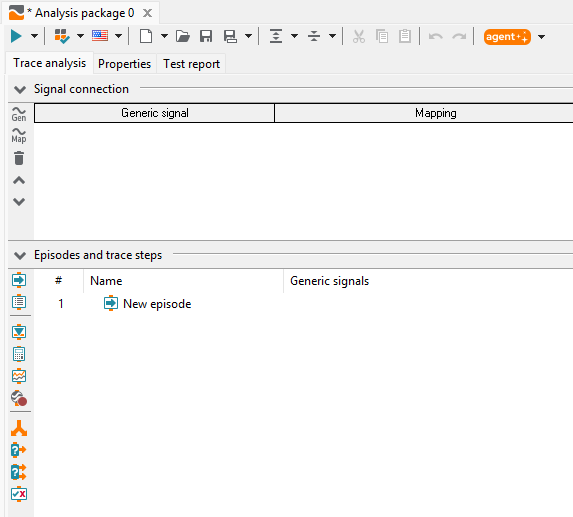
A new analysis package
An analysis package call can be inserted into a project similar to regular package calls, e.g. via drag-and-drop from the workspace explorer or via the toolbar in the project editor.
A newly inserted analysis package will automatically be connected with the preceding stimulation package reference. This connection can be modified in the Edit dialog of the analysis package call.
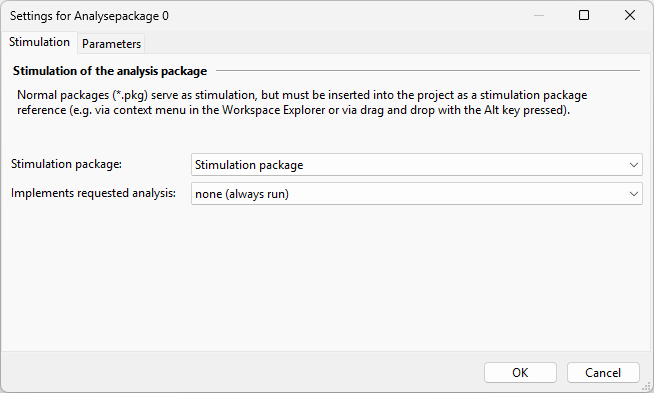
Multiple analysis packages can reference one stimulation package.
An analysis package will automatically be executed for all parameter sets of the corresponding stimulation package and using the supplied recordings. Depending on the number of recordings per stimulation package, separate analysis jobs will be created. For example, in the following project both analysis packages would each be executed with both parameter sets:

When the analysis is executed, at first, the mapping space of the relevant analysis package (resp. parameter set) is applied. If a mapping refers to a generic or invalid target, the mapping space of the stimulation package (resp. the relevant parameter set) is applied to find a valid mapping. E.g., a generic mapping of an analysis package can be resolved by a local mapping of the stimulation package.
An analysis package can be run for multiple stimulations if the option <all previous>
is chosen in the stimulation package selection. Thereby, only stimulation package calls
located in front of the analysis package call in the project are referenced. During execution,
a project folder containing one analysis package call for each referenced stimulation package call
is created in the report.
Assigning signals to signal groups
When executing a project containing stimulation and analysis packages, ecu.test will attempt to automatically assign mappings with a signal connection in at least one of the analysis packages to signal groups of the stimulation, such that those are recorded. The determination of the appropriate signal group is attempted based on the following rules in descending priority:
A signal group is already supplying the mapping.
For concrete mappings, name and target must match.
For generic mappings of the analysis package, only the name must match a mapping of the stimulation package.
A signal group is named after the system identifier of the addressed mapping target (e.g. ‘A-FlexRay’).
A signal group already supplies a mapping with the same system identifier.
For mappings of type “Trace file”:
If there is only one signal group, it will be used.
If the mapping target matches a signal from a signal recording step, this signal group is used.
If none of these rules can be applied, the respective signals must be manually assigned to a signal group via Edit dialog of the stimulation package call in the project:
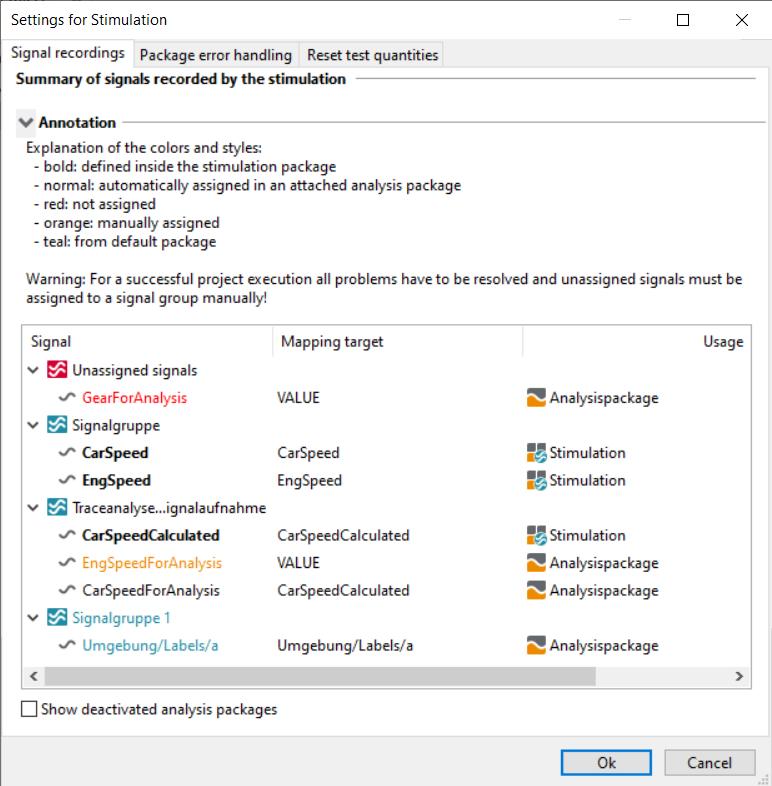
Manual assigned signals will be displayed using orange-colored font, automatic assigned signals from signal groups of a default package set in the test configuration in petrol and not assigned signals in red.
A generic mapping of an analysis package can neither be resolved automatically nor manually if two signal groups of the stimulation package contain mappings with the same name! In this case, the mapping names in the stimulation package should be adjusted to resolve the naming conflict.
Special signals and recording groups
Test case variables
The recording group of test case variables will be shown in the dialog of the stimulation package as soon as at least one test case variable is selected for recording. The assignment will be done strictly via name matching of mappings. This means that if the variable ‘loopCounter’ is to be used in the trace analysis, a mapping with the same name has to be created and assigned. Similar to previous cases the assignment has to be unambiguous, such that no other signal group contains a mapping named ‘loopCounter’.
Additionally, the mapping item has to be of type ‘Trace file’ and the mapping target has to be equal to the name the test case variable.
Signal recording steps
For each signal recording step that is included in the trace analysis of the stimulation package an additional recording group will be shown. The assignment is done via matching mappings, too. Thus, an analysis package has to contain a mapping with the generic signal name of the signal that was calculated and stored as mapping target.
Additionally, the mapping item has to be of type ‘Trace file’ and the mapping target has to be equal to the generic signal name in the trace analysis of the stimulation package.
Pseudo signals
The analysis of pseudo signals such as the signal ‘FrameId’ from an ASC or BLF file, is performed similar to the usage of recorded test case variables. If signals are not assigned to a signal group in the stimulation package, this kind of signals (trace file signals) can usually not be assigned a group automatically. Therefore, the stimulation package reference has to be modified in the project and the signals have to be assigned to the corresponding signal group manually.
If the pseudo signal is to be read from multiple signal groups (e.g. one group for CAN and one group for FlexRay) a conflict will occur during assignment. This can be prevented by creating multiple mappings pointing to the same target, e.g ‘FrameId_CAN’ and ‘FrameId_FLX’, both pointing to ‘FrameId’.
Using return values from stimulation packages in analysis packages
Sometimes it is necessary to transmit information determined in the stimulation package at runtime
to an associated analysis package. This use case can be realized using package variables.
In the stimulation package, each variable that is to be accessed in the analysis package
must be marked as return value. In a parameter set of the analysis package, the return values
of the linked stimulation package are available via the identifier stim.
With stim.returnVariable e.g. the return value of the variable named returnVariable
can be accessed.
In order to reduce the effort of the assignment, there is the option to “Use stimulation return values as standard parameterization”. If the option is enabled and no value has been assigned to a parameter of the analysis package via a parameter set or a project-wide parameterization, it will automatically be replaced by the return value of the stimulation with the same name if existent.
Info
The return value is the value set latest in the stimulation package. Variables can be set either in the test case or one of the following trace analyses. Within a trace analysis, the value must be set explicitly via a return parameter of a trace step to be taken into account.
If multiple trace analyses set the value of the variable, the value set in the trace analysis executed last is the return value. However, since trace analyses generally run independently of each other, this procedure is not recommended.
Using values of global constants and attributes of stimulation packages in analysis packages
Often it is desired, that the values of global constants and attributes being set at the time of stimulation also apply in the analysis package.
In most cases it is sufficient to define the global constants in the test configuration or the parameterization by a common, parent project element. In rare cases however, a global constant is determined and set only in the stimulation.
For this reason, during the execution of the stimulation, valid values of global constants and attributes are taken over into the execution of the analysis package, if they are not defined at this time yet or if they are only defined in the test configuration.
Request analyses
Normally, all analysis packages assigned to a stimulation package are executed. To achieve conditional execution while ensuring that certain aspects of the stimulation are checked by a suitable trace analysis, one can “request analyses” in the test case of the stimulation.
An analysis is requested by using the test step Request analysis  and
defining a label for the requested analysis. This label is used to link the request and the
appropriate analysis package.
and
defining a label for the requested analysis. This label is used to link the request and the
appropriate analysis package.
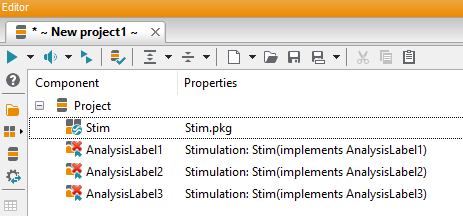
Project with inserted stimulation package
If the stimulation package is dragged into a project, so-called Analysis package mapping steps
 are automatically generated for each requested label.
These steps serve as placeholders for actual analysis packages and enable an advanced workflow,
more about this in the following section Analysis package mapping steps.
For the beginning it is sufficient to replace these placeholders with actual analysis packages
by dragging an analysis package from the workspace onto one of the analysis package mapping steps.
In doing so, the placeholder is replaced by a concrete package reference and the property
“Implements requested analysis” is set. This property can also be edited for existing and newly
added analysis packages in the project.
are automatically generated for each requested label.
These steps serve as placeholders for actual analysis packages and enable an advanced workflow,
more about this in the following section Analysis package mapping steps.
For the beginning it is sufficient to replace these placeholders with actual analysis packages
by dragging an analysis package from the workspace onto one of the analysis package mapping steps.
In doing so, the placeholder is replaced by a concrete package reference and the property
“Implements requested analysis” is set. This property can also be edited for existing and newly
added analysis packages in the project.
An analysis package that implements a requested analysis is only executed if the corresponding test step “Request Analysis” was actually executed during project execution. This can be controlled by an If-Then-Else block, for example. Nevertheless, an analysis package can still be configured to run always by setting its option “Implements requested analysis” to “none (always run)”.
It is possible for multiple analysis packages to implement the same requested analysis. It is possible for multiple test steps to request the same analysis; this has no further effect.
Info
An analysis package call that refers to multiple stimulation package calls cannot implement a requested analysis.
If the option Take over result of analysis is activated, the test step will be given the overall verdict of the associated analysis packages.
Info
Attention: If the test step Request analyses with activated option
Take over result of analysis is followed by a calculation step that uses
api.TestEnvironment.ExecutionInfo.LastTestStepResult to access the result of the last
test step, it will always return INCONCLUSIVE. The reason is that the result of the analysis
is not yet determined at time of test execution.
Analysis package mapping steps

Schematic workflow when using analysis package mapping steps
Analysis package mapping steps serve as placeholders for actual
analysis packages. They are created automatically if a stimulation package requesting analyses
is added to the project. Missing steps can be generated via the context menu of the stimulation
package.
As its name suggests, analysis package mapping steps are defined using the global mapping to resolve analysis packages. This enables a variant handling of the analyses based on different test configuration files (e.g. per test bench). The assignment is done based on the implemented analysis. This must correspond to the name of an entry in the mapping.

Creating an analysis package mapping
Such a mapping entry must be of type ANALYSIS. It is created by inserting an analysis package from the workspace into the global mapping or by dragging it into a mapping editor (see screenshot). The path is stored relative to the package directory or absolute, if the analysis package is outside the directory.
The check in the project editor warns if the analysis package mapping step cannot be resolved correctly at the time of editing. However, the decisive factor is that the mapping is loaded at the time the step is executed. This can also be realized, for example, by a configuration change step. Missing entries can be automatically created in the global mapping via the project check dialog. These must then be edited to refer to an existing analysis package.
Info
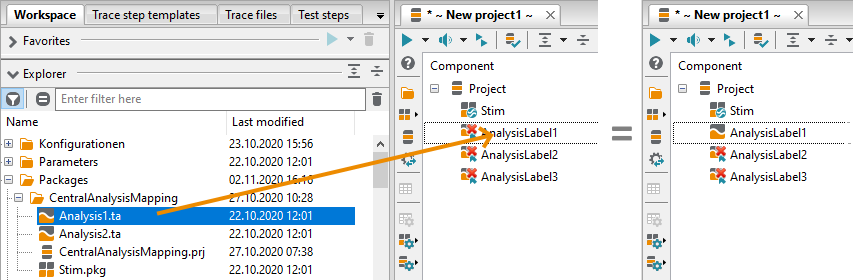
Replace analysis package mapping step by an analysis package
Analysis package mapping steps enable an advanced workflow in the project because they can be influenced by the mapping of the currently loaded configuration. For simpler projects, however, it is sufficient to work directly with analysis packages. These can be dragged from the workspace onto analysis package mapping steps of the project to replace them.
Find analyses for a stimulation in test.guide
To allow for easier association of stimulations and analyses in test.guide, an internal global constant called TT_STIMULATION_RUN_ID with a UUID is created for each run of a stimulation package within a project. This constant is transferred to the assigned analysis packages. In test.guide this constant can be used in a filter to find all analyses executed for a stimulation.
Restrictions
The selective execution mode will not work for projects containing stimulation and analysis packages.
For stimulation and analysis packages, both parameter sets and parameter set generators can be used
similar to regular packages.
However, it is not possible for parameter generators to add recordings to analysis packages.
Further, parameter set generators for analysis packages must define all mappings that will be
added to generated parameter sets via CycleData.AddMappingItem()
in the GetUsedMappingItems() method of the generator
in order to make them known to the stimulation package
(see Parameter set generator API).