Report tab
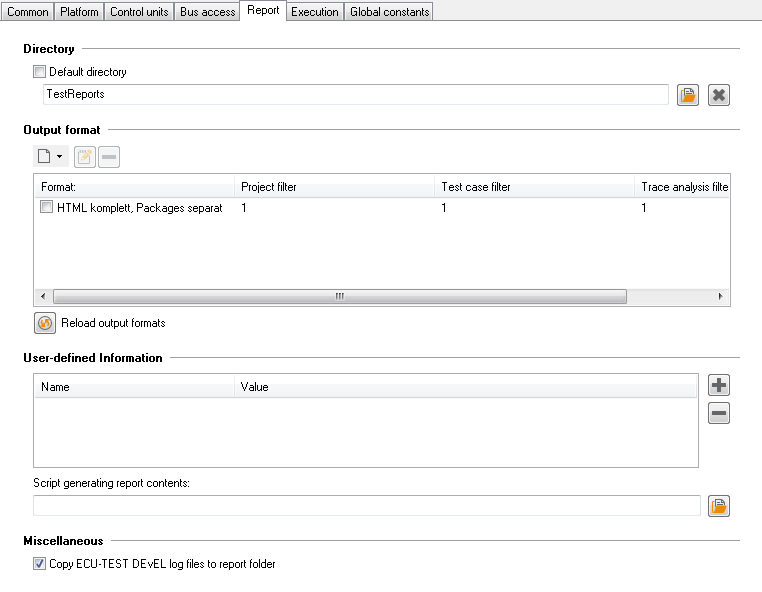
The tab Report contains the settings for documenting test results.
Directory
The upper sector shows the folder in which the documentation results are stored. The handling is similar to what has been described in section Platform tab for the selection of files, with the only difference that a directory is selected here.
Output format
At Output format the required output formats can be defined. Output formats combine format templates. (ecu.test provides the default templates HTML and text) with various options and filters.
A check box in front of a given output format serves to engage or disengage automatic generation. If a tick is put there the report concerned will be generated automatically after every test run. If the box is not ticked generation must be started manually at test report. The test report is a viewer for report databases (TRF files). It opens automatically after every test run or is shown when a report database is opened via the menu .
The first symbol ( ) serves to set up a new format. With
  the settings of the
selected format can be changed (as with a double click on the output format).
the settings of the
selected format can be changed (as with a double click on the output format).  serves
to delete the chosen format.
serves
to delete the chosen format.
In order to create, for example, a new HTML-based test report format click on the first symbol and select HTML.
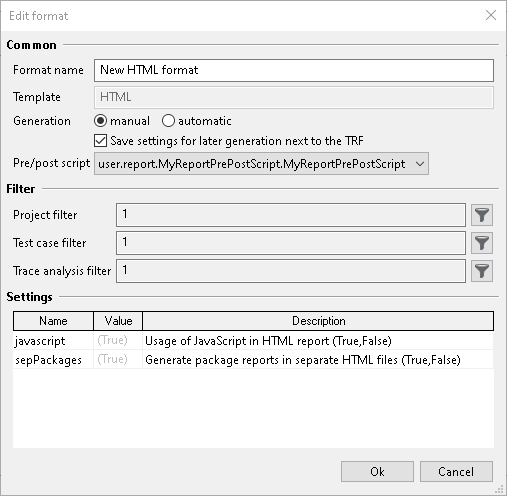
In this dialog, you can specify a name for the output format. Further, you can select whether the report format should always be created automatically after each execution. You can also set to store this settings next to the TRF, in order to be able to generate the report format via Jenkins or COM API ‘GenerateTestReportDocument()’ for example. Pre/post script defines a script that will be executed before or after the report generator. Such a script must be placed in the directory for User Python libraries and have the following structure:
MODULE_TYPE = 'REPORT_PRE_POST_SCRIPT'

class MyReportPrePostScript:
    def __init__(self, reportApi):
        self._reportApi = reportApi

    def ExecutePreScript(self):
        ...

    def ExecutePostScript(self):
        ...
By means of Project filter, Test case filter and Trace analysis filter the respective filters can be applied to the test report to be generated. The filters correspond to the filters for display in the test report. At last it can be defined if Java script should be used and a separate HTML file established for every subpackage. While in case of false all subpackages are put in a common HTML file, with true, separate files are set up for the subpackages and linked among each other. If separate HTML files are used, they are smaller in size, and the presentation of large test reports with many subpackages is effected much faster.
Note:
The format templates in ecu.test are designed as plugins. So the user has the opportunity to customize the default templates (e.g. HTML and Text), or to complement or replace them with entirely self-made templates. The default format templates are located in the ecu.test program directory under
Templates/Report.Custom report format templates can be placed in the workspace in the sub directory for
Templates(cf. Directories). Each template has its own folder. The folder name determines the name of the format template. In order to structure a large collection of templates, subfolders can be used. In this case the innermost folder name is used as the name of the report format template.In order to create a new format template based upon an existing one, only the corresponding folder needs to be copied. Afterwards, the copy can be edited and adapted to the particular requirements. If there are several report format templates sharing the same name, templates in the workspace have priority over templates in the program folder. If even in the workspace there are several templates with the same name, an arbitrary selection is made. In both cases, a warning will be printed out, which identifies the report format template that will be actually used.
Format templates are carried out either in the form of mako templates (like the HTML default supplied) or as Python scripts (like the text default supplied). For rendering mako templates, ecu.test uses the mako template engine. Information about structure and contents of mako templates can be found at http://www.makotemplates.org/docs/syntax.html.
User-defined Information
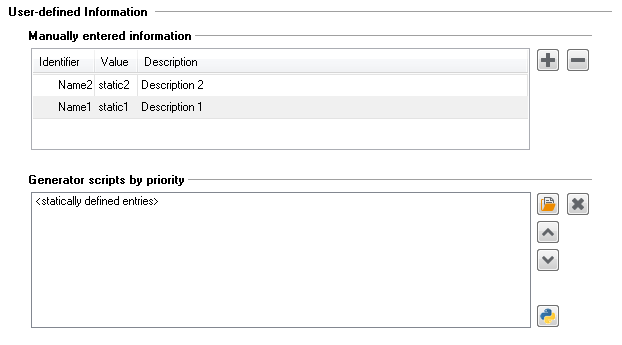
The section User-defined Information lets you specify data displayed in the test report in addition to the commonly created report data. Such user defined data comprises of entries which contain a name, a value and a description. These entries can be specified in the table shown below. They will appear the test report of every package executed in combination with the corresponding test configuration. In the following screenshot two entries have been defined:
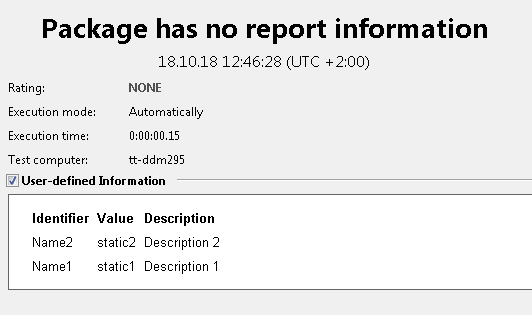
These entries will appear under the rubric User-defined Information in the test report for any package using this configuration. Starting the configuration and running an empty package will lead to the following result:
In addition, Python scripts can be referenced under Generator scripts by priority, generating dynamic data for the test report. These scripts will be executed as soon as the test configuration was started in the order they appear in the list:

Each script must provide a function called Init as shown below. The parameter userReportData references an instance of UserReportData, which can be used to add and edit entries. The following script demonstrates this for two added entries:
# -*- coding: utf-8 -*-

def Init(userReportData):
    # define new entries
    userReportData.AppendEntry('Name2', 'dynamic2', 'Description 2')
    userReportData.AppendEntry('Name3', 'dynamic3', 'Description 3')

    # evaluate if given entry exists (previously defined, e.g. in TCF)
    if "AnImportantEntry" not in userReportData.GetAllEntryNames():
      raise AbortConfigError('Value of AnImportantEntry is not set!')
Info
It is recommended to use the encoding “UTF-8” within the Python file.
Starting this configuration and running a package will bring up the merged static and dynamic information in the test report:

It must be pointed out that the entry with the name “Name2” was defined both in a static and a dynamic manner. However, it only appears once in the test report. This is due to the fact that the static and dynamic entries are combined. In the given example, dynamic entries provided from the script have a higher priority than the static entries and hence overwrite them. The priority can be adjusted by reordering the entry sources with the up and down arrow buttons.
Miscellaneous
It is determined by means of the check box Copy log files to report folder if ecu.test should automatically copy Output logs into the corresponding test report folder.