Diagnostic tutorial
Info
To be able to use the following features to their full extent, the license must be activated.
The following tutorials show workflows for the Add-on ecu.test diagnostics.
Flashing
One of the most important functions of vehicle diagnostics is flashing the ECU. During this process, the ECU software, or parts of it, are replaced with a new version. The UDS standard (ISO-14229) defines which services must be carried out to perform a Flash process.
Warning
Permanent damage to the ECU due to incorrect flashing
Flashing can cause errors or permanent damage to the ECU in case of misuse or faulty software versions.
Before flashing, make sure that you have made the correct settings.
The tracetronic product ecu.test supports the UDS services, but does not check the correctness of the data and settings made. tracetronic does not assume any liability for its use.
Flash workflow
Flashing the ECU involves four steps that build on each other:
Diagnostic Session Control: Switch to the Programming Session
Request Download: Inform the ECU of the upcoming flash process
Transfer Data: Divide the flash data into separate blocks for sequential transfer to the ECU
Request Transfer Exit: Complete the flash process

Required data
The data required for flashing is manufacturer-specific. There is no standardized source.
Flash data
The flash data is binary data that is to be loaded into the ECU. In most cases, it is available as a file.
Since the flash data is specified in ecu.test as a ByteStream, a byte stream must be generated from the binary file.
The following code block contains an example of how to do this:
def func(pathToFlashContainer):
    with open(pathToFlashContainer, mode="rb") as flashContainer:
        return ByteStream.FromRawString(flashContainer.read())
Memory address
The memory address is the start address in the ECU memory to which the flash data is written.
Memory size
The memory size is the length of the data to be transmitted. The control unit uses this value to check if the transmitted data is complete. Whether the memory size refers to the packed or unpacked data is manufacturer-specific.
Info
Flash data can contain packed data, which is why the length of the flash data does not have to correspond to the memory size.
Data format identifier
The identifier describes the compression or encryption method used.
If the value is 0, neither of the two methods is used. All other values are manufacturer-specific.
Step 1: Switch to the programming session (service 0x10)
Drag the DiagnosticSessionControl job from the Jobs tab into your package. Set the SessionType parameter to 2 (programming session).
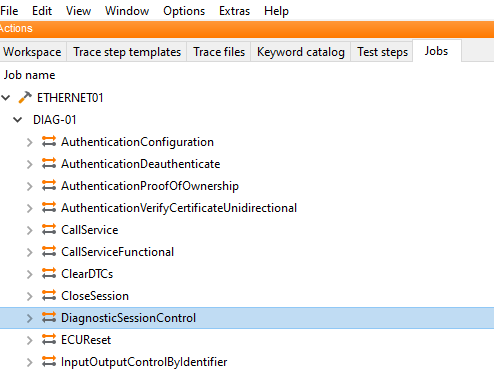
This job sets the control unit to the programming session. A ECU can only be flashed in this session.
Info
It may be necessary to run additional diagnostic services to be able to flash the ECU (for example Authenticate or RoutineControl).
Step 2: Request Download (service 0x34)
Drag the RequestDownload job from the job tab into your package
Fill in the parameters as follows:
DataFormatIdentifier with the identifier for the data format data format identifier
MemoryAddress with the memory address memory address
MemorySize with the memory size memory size

The control unit is informed of the impending flash process by this job.
If successful, the job returns a RequestDownloadResult object, which is needed for step 3.
Step 3: Transfer Data (service 0x36)
Drag the TransferData job from the Jobs tab into your package
Fill the parameters as follows:
BlockLength with the maximum block length supported by the ECU. This is provided by the RequestDownloadResult object via the GetMaxNumberOfBlockLengthAsInt method.
FlashData with the flash data

During execution, the job divides the flash data into separate blocks (transferRequestParameterRecord) and transfers them sequentially to the control unit. Depending on the total size of the flash data and the selected network protocol, this process can take several minutes.
The job returns a TransferDataResult object. This contains a separate TransferDataBlockResult object for each block transferred.
Step 4: Request Transfer Exit (service 0x37)
Drag the RequestTransferExit job from the Jobs tab into your package.
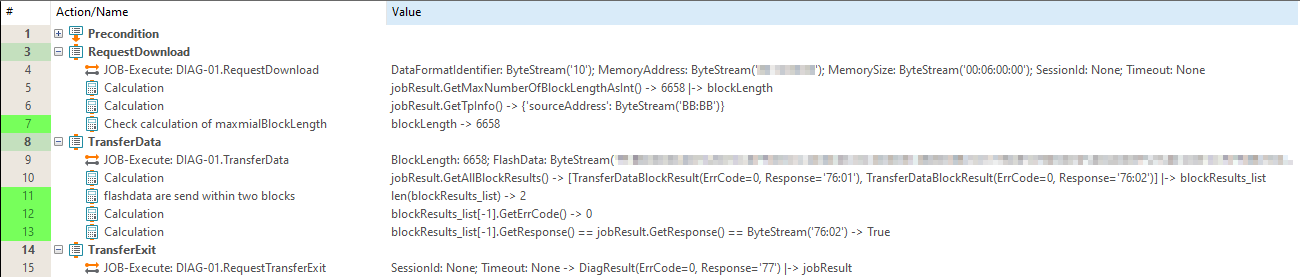
This job completes the flash process. After that, it may be necessary to restart the ECU with the ECUReset job.