Execution of a supplied example
Before creating the first analysis of our own, let us consider and run one of the examples supplied.
We open the package “EngineStarts” with a left double click on tab Packages (1) (see figure Supplied package “EngineStarts”).
We can see in the package view (on the right) in tab Signal recordings the signals to be analyzed, “StartEnd”, “EngineRunning”, “Clamp50” as well as “CrankshaftRotates”, which were selected beforehand from a supplied trace file and arranged in signal group “Start recordings” (see details in the Manual.)
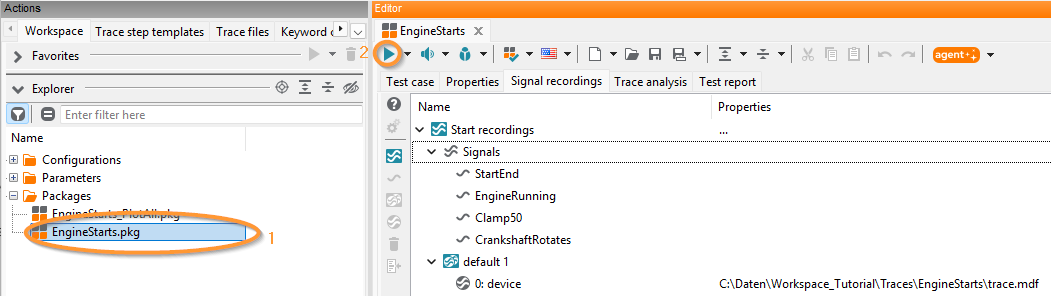
The supplied package “EngineStarts”
How the signals in this package are analyzed in the end can be seen in detail in tab Trace analysis. In Episodes and trace steps we can see the prepared analysis flow: the two episodes “step 1” and “step 2” are carried out one after the other, whereas the two trace steps contained in them are carried out in parallel. (You can find a comprehensive description in the Manual).
The trace analysis can be started by clicking the start button (2). The result is presented in the tab Test report (see figure Test report of package “EngineStarts”).
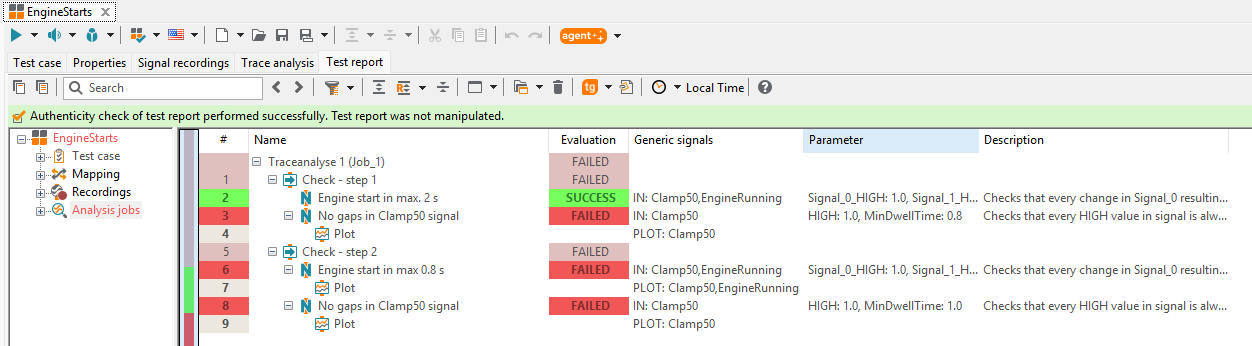
Test report of package “EngineStarts”
The test report reflects the structure of the trace analysis of this package known from Episodes and trace steps.
The first column contains the results of the individual trace steps (here SUCCESS or FAILED), the results of the episodes containing them (“check stage 1” and “check stage 2”), the results of the trace analysis containing these episodes (“trace analysis 1”), and on top the overall result of all trace analyses carried out.
A small plus symbol (outer left in column Name) shows that there are more details which can be expanded by a click on that symbol or a double click on the respective line. So it can be seen, in the trace step “no gaps in clamp50”, that it failed because the specified analysis rule was not fulfilled at 5 points (“5 errors found”).