Window “Global mapping”
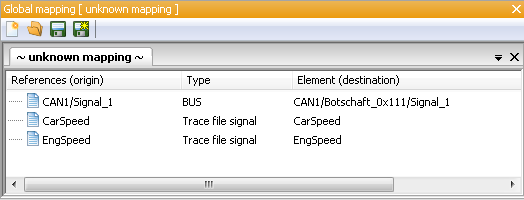
Window “Global mapping”
The window “Global mapping” contains for each global mapping (opened in a separate tab) the table which is familiar from the tab mapping:
The column Reference (origin) contains the mapping name, the column Element (target) the original name of the signal the mapping name refers to. The column Type explains where the signal comes from (either “trace file signal” or “BUS”).
A right click on a line of the table brings up a context menu with the following options:
Edit:
Opens the dialog Edit mapping item (see below).
Delete:
Deletes the selected mapping item.
A double click on a line opens the dialog Edit mapping item.
Here the mapping name can be changed freely. The possibility is offered to apply the changed name also to all packages in the package directory and/or all mapping files. Additionally, information from the respective database (“trace file signal” or “BUS”) is shown, depending on the mapping item opened.