Part 1: Execution of asynchronous packages
Objective
Creation of a simple test consisting of one caller and 3 packages in asynchronous execution
Test preparation
Creation of four empty packages “main”, “sender”, “receiver1” and “receiver2”
Switch to “main” in test case editor
Insert comment “main package starting”
Right-click “sender” in workspace explorer to open the context menu and choose (see image “Creation of a parallel reference”)
Repeat the last step with “receiver1” and “receiver2”
Insert comment “main package test steps completed” in the newly inserted package reference
Switch from test case editor to “sender”
Insert comment “sender package starting”
Create a loop with 10 repetitions
Insert into the loop the comment “sender package answering”
Finally Insert the comment “sender package finishing” (outside the loop)
Repeat steps 8-12 with “receiver1” and “receiver2” and adapt comments to package names
Save all packages and execute main package
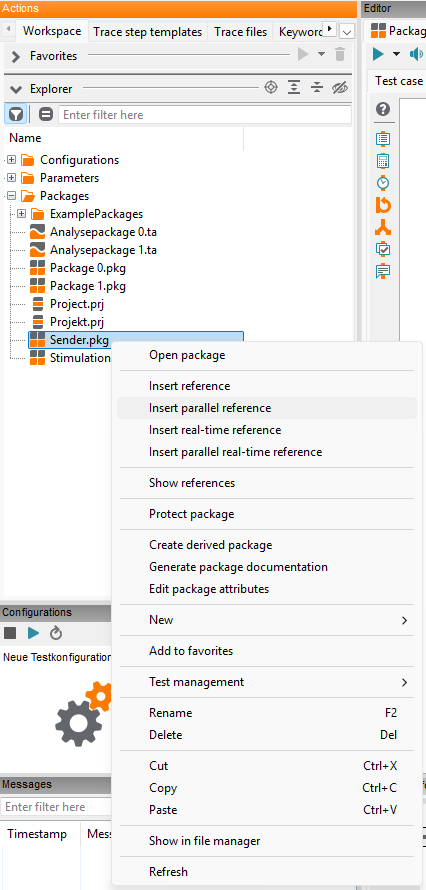
Creation of a parallel reference
Result
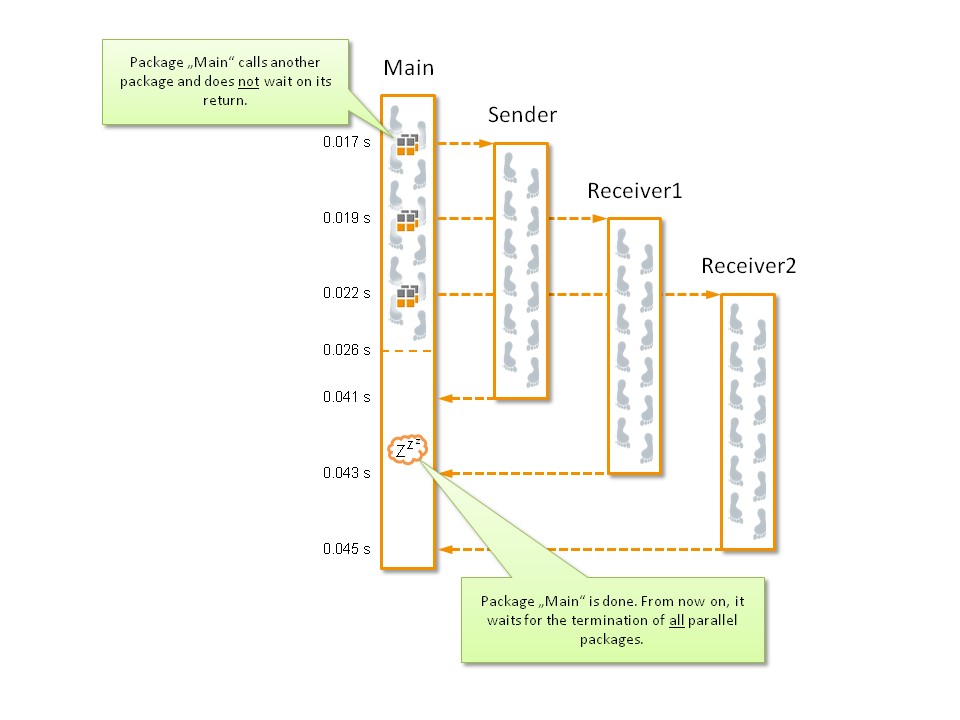
If you look at the test step times of “sender”, “receiver1” and “receiver2” in the test report you can see overlaps which signal parallelism in time.
Remark
The package “main” waits implicitly for “its” packages to be finished.