Part 4: Communication between two asynchronous packages
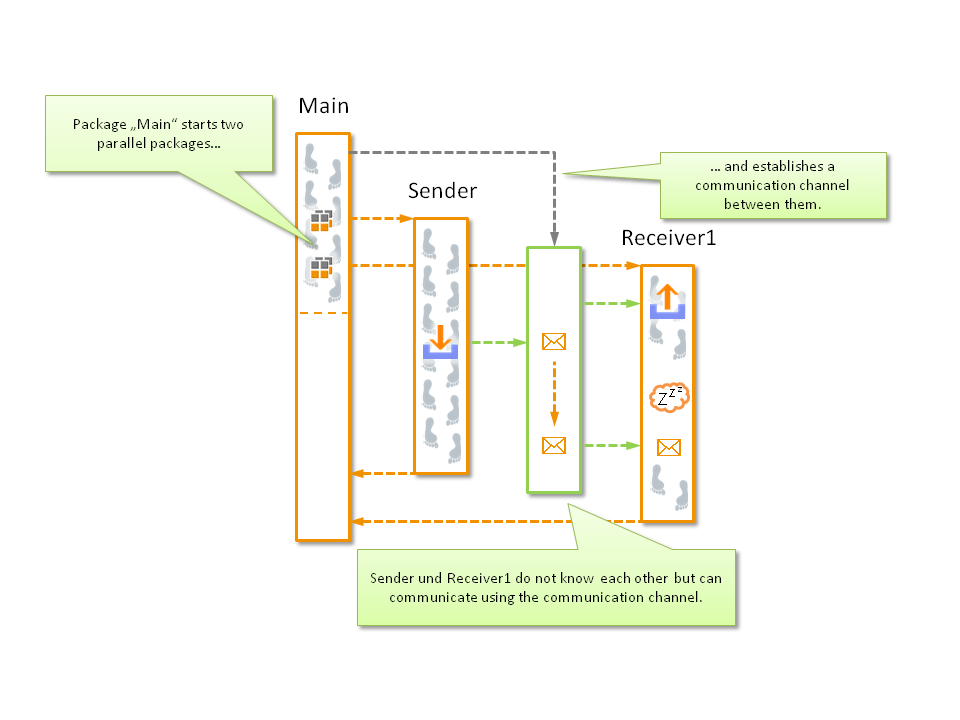
Objective
Communication of two asynchronous packages which were created from the same “parent” package.
Test creation
Switch to “receiver1” in test case editor
Create the variable “receiveLine” with the type “inbox”, maintaining the standard settings, and mark it as input parameter
Insert the test step “read from inbox” under within the loop, selecting the inbox “receiveLine” and and specifying as expectation value that the measuring value is equal to “loopCounter”
Switch to “main” in test case editor
Hide the loop
Create the variable “relais” with the type “relay”, maintaining the standard settings
Link the outbox “sendLine” with “relais” via the package parameterization dialog of “sender”
Link the inbox “receiveLine” with “relais” via the package parameterization dialog of “receiver1”
Save all packages and execute the main package
Result
The loop counter is now propagated not between the calling and the called package but between two packages that are in no relation with each other. The comparison is made according to the same principle as before by “main”.
Remark
A relay functions as a mediator of inboxes and outboxes between two called-up packages. That mediation takes place after the relay was linked with an inbox and an outbox. Data cannot be communicated to several receivers.