Part 5: Communication between several asynchronous packages
Objective
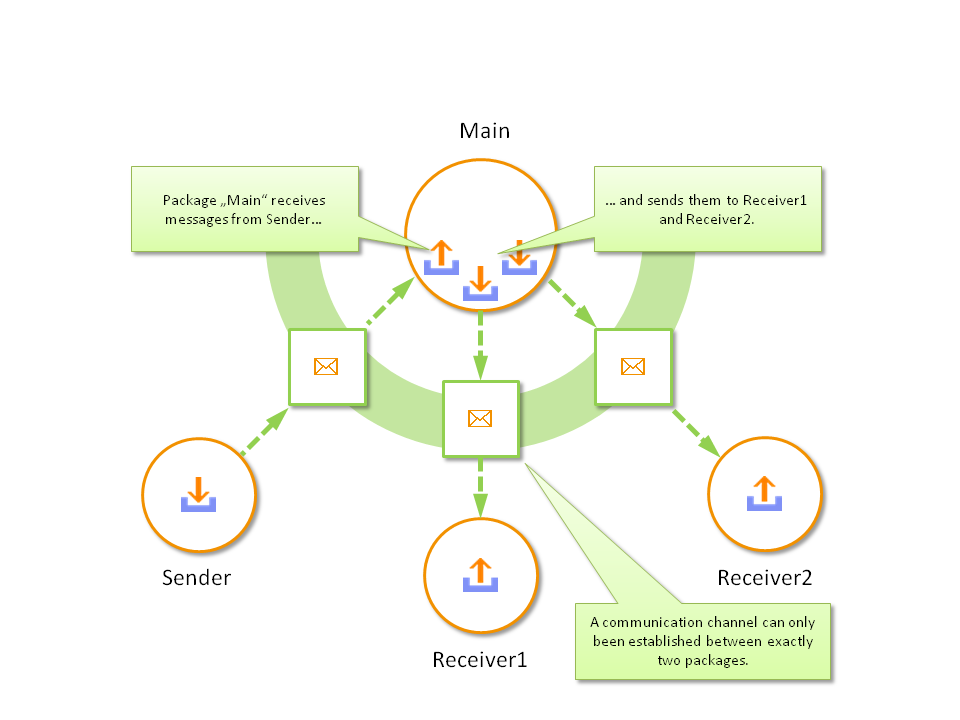
Communication between several asynchronous packages created from the same “parent” package.
Test creation
Switch to “receiver2” in test case editor and repeat steps 1-4 of part 4 for this package
Switch to “main” in test case editor
Remove “relay” variables
Create the variable “sendLine1” with the type “outbox”
Create the variable “sendLine2” with the type “outbox”
Restore the loop
Insert the test step “write to outbox” inside the loop under “read from inbox “, selecting “sendLine1” as outbox and indicating “receivedData” as message
Insert the test step “write to outbox” inside the loop under the other outbox, selecting “sendLine2” as outbox and indicating “receivedData” as message
Link the outbox “sendLine” with “receiveLine” via the package parameterization dialog of “sender”.
Link the inbox “receiveLine” with “sendLine1” via the package parameterization dialog of “receiver1”
Link the inbox “receiveLine” with “sendLine2” via the package parameterization dialog of “receiver2”
Save all packages and execute the main package.
Result
The data of the sending package are received and saved by the calling package like in part 3. Those data are then transmitted to two (or more) receivers.