Protecting packages
ecu.test provides means to protect packages from manipulations and from exposure of the test implementation.
Packages protected with a password can only be opened if the password is reentered upon opening them. If the password is lost, the contents cannot be restored, because they are encrypted with a key derived from the password.
Signed packages can be opened only if the public part of the certificate used for signing is available and if the package has not been tampered with outside ecu.test. In order to be able to sign packages, you must once generate or import a key pair.
If a package has access limitations configured to “only executable”, its contents cannot be viewed, only execution is possible. If the option “not editable” is set, the contents are visible, but you can neither change them nor save an unprotected copy of the protected package.
Creating signing keys
The creation of signing keys can be reached via the following menu selections:
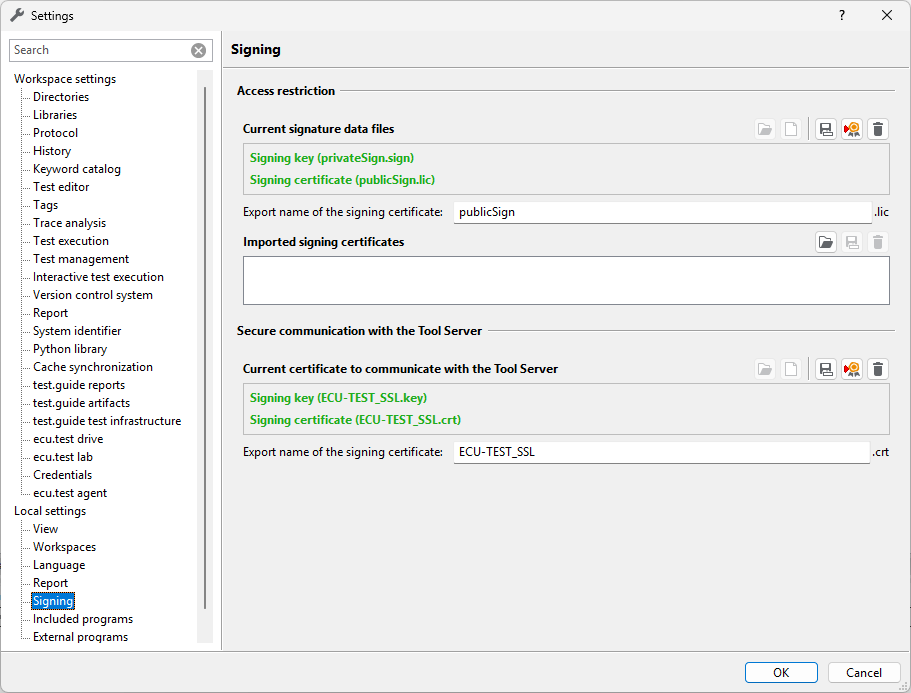
In the upper part of the dialog the signature data files available for signing are shown.
If no signature data files exist, they can either be imported from existing files, or generated from scratch. These two functions are available via the first two buttons.
After successful generation the two files needed for signing are available at
%appdata%/tracetronic/ecu.test 2026.3/:
The file Package key (private) contains the secret key, which enables the package creator to sign packages. This file should not be copied carelessly since whoever has a copy of it can impersonate the package creator.
The file Package key (public) contains the public key, which will be distributed to the users of the signed packages so they can verify that the packages they receive actually are from the package creator who signed them.
When both files are present, further options are available. For instance the files can be exported, so they can be given to someone else.
Warning
The export of signature data files should not be undertaken lightly. Since the private key is exported as well, if an unauthorized person gains access, misuse is possible.
Furthermore, the signing certificate can be exported. If you want to save the certificate independently from signing packages or if you forgot to include it with the signed packages, you can do it here.
Lastly, you can delete the signature data files.
All functions are accessible via the corresponding buttons.
In the lower part Imported signing certificates all files are listed, which are used for validation of package signatures.
Via these buttons you can import a signing certificate from a file as well as export or delete an already installed certificate from the list.
Protecting packages or entire folders of packages
In order to protect a package or a folder of packages, click or in the context menu that appears when right clicking a package or a folder in the Workspace tab.
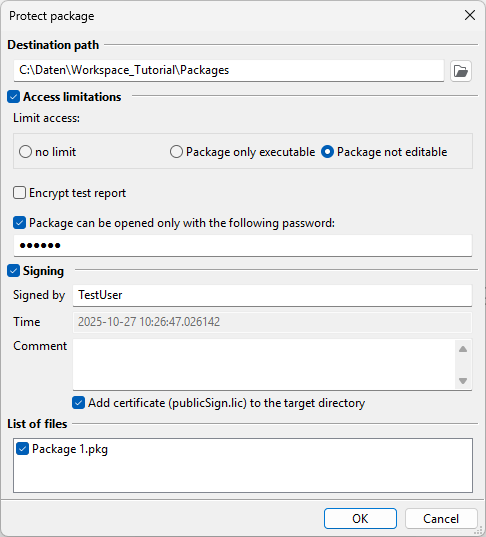
The following dialog allows to select and configure the means of protection:
Settings:
The destination path is the directory where the protected packages will be stored. If the option Add cerfificate to the target directory is selected, this is also the directory where the certificate needed for validation of the signature (see below) will be stored.
The section Access limitations allows you to impose limits onto the protected package:
no limit
Package only executable: The package can only be executed. I.e. the individual test steps are not visible to the user.
Package not editable: The package can be viewed and executed but not changed or saved.
If furthermore a password is specified, the protected package can be opened and executed only with this password. For security reasons the password must consist of at least 6 characters.
The option Encrypt test report causes the full report to be viewable only if the signing key (
privateSign.sign) used to sign this package is available. Without this key, only test steps tagged INFO are visible. This option applies only to the package, for which it is set. If another package is called via package reference, and this option is not set for it, all its test steps are visible in the unencrypted part of the test report, regardless whether they are tagged with INFO or not.If the option Signing is chosen, you must at least specify a name in the field Signed by. A comment is optional.
In the file list all chosen files are listed. Individual files may be deselected here.
The duration of the signing process depends on the number and size of the packages.
The options for access limitations use symmetrical encrpytion with AES-256 with a ecu.test internal key.
The options for signing rely on Public-key cryptography with RSA-2048.
Opening signed packages
In order to open a signed package you first need to import the package creator’s certificate. You can do this via the main menu: : .
If a certificate file of the same name is already present, the import is ignored. You can, however, import several certificates from various issuers, as long as their file names are different.
The certificate files are saved under
%appdata%/tracetronic/ecu.test 2026.3/
Signed packages are marked as follows:
 signifies a valid signed package. Further signature information
is available in the tool tip that appears when the mouse pointer hovers over
the package.
signifies a valid signed package. Further signature information
is available in the tool tip that appears when the mouse pointer hovers over
the package. indicates a package whose signature could not be successfully
verified and thus cannot be opened. Possible reasons for this are either
a missing certificate or a package file that has been tampered with.
indicates a package whose signature could not be successfully
verified and thus cannot be opened. Possible reasons for this are either
a missing certificate or a package file that has been tampered with.
Info
Protected packages can not be managed using the Test management link.
Importing a protected project archive(deprecated)
When importing a protected project archive, ecu.test asks for the password if one has been set during export. Thereafter, just like in importing a (plain, unprotected) project archive, all packages, projects and configurations contained in it are loaded. Unlike a plain project archive, the individual elements are not saved to disk but extracted from the protected archive directly into the main memory. This way ecu.test ensures, that the protection cannot be circumvented by making unauthorized copies of temporary files.
For general information regarding project archives, see Import and export.