Message window
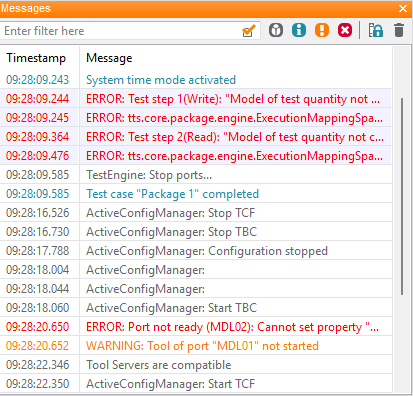
The output window (messages) serves for information about current activities of ecu.test. All errors and messages are displayed here. A distinction is made between:
gray: debugging information
blue: general outputs
orange: warning
red: problems
Additional information regarding the last point can be found in the Error logs.
Individual messages may be selected and copied to clipboard by the context menu. Messages that are created through a test step are deposited as a link (interrogation cursor) and can be selected directly in the test case via a double-click.
By activating the buttons it is possible to allow only designated information to the window. What kind of messages should be displayed generally, can be determined in the menu . In addition a more complex Filter can be configured.
If a lot of outputs are made during test execution, there may be negative consequences on the speed of the test run. Then the window can be collapsed. Even if the window is not displayed directly, all outputs continue to be recorded in the ecu.test Output logs.
Messages originating from a Tool Server, that are forwarded to ecu.test, will be extended by Tool Server timestamps as additional prefixes.