Analysis flow control
In this section all elements which can influence the flow of a trace analysis are described. The following blocks are available: If-Then-Else, IfDef and SwitchDef-Case. All blocks can be used below or above an episode and nested as desired.
If-Then-Else
With an If-Then-Else block it is possible to execute certain trace steps depending on signals, global constants, package or user variables. In contrast to an IfDef or SwitchDef case, the If-Then-Else block can use signals and react flexibly to package variables, that were set in the test case or via the package parameterization. Another difference is, that when using the If-Then-Else block, the used signals of contained trace steps are read in even if the trace steps are not executed.
For comfortable creation of the condition, the auto-completion can be used to select e.g. variables.
Confirmation by OK inserts the trace step into the trace analysis, and further conditions can be added into Then (condition true) and Else (condition not true).
Using the context menu multiple selected trace steps can be moved inside a newly created Then block.
Info
Signals can only be used within the functions listed below. Signals can also only be used if the If-Then-Else block is located below an episode. Furthermore, the functions are evaluated globally, even if the If-Then-Else block is below a trigger block.
Info
If-Then-Else blocks outside of episodes are evaluated at the beginning of the trace analysis. Thus, if a variable value is changed during the trace analysis, this only affects If-Then-Else blocks below episodes.
Functions
- IsFound(signal)
Returns if the signal is calculated or found in the trace file.
Info
A signal might be found even if it has zero samples.
Example:
# True, if signal Sig0 is calculated or found in the trace file
IsFound(Sig0)
- SampleCount(signal)
Returns the number of samples of the given signal.
Example:
# Number of samples of the signal Sig0
SampleCount(Sig0)
IfDef
This analysis element allows direct access to the global constants of a configuration. So trace steps can be carried out only if a certain global constant has been set to particular value, or if the global constant generally exists.
The IfDef condition is checked before trace analysis execution.
Using the context menu multiple selected trace steps can be moved inside a newly created IfDef block.
SwitchDef-Case
Using the SwitchDef-Case block it is possible to define an arbitrary number of branches for the analysis execution. Depending on the value of a global constant one can specify trace steps that will be executed by inserting them into the corresponding Case block.
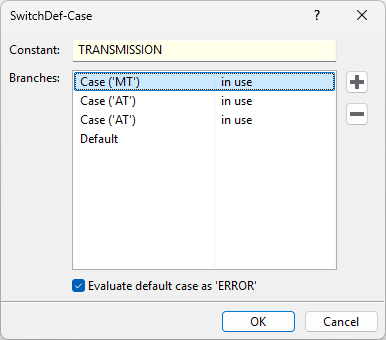
The global constant to be evaluated is specified behind Constant. Here one may also enter a constant expression.
Branches (possible values) can be added or deleted by means of the two buttons on the right of the SwitchDef-Case dialog. The special branch Default exists permanently and cannot be deleted. It is accessed only if no other branch is applicable. The value of all other branches can be edited by double click.
The word behind a given branch indicates if the branch contains further trace steps (in use) or is currently
empty (not in use). If it is marked new, it has just been created and the dialog has not been closed yet.
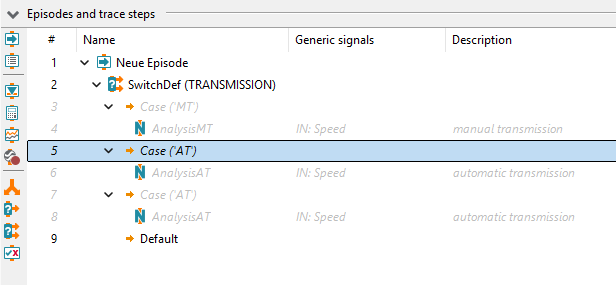
If multiple Case branches match the value of the global constant, only the first one of those is executed (implicit break).
This behaviour can be seen in the picture as well, with TRANSMISSION being a global constant
with the value AT. If no Case branch matches the constant expression, trace steps under the
Default branch will be executed.
In order to help discovering unexpected constant values, the Default node is configured
to always give an ERROR by default. This behaviour may be deactivated using a checkbox in the
SwitchDef-Case dialog. The existence of such a Default node can lead to the creation of an analysis job that
would not have been created under different circumstances.
If the global constant does not exist, this always leads to an ERROR, and neither the
Default trace steps, nor the trace steps under one of the Case branches will be executed.
The Case blocks and the Default block cannot be hidden manually. Though, in contrast to the IfDef block it is possible to show and hide the entire SwitchDef-Case block.