Analyses with triggers and calculations
Calculation step
A calculation step within a trace analysis can be used to calculate and check signals based on simple expressions.
For this purpose, a dialog is provided that can be opened via the respective button for the calculation step ( ).
).
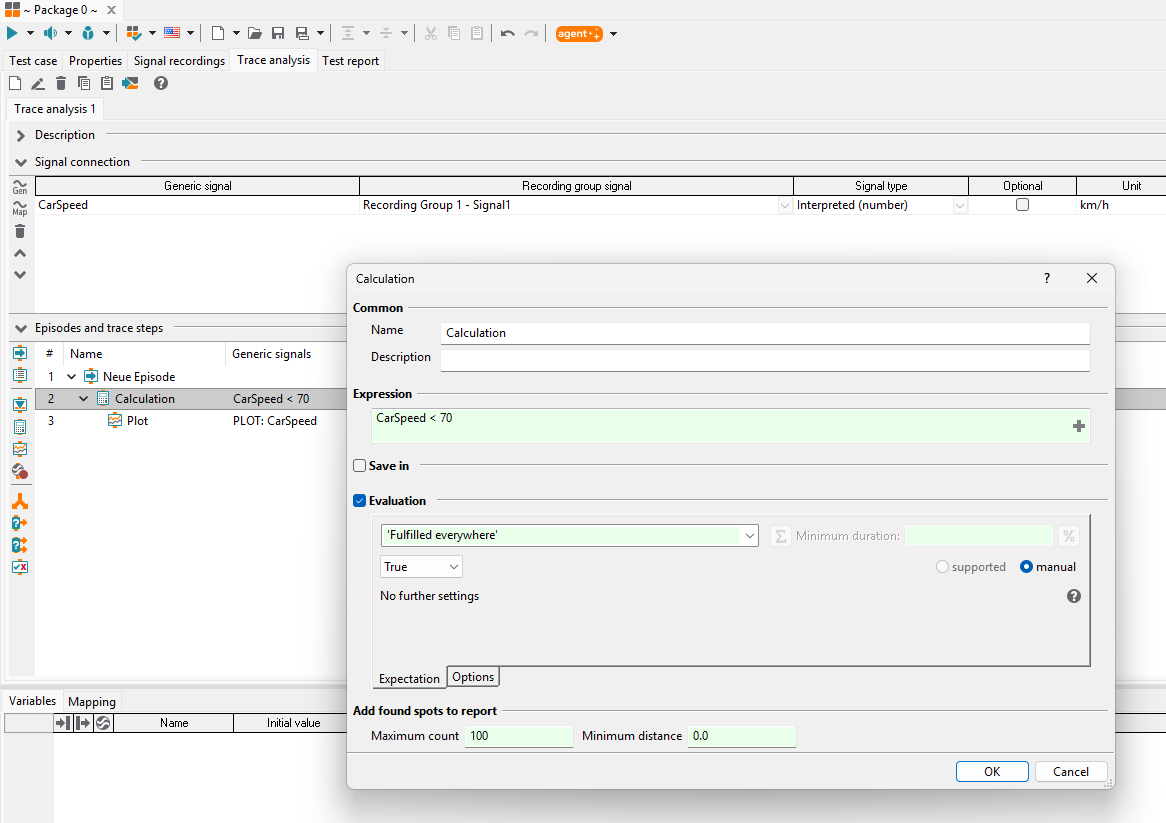
The dialog for creating and editing calculation steps provides the following options:
Common
The field Name can be used to give the calculation step an explanatory name.
This name will show up in the overview of the analysis editor as well as in the report.
Package variables can be used within the name by using the syntax {variable_name}. In the report
the value of the variable will then be inserted at this position within the name.
Additionally a description can be entered in the field Description. The description may also contain package variables, which will then be replaced by their value in the report.
Expression
In this field, the expression to be calculated and evaluated can be entered. Signals, package variables, function calls, and arithmetic operations can be used and are easily accessible via the auto-completion.
Info
An overview of all available functions can be found in section Functions for use in expressions.
Example: It should be checked that a signal should always be below 0.5.
The following Expression can be used for this:
SignalToCheck < 0.5
This will calculate a discrete signal of boolean values (i.e. True or False). By default the calculation step
checks that it must always be True.
Info
The actual evaluation is configured in the dialog section Evaluation (see below).
Save in
Here, a generic signal name can be entered. The expression result will be available via that name to other trace steps or plots. If an unknown signal name is entered, a new signal with this name will be created, automatically.
Evaluation
With this option a specific evaluation can be defined. If the evaluation is activated, the two tabs Expectation and Options will be available.
Expectation
In the first part of this section one has to specify the expectation with respect to timestamps. Possible values are listed in the following table, in which each row represents a certain mode, i.e. both entries of any row can be used synonymously.
Expectation
Long alias
‘always’
‘Fulfilled everywhere’
‘once’
‘Fulfilled at least once’
‘duration’
‘Fulfilled for at least’
‘Fulfilled everywhere’
True, if the expectation is met at all timestamps of the used signals.
‘Fulfilled at least once’
True, if (for every trigger range) the expectation is met at at least one timestamp of the used signals.
‘Fulfilled for at least’
True, if (for every trigger range) the expectation is met at a certain timestamp of the used signals and if starting at this timestamp there is no sample of these signals such that the expectation does not hold true for the parameter Minimum duration. If the length of the evaluated range is smaller than “Minimum duration”, the range will be evaluated as FAILED.
The behavior of the evaluation can be fine-tuned by two toggle buttons. The button
 decides whether the minimum duration matches one successful
subrange or the summed up duration of successful subranges.
The button
decides whether the minimum duration matches one successful
subrange or the summed up duration of successful subranges.
The button  is used to specify that the value for the “Minimum duration” is a relative
value given in percent (%).
is used to specify that the value for the “Minimum duration” is a relative
value given in percent (%).Caution
If a relative minimum duration is used, the calculation can only be used within a trigger block!
Due to the sample-and-hold principle, this option is only suitable if the samples of the signals used cover the trigger range as far as possible.
The duration is derived from actual evaluated subranges and follows the sample-and-hold principle to cover the transition between two subranges.
Example:
0.0 - 8.0       Trigger range
  1.0 - 2.0     subrange SUCCESS
  4.0 - 6.0     subrange FAILED
Will result in a considered duration of 3.0 (1.0 to 4.0) SUCCESS and 4.0 FAILED (4.0 to 8.0). Respectively, 42.86% SUCCESS and 57,14% FAILED.
In the next section one may specify the expectation with respect to the expression. Besides the simple default evaluation by comparison with
True, other evaluation types can be selected. For example,Numericcan be selected which provides an easy means for entering a tolerance. The trace analysis will report SUCCESS or FAILED accordingly.Switching to manual mode or selecting Unspecific as the evaluation type offers the opportunity to enter Python expressions that should result either in
TrueorFalse. The resulting value of the expression is available using the keyword value in these expressions.Options
In the section Options one may specify additional settings for the evaluation.
Vector/Matrix handling
Enables the evaluation of vector- or matrix-valued signals with respect to expectations similar to “Numeric”. Depending on the chosen setting the result SUCCESS will be returned if the expectation is met in all or in at least one component, respectively.
Result … as result for the empty range
If the calculation expression is not computed for at least one timestamp then the result is set accordingly.
SUCCESS comment
Alternative result text that will be used if the calculation evaluates to SUCCESS.
FAILED comment
Alternative result text that will be used if the calculation evaluates to FAILED.
Add found spots to report
Configuration of the maximum number of found spots and ranges to be explicitly reported.
The Minimum distance defines how close to each other explicitly reported spots may be. Spots within this minimum distance are still reported if they have a worse verdict than the spot with the worst verdict previously displayed in the report.
Trigger blocks
Trigger blocks can be used to locate specific ranges in traces based on expressions. By adding other trace steps within trigger blocks trace analyses can be performed within the located ranges.
A new trigger block can be created with the  button (”New trigger block”).

The dialog of the trigger block provides the following options:
Common
The field Name can be used to give the calculation step an explanatory name. This name will show up in the overview of the analysis editor as well as in the report. The Name may also contain package variables which are replaced by their value during execution.
Additionally a description can be entered in the field Description. There it is also possible to use package variables.
Parameters
The parameters for trigger blocks are separated into three tabs: Conditions, Extended options and Report, that are described subsequently.
Conditions
The tab Conditions allows the parametrization of basic trigger block functionalities.

Trigger mode:
The Mode specifies how the start (and possibly stop) trigger conditions are to be processed to create trigger ranges. Possible values are listed in the following table, where each row represents a certain mode, i.e. the first two entries of each row can be used synonymously.
Modus
Long alias
Requires stop trigger
‘while start trigger’
‘as long as start trigger is fulfilled’
no
‘start trigger while not stop trigger’
‘from start trigger as long as stop trigger is not fulfilled’
yes
‘start trigger to next stop trigger’
‘from start trigger until next time stop trigger is fulfilled’
yes
‘start trigger with time offsets’
‘with time offset if start trigger is fulfilled’
no
By default, trigger ranges are created as left-closed, right-open intervals. The start time of the trigger range belongs to the trigger range, whereas the stop time is usually not part of the trigger range.
Info
By definition, a new trigger range is only allowed to start with the next timestamp after a stop condition was triggered (except in the last mode).
‘as long as start trigger is fulfilled’
In this mode, a trigger range contains those timestamps, and those only, where the start trigger continuously evaluates to True. In other words, the trigger range begins when the start trigger condition is fulfilled and ends, as soon as the start trigger condition is no longer fulfilled.
As an example consider a signal with timestamps covering the interval [0, 5). Furthermore consider a start trigger condition that evaluates to False from timestamp 2 until timestamp 4 (more precisely in the interval [2, 4)) and that is True everywhere else. In this case, the two trigger ranges [0, 2) and `[4, 5) will be created.
‘from start trigger as long as stop trigger is not fulfilled’
In this mode, the beginning of a trigger range is defined by both, the start and stop trigger condition. At first, the stop trigger condition is evaluated. Wherever it is fulfilled, a trigger range cannot be opened, regardless of the start trigger condition. Thus, this mode may suppress a fulfilled start trigger (see option Report omitted start triggers on the tab Report). On the other hand, if the stop trigger condition is not fulfilled (or if it cannot be evaluated) and the start trigger condition evaluates to True, a trigger range is generated. Then, the stop trigger condition defines the end of the trigger range (see parameter Stop trigger).
As an example consider a signal with timestamps covering the interval [0, 5) again. Furthermore, assume the start trigger condition to hold everywhere except for the time range from 1 until 3 (more precisely the interval [1, 3)) and the stop trigger condition to be True from timestamp 2 until timestamp 4 (more precisely the interval [2, 4)). In this case, the two trigger ranges [0, 2) and [4, 5) will be created.
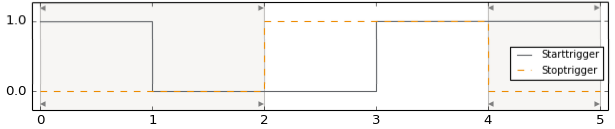
‘from start trigger until next time stop trigger is fulfilled’
In contrast to the previous one, in this mode, a fulfilled start trigger condition will always open a trigger range. Thus, the beginning of a trigger range only depends on the start trigger condition. The stop trigger condition defines the end of the trigger range (see parameter Stop trigger).
If this mode is applied to the last example, apart from the previously delivered trigger ranges [0, 2) and [4, 5), additional ones will be created. These will be located between the timestamps 3 (inclusive) and 4 (exclusive) and will merely cover intervals between two consecutive samples each.
‘with time offset if start trigger is fulfilled’
In this mode, a trigger range is created for each time at which the start trigger condition is met by adding a Start offset and a Stop offset to the time of the start trigger. If a range is to be spanned around the start trigger, a negative start offset and a positive stop offset must be selected. If start offset and stop offset have the same sign, the start trigger itself is outside of the resulting range.
Info
In this mode, overlapping trigger ranges may occur!
Info
The trigger mode may be parametrized using package variables or global constants.
Start trigger:
The Start trigger defines when a trigger range should start. The expression in the input field can contain generic signals, arithmetic and logical operators, package variables and functions. Valid expressions are, for instance:
SignalToAnalyze == 5Edge(SignalToCheck, 0, 1)
The selection of signal, variable and function names is supported by the integrated auto-completion.
Start offset:
Using a Start offset the beginning of a trigger range can be shifted into the past (negative start offset) as well as into the future (positive start offset).
Stop offset:
Using a Stop offset the end of a trigger range can be shifted into the past (negative stop offset) as well as into the future (positive stop offset).
Stop trigger:
Depending on the selected trigger mode a Stop trigger may be required. If specified by a valid expression, it will define the end of a trigger range. More precisely, the end of a trigger range corresponds to the timestamp where the stop trigger evaluates to True - regardless of whether the start trigger condition still holds or not. However, the triggering timestamp itself will not be part of the trigger range (right-open interval).
Often a trigger range is not stopped by trigger conditions, but by reaching the end of a trace. By choosing the option Handle end of trace as stop trigger this event is treated like an ordinary stop trigger. In contrast to a regular end of a trigger range all contained trace steps will also be evaluated for the last sample (closed interval). However, if this option is not set, a trigger range that is terminated by the end of the trace will be rated INCONCLUSIVE.
Info
Please refer to the section Functions for use in expressions for an overview of functions that can be used within start and stop trigger expressions.
Extended options
The tab Extended options contains additional settings for the trigger block.
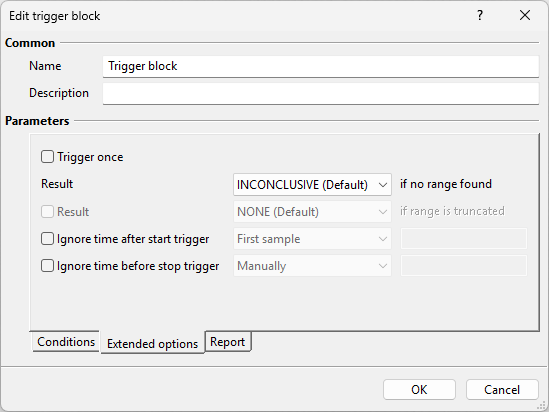
Trigger once
Only the very first trigger range that is found will be analyzed. Further ranges will be ignored.
Result … if no range found
If no range is found, this is the verdict that will be given to the trigger block under consideration. By default, a trigger block without any trigger ranges has the result INCONCLUSIVE.
Result … if range is truncated
If this setting is set, a truncated area is evaluated with the specified result. If this setting is not set, a truncated range is evaluated normally.
Info
When using Start offset and Stop offset, the trigger range might start before the beginning of the parent trigger range (or the beginning of the trace) or might end after the end of the parent trigger range (or end of the trace). Since this is not possible, the start or stop time of such a trigger range are set to the start or stop time of the parent trigger range. Thus, the trigger range is shorter than specified.
Ignore time after start trigger
Here, it is possible to exclude the first sample of each trigger range from being analyzed. To do so, choose the setting First sample. As a consequence, all trace steps contained in this trigger block will not receive the first sample.
More generally, choosing the option Manually allows specifying the length (a positive number) of a time span after the start trigger event to be ignored. If a sample is exactly on the boundary of the ignored range, it will be ignored as well.
Info
It is also possible to enter a variable into this field. Possible values are positive numbers, “firstsample”, 0 or None. The string “firstsample” represents ignoring the first sample, whereas 0 or None deactivate this feature, i.e. no samples will be ignored.
Ignore time before stop trigger
If one chooses the setting Manually, one can specify the time span to be ignored before the stop trigger. If a sample is exactly on the boundary of the ignored range, it will be ignored as well. If this trigger block contains further trigger blocks, the trigger ranges resulting from the latter will stop not later than the time ‘Stop trigger time of the parent trigger range minus ignored time before the stop trigger of the parent trigger range’, even if no signal has a timestamp at this time.
Report:
The tab Report contains options for adjusting the reporting of trigger ranges.

Condition
This option allows for setting a condition that needs to be fulfilled for trigger ranges to be included in the report.
Maximum number per result and contained trace step
This option allows for the specification of a maximum number of trigger ranges to be reporded. The given limit is applied per result, i.e. a maximum number of five leads to a report that includes at most five trigger ranges rated ‘SUCCESS’, at most five ranges rated ‘FAILED’, at most five ranges rated ‘ERROR’ and so on.
Furthermore, the limit is applied per trace step that is included in the trigger block, such that no single trace step can completely preempt relevant entries from other trace steps. If, for instance, one trigger block contains two calculations that are rated ‘FAILED’ in disjoint ranges, then (with the limit still being set to five) the report will contain five ‘FAILED’ ranges for each of the calculations, summing up to ten ‘FAILED’ ranges in the result table of the trigger block.
Furthermore, it should be emphasized that, especially in the case of nested trigger blocks, subordinate trigger blocks only consider their own settings and other subordinate trace steps only consider the settings of the directly superordinate trigger block. Ranges of superordinate trigger blocks will always be displayed if at least one subordinate range is displayed (regardless of their own settings). This behavior may be improved in a future version of ecu.test, so that the settings of all trigger blocks are considered and multiplied out.
Info
All of the previously mentioned filter options affect the reporting only, i.e. the number of trigger ranges that are listed in the report tree on the left and in the detailed result table on the right of the report view. They do not affect the result of any individual trace step, let alone the entire trace analysis. Furthermore, the total number of trigger ranges per result is always displayed in the result text of the respective trace step, regardless of the filter options.
Report omitted start triggers
If this option is set, a spot with a corresponding message about the cause of the omission is reported for each omitted start trigger. A omitted start trigger can occur in ‘from start trigger as long as stop trigger not fulfilled’ mode if the stop trigger condition is fulfilled at the same time as the start trigger condition. On the other hand, a start trigger can be omitted in ‘with time offset when start trigger fulfilled’ mode if the complete trigger range would lie outside the parent trigger range.
Mention ignored ranges in test report
A trigger range is being ignored if the sum of the ignore times (i.e. ignore time after start trigger + ignore time before stop trigger) is greater or equal than the length of the trigger range. An ignored trigger range is always rated NONE. One can suppress detailed reporting of ignored trigger ranges by unchecking the option Mention ignored ranges in test report. Then, only the number of ignored ranges will be reported in the result text of the trigger block.
Info
The numbering of trigger ranges always takes ignored ranges into account. Consequently, the second trigger range will always be labeled trigger range 2, even if the preceding trigger range 1 has been ignored and is therefore not mentioned in the test report, i.e. the list of trigger ranges will start with trigger range 2 in such case.
Example:
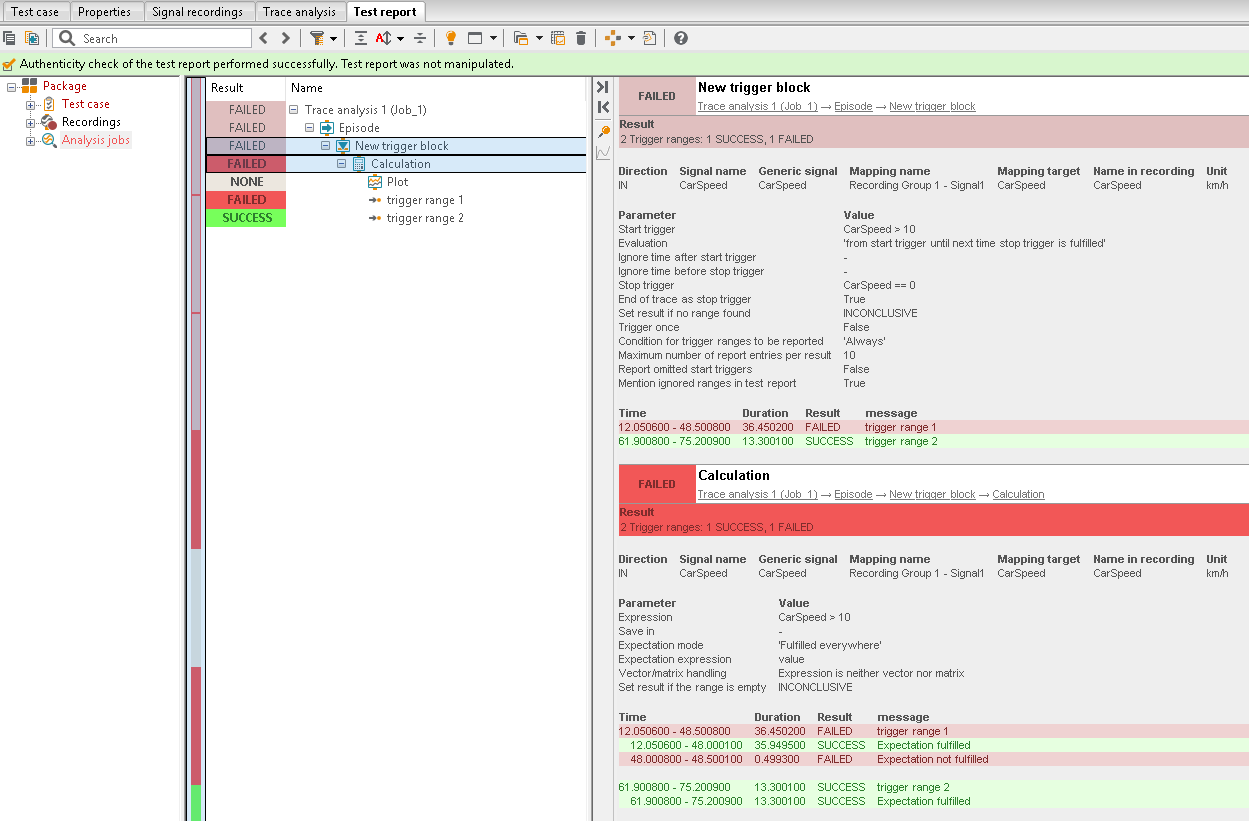
In the following a short example for the usage of triggered blocks and calculation steps is provided. As an input signal, the recorded velocity of a vehicle (in km/h) is analyzed:
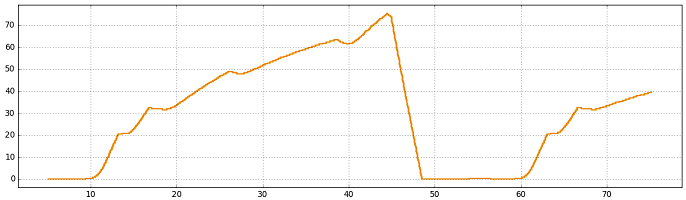
For the trace analysis, the velocity is assigned to the generic signal CarSpeed. The trigger
block generates trigger ranges based on the start trigger CarSpeed > 10, i.e. the car going faster
than 10 km/h. The end of each range shall either be the moment the vehicle comes to a full stop again (i.e. its
velocity being 0) or the end of trace (and thus the recording).
In order to analyze the trigger ranges, a simple calculation step (Analyses with triggers and calculations)
is added below the trigger block. It checks whether CarSpeed > 10 holds. To include some visual
feedback a plot is inserted below the calculation step (Diagram creation (Plot)).

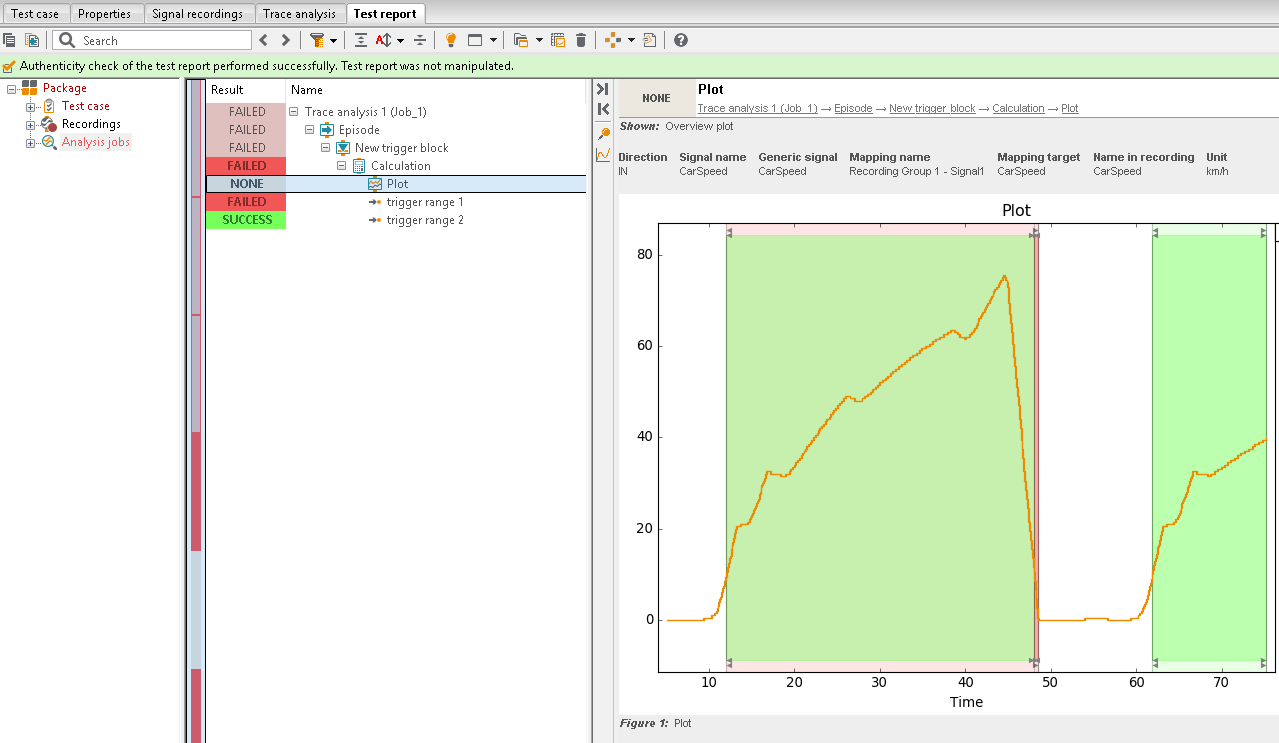
After the trace analysis is executed, a report is generated automatically. The section New trigger block shows that two trigger ranges (trigger range 1 and trigger range 2) are detected. They are rated based on the calculation step. The section Calculation provides more details: amongst others, it can be seen that a subsection of trigger range 1 is marked as FAILED.
The trigger ranges and the evaluation given by the calculation step are visualized in a plot:
Report
In the report of a calculation trace step, consecutive timestamps with the same evaluation are combined to form ranges. Each range is characterized by its start and end time, its evaluation and a message. Examples for ranges of calculation trace steps are displayed in the following:

Ranges of a calculation trace step without and within a trigger block
If a calculation step is used inside a trigger block, its ranges are reported in indented lines below their superordinate trigger range.
Under certain circumstances it is not possible to evaluate the expression of a calculation trace step everywhere. For example, the expression Value(Sig1, 1.0), providing the value of the signal Sig1 one second ahead of the current timestamp (see section Functions for use in expressions), can no longer be evaluated if the signal ends within the next second. This situation may also occur if Sig1 is generated by a calculation trace step inside a trigger block. Then, signal values of Sig1 will only be available in certain trigger ranges. Here, subranges where no evaluation is possible are rated INCONCLUSIVE.
In order to restrict evaluations to suitable subranges one may use (sub)trigger blocks with positive ignore times.
Info
For calculation trace steps outside of any trigger block, expressions depending on future (or past) signal values would always result in sub ranges rated INCONCLUSIVE at the end (or start) of the signal. Hence, for calculation trace steps outside of any trigger block such subranges are rated NONE instead.
Expressions
Expressions for the formulae of calculation steps must contain the name of at least one generic signal. Additionally, package variables, function calls or arithmetic operations may be used. In contrast, expressions in start or stop trigger conditions of a trigger block do not need to contain a generic signal.
In a calculation step the expression is evaluated for all timestamps at which at least one of the referenced generic signals has a sample. In a trigger block the evaluation is carried out for all timestamps at which at least one generic signal of all used expressions has a sample. If no generic signal is used in any of the expressions, the timestamps of the signals from the expressions of the parent trigger block or - if none exists - of all signals referenced in the episode are used.
The value of other generic signals that do not have a sample at the considered timestamp remains
at the last processed value or is None if no such value exists.
The evaluation of an expression of a calculation or trigger block can be (further) restricted by
inserting the calculation or trigger block into a parent trigger block. Note that the functions
CheckResponse, Derivative, HoseAbsolute, HoseRelative, Integral, MovingAverage,
StartTriggerValue, StopTriggerValue and Value (and also with restricted = False the functions
Always, AtLeastOnce and Static) can access signal values that are outside of the topmost
trigger range. For instance, the expression Value(Signal, 2) may process signal values, that
exceed the end of the trigger range by up to two seconds. Such an expression is rated INCONCLUSIVE
whenever not all required values can be determined.
Functions for use in expressions
-
Always(signal, duration, restricted=
False)¶ Checks whether the boolean value of a signal or condition always evaluates to True within the specified time duration.
All signal values in the right open time range [t, t + duration) for duration > 0 or in the closed time range [t + duration, t] for duration < 0 are considered. If there is no sample at the left interval limit, the held signal value is used. Depending on the restricted parameter, trigger ranges will restrict the range further.
If the parameter restricted is set to False (default), the time range defined by duration can exceed the limits of a trigger range. If it is set to True, the condition is only checked within the trigger range.
Info
In contrast to the function Static this function also evaluates if the available time span is shorter than the specified duration.
Example
# True if the signal always evaluates to True for the next 2 seconds
Always(Sig0, 2.0)

# True if the condition 'Sig0 > 5' was always fulfilled for the last 2 seconds
Always(Sig0 > 5, -2.0)

# True if the signal evaluates to True for the next second or up to the
# end of the current trigger range
Always(Sig0, 1.0, True)

# True if there is no rising edge from 0 to 1 within the next 1.5 seconds
Always(not Edge(Sig0, 0, 1), 1.5)
-
AtLeastOnce(signal, duration, restricted=
False)¶ Checks whether the boolean value of a signal or condition evaluates to True at least once within the specified time duration.
All signal values in the right open time range [t, t + duration) for duration > 0 or in the closed time range [t + duration, t] for duration < 0 are considered. If there is no sample at the left interval limit, the held signal value is used. Depending on the restricted parameter, trigger ranges will restrict the range further.
If the parameter restricted is set to False (default), the time range defined by duration can exceed the limits of a trigger range. If this parameter is set to True, the condition is only checked within the trigger range.
Info
In contrast to the function Static this function also evaluates if the available time span is shorter than the specified duration.
Example
# True if the signal evaluates to True at least once in the next 2 seconds
AtLeastOnce(Sig0, 2.0)

# True if the condition 'Sig0 > 5' was fulfilled at least once in the past 2 seconds
AtLeastOnce(Sig0 > 5, -2.0)

# True if the signal evaluates to True at least once within the next second (but only
# up to the end of the current trigger range)
AtLeastOnce(Sig0, 1.0, True)

# True if there is a rising edge from 0 to 1 within the next 1.5 seconds
AtLeastOnce(Edge(Sig0, 0, 1), 1.5)
- Average(signal)
Returns the average of the given signal for the entire trigger range.
If the function is used outside a trigger block, the average of the given signal over its domain of definition is returned. The average value is saved as a constant signal with timestamps identical to those of the input signal.
Example
Important
This function cannot be used in the expressions for Start trigger and Stop trigger.
Average(Sig0) # Average of the signal Sig0
- BoundControl(signal, minVal, maxVal)
Checks for every sample if the value of the input signal is within the given minimum and maximum value borders.
Each of the parameters minVal and maxVal can be the name of a generic signal or a number. If more than one signal is passed to the function, it is only evaluated where all used signals hold a value.
The return value at the considered timestamp is:
True, if the signal value is within the given range
False, if the signal value is outside the given range
Example
# True at timestamp t if 0 <= Sig0(t) <= 100
BoundControl(Sig0, 0, 100)

# True at timestamp t if Sig1(t) <= Sig0(t) <= Sig2(t)
BoundControl(Sig0, Sig1, Sig2)
- CheckAlive(signal, cycleLimit)
Returns whether a given signal is starting at 0, strictly increasing with a step size of 1 (one) until it reaches the limit given by the parameter cycleLimit and then starts counting from zero again.
The function returns False if the same signal value is repeated, the step size differs from 1, the limit given by the parameter cycleLimit is exceeded or the signal does not start from 0 (also after reaching cycleLimit).
Example
# True if the sequence of values in Sig0 is (0, 1, 2, 3, 0...)
CheckAlive(Sig0, 3)
-
CheckResponse(signal1, signal2, timeout=
None, useHoldValue=False)¶ Evaluates the temporal correlation between two signals. For every value where signal1 is True, signal2 must also become True within a given timeout.
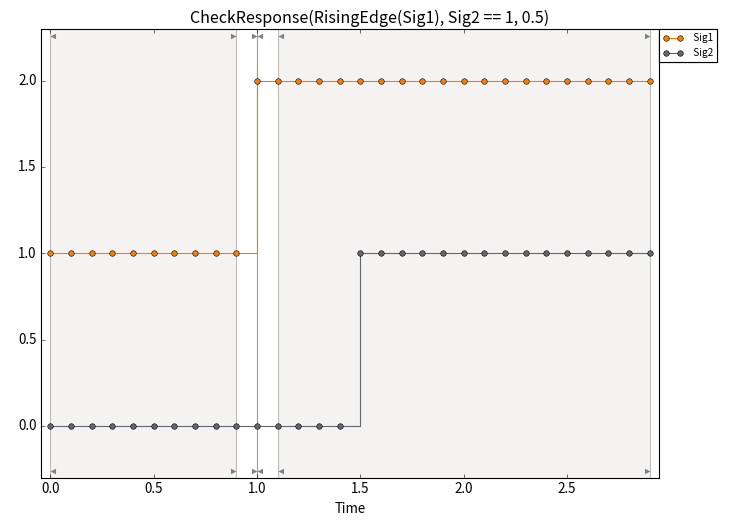
Boolean interpreted values are used, so it can intuitively be used with logical expressions. For instance, one can write CheckResponse(RisingEdge(ignition), engineSpeed > 0, 0.5).
The parameter timeout is optional. If not given, CheckResponse checks that signal2 contains at least one True value at a later time. Negative values are not allowed and result in an error.
The parameter useHoldValue is only relevant if signal1 and signal2 have different time axes or signal2 has gaps. If useHoldValue is set to True, then at points in time where signal1 is True and signal2 provides no value, the last valid value of signal2 (hold value) is used.
If the function is used in a calculation step inside a trigger block the condition of signal2 is checked even if the specified timeout exceeds the end of the trigger range. signal2 is also checked within the ignored ranges of the trigger block. In contrast, signal1 is not evaluated in the ignored ranges.
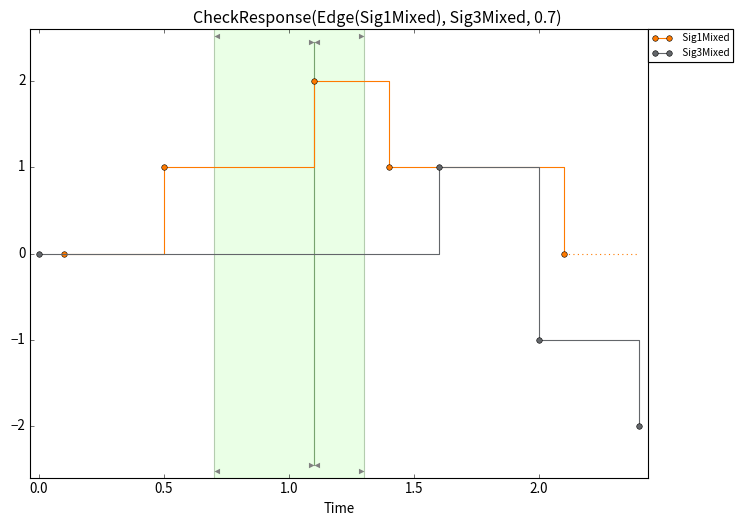
Info
It is recommended to use functions such as Edge in the triggering condition of signal1 in order to avoid multiple activations on consecutive samples. An expression like ignition == 1 would trigger, for example, when the value changes from 0 to 1 but also on all following samples where the value remains 1.
Example
# Using logical expressions for better readability
CheckResponse(RisingEdge(ignition), engineSpeed > 0, 0.5)

# Use the hold value of Sig2 at the beginning of a trigger range
CheckResponse(RisingEdge(Sig1), Sig2, 1.5, useHoldValue=True)

# No timeout value
CheckResponse(FallingEdge(Sig1), RisingEdge(Sig2))
- CheckTiming(signal, period, tolerance)
Returns whether the time period has passed between the two most recent timestamps of the given signal.
If one wants to allow a symmetric time interval with respect to period, the parameter tolerance may be used as the relative tolerance in percent (%).
Example
# True if 0.9 <= time between the two most recent timestamps <= 1.1
CheckTiming(Sig0, 1, 10)

# True if 0.01 seconds passed between the two most recent timestamps
CheckTiming(Sig1, 0.01, 0)
- Derivative(signal)
Returns the first derivative of the given signal.
For the first sample (n=0) the derivative y’(n) is calculated as:
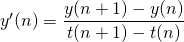
For all following samples it is calculated as average of the two slopes:

For equidistant timestamps the latter formula simplifies to the central differencing scheme:

Example
Derivative(Sig0) # Derivative of signal Sig0
-
Edge(signal, valFrom=
'*', valTo='*')¶ Checks whether the value of the given signal changes from valFrom to valTo.
Using the default parameters, every value change is detected as edge (change from any value to any value).
For one of the parameters, it is possible to pass the strings ‘<’ (a value less than the other) or ‘>’ (a value greater than the other) as argument. This way, rising/falling edges from/to unspecified values can be detected.
Info
The parameters valFrom and valTo must not be equal (unless both parameters have the default value ‘*’)!
Example
Edge(Sig0)            # any edge (any value change)
Edge(Sig0, 0, 1)      # rising edge from 0 to 1
Edge(Sig0, '>', 1)    # falling edge from any value greater 1 to 1
Edge(Sig0, 1, '<')    # falling edge from 1 to any value less than 1
Edge(Sig2, '<', '>')  # same as Edge(Sig2, '*', '>') or Edge(Sig2, '<', '*') or RisingEdge(Sig2)
- Evaluate(expression)
Evaluates an expression provided as a string.
Example
Evaluate('Sig0 > 0')  # equivalent to Sig0 > 0
Evaluate(var)         # evaluates the expression stored in the variable 'var'
-
FallingEdge(signal, threshold=
'*')¶ Checks whether the value of the given signal changes from a value greater equal to threshold to a value less than threshold.
Example
FallingEdge(Sig0)      # True if Sig0(n-1) > Sig0(n)
FallingEdge(Sig0, 0.5) # True if Sig0(n-1) >= 0.5 and Sig0(n) < 0.5
- HasSample(signal)
Checks whether signal was sampled exactly at the time considered.
The function returns False if the signal was not sampled at exactly that time and the signal value is only derived from the sample-and-hold principle.
Example
# Checks whether 'signal' has a sample at each
# timestamp that is part of the common time
# axis of 'signal' and 'clock'
HasSample(signal) and clock >= 0
The following figure shows the signals signal and clock as well as the result of the example expression:

The figure also shows the result of a triggered analysis, which was used to check whether a new sample value of signal was obtained no later than one second after each rising edge of clock. For this purpose, the following trigger conditions had to be formulated in trigger mode ‘from start trigger until next time stop trigger is fulfilled’:
Start trigger:
clock == 1Stop trigger:
HasSample(signal)Within the trigger block the following calculation step had to be carried out:
StopTriggerTime() - Time(signal or clock) <= 1.0
-
HasValue(signal, restricted=
False)¶ Checks whether signal has a value at the current timestamp or a hold value exists.
If this function returns True, a subsequent access to the signal, e.g. by calling
Value(signal, 0.0), will return a valid signal value.If True is passed for the parameter restricted (default: False), only signal values within the trigger range are considered. Held values from outside of the trigger range are ignored.
Example
HasValue(Sig0) # True, if Sig0 already has a value
HasValue(Sig0, True) # True, if Sig0 already has a value (in the trigger range)
- HoseAbsolute(signalA, signalB, deltaT, deltaY)
Calculates a hose for the signal signalA and checks whether the values of signalB are within. Here, deltaT is interpreted as the temporal and deltaY as the absolute tolerance of the signal values.
- deltaT:
The minimal distance in time between the hose border and the signal signalA, resulting in a final hose width of at least 2 * deltaT in time coordinate direction. This non-negative parameter is incorporated in the calculation of the hose borders as described below.
Info
If deltaT is set to 0, deltaY is applied to the current value (or hold value) of signalA.
- deltaY:
Can be a tuple (minusDeltaY, plusDeltaY). These non-negative parameters are used as absolute tolerances in the calculation process of the hose borders as described below. If the parameter is a single number, it is interpreted similar to the tuple (deltaY, deltaY).
The calculation of the hose borders at timestamp t is decomposed into two steps. First, the maximum and the minimum of the signal signalA over the time interval [t - deltaT, t + deltaT] are determined. If there is no sample at t - deltaT, the hold value of signalA is used. Second, this minimum is reduced by the first component of deltaY. The result yields the lower bound of the hose at the timestamp t. Similarly, the upper bound of the hose is determined by adding the second component of deltaY to the maximum obtained in the first step.
Particularly for signals with large slopes, the height of the hose can be significantly larger than minusDeltaY + plusDeltaY.
Example
# True if Sig1 is within a floating range based on Sig0 with a duration of 0.2,
# floating minimum and maximum expanded by 123.4 each.
HoseAbsolute(Sig0, Sig1, 0.2, 123.4)

# True if Sig1 is within a floating range based on Sig0 with a duration of 0.1,
# only floating maximum expanded by 1.33.
HoseAbsolute(Sig0, Sig1, 0.1, (0, 1.33))
Plotting or further processing of the boundary curves:
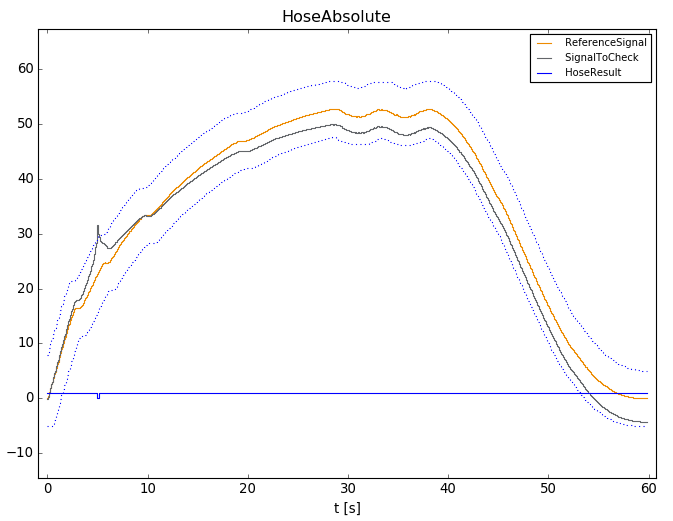
The result of the HoseAbsolute() function is a so-called structured signal. In addition to the binary result signal, the structural elements .lower and .upper, which store the lower and upper boundary respectively, are available and can be used in expressions. If the result of the function is saved (option Save in of calculation steps) in a signal named HoseResult, for instance, the lower and upper boundary curves can be accessed via
HoseResult.lower
HoseResult.upper
From within array-based NumPy trace step templates access to structured signals works analogously:
signals['HoseResult'].GetValues().lower
signals['HoseResult'].GetValues().upper
Plotting HoseResult will display the boundary curves in addition to the binary result:
- HoseRelative(signalA, signalB, deltaT, toleranceY)
Calculates a hose for the signal signalA and checks whether the values of signalB are within. Here, deltaT is interpreted as the temporal tolerance and toleranceY as the relative tolerance of the signal values in percent (%).
- deltaT:
The minimal distance in time between the hose border and the signal signalA, resulting in a final hose width of at least 2 * deltaT in time coordinate direction. This non-negative parameter is incorporated in the calculation of the hose borders as described below.
Info
If deltaT is set to 0, toleranceY is applied to the current value (or hold value) of signalA.
- toleranceY:
Can be a tuple (minusToleranceY, plusToleranceY). These non-negative parameters are used as relative tolerances in the calculation process of the hose borders as described below. If the parameter is a single number, it is interpreted similar to the tuple (toleranceY, toleranceY).
The calculation of the hose borders at timestamp t is decomposed into two steps. First, the maximum and the minimum of the signal signalA over the time interval [t - deltaT, t + deltaT] are determined. If there is no sample at t - deltaT, the hold value of signalA is used. Second, this minimum is reduced by the factor minusToleranceY. The result yields the lower bound of the hose at timestamp t. Similarly, the upper bound of the hose is determined by increasing the maximum obtained in the first step by the factor plusToleranceY.
Example
# True if Sig1 is within a floating range based on Sig0 with duration of 0.2,
# floating minimum and maximum expanded by 40%.
HoseRelative(Sig0, Sig1, 0.2, 40)

# True if Sig1 is within a floating range based on Sig0 with duration of 0.1,
# only floating maximum expanded by 10%.
HoseRelative(Sig0, Sig1, 0.1, (0, 10))
Plotting or further processing of the boundary curves:
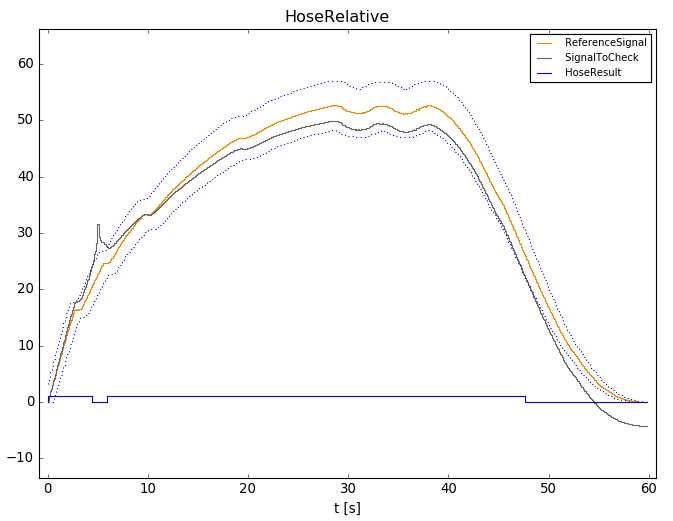
The result of the HoseRelative() function is a so-called structured signal. In addition to the binary result signal, the structural elements .lower and .upper, which store the lower and upper boundary respectively, are available and can be used in expressions. If the result of the function is saved (option Save in of calculation steps) in a signal named HoseResult, for instance, the lower boundary curve can be accessed via
HoseResult.lowerFrom within array-based NumPy trace step templates access to structured signals works analogously:
signals['HoseResult'].GetValues().lowerPlotting HoseResult will display the boundary curves in addition to the binary result:
- Integral(signal)
Returns the value of the definite integral between the first and the current timestamp of the given signal.
For the first sample, the calculated integral is 0. For all following samples it is calculated as:

Example
Integral(Sig0) # Integral of signal Sig0 up to the current timestamp
- Monotony(signal, type)
Returns True if the given signal is monotonically increasing or decreasing over the considered interval, which is the domain of definition of the signal signal (restricted to the trigger range if applicable).
In general, the last sample and the current sample are compared. In special cases where only one sample can be used for evaluation (e.g. begin of a trace) there will be a lookahead for the next valid sample.
The argument type specifies what kind of monotonicity should be checked for:
‘inc’ to check for increasing monotonicity
‘dec’ to check for decreasing monotonicity
‘inc_strict’ to check for strictly increasing monotonicity
‘dec_strict’ to check for strictly decreasing monotonicity
Example
# Check whether Sig1 is monotonically increasing
Monotony(Sig1, 'inc')
# Check whether Sig1 is strictly decreasing
Monotony(Sig1, 'dec_strict')
-
MovingAverage(signal, duration, durationKind=
'sample')¶ Returns the moving average of the signal signal using the given time interval.
- duration:
Has to be either a positive numeric value or a tuple of two positive numeric values and specifies the size of the interval. A single value specifies an interval that reaches into the past only. A tuple specifies how far the interval reaches into the past and into the future, respectively.
- durationKind:
Specifies how duration has to be interpreted:
Setting durationKind to ‘sample’ causes duration to be interpreted as sample count. duration must contain only integer values in this case.
Setting durationKind to ‘time’ causes duration to be interpreted as a time span. The time range is a closed interval [t - duration, t] if duration is a numerical value or a closed interval [t - duration[0], t + duration[1]] if duration is a tuple.
Info
If duration is specified as a single value and durationKind is set to ‘sample’, duration includes the current sample of the signal, i.e. a duration of 3 causes the the moving interval to include the current sample and 2 past samples. If duration is specified as a tuple and durationKind is set to ‘sample’, the tuple specifies how many samples from the past and the future are to be taken into account in addition to the current sample.
Example
# Moving average of the last 5 seconds
MovingAverage(Sig0, 5.0, 'time')

# Moving average of the last 3 and the next 2 seconds
MovingAverage(Sig1, (3.0, 2.0), 'time')

# Moving average of the last 10 samples (the current sample and 9 past samples)
MovingAverage(Sig1, 10, durationKind='sample')

# Moving average of 5 samples (2 past samples, the current sample and 2 future samples)
MovingAverage(Sig2, (2, 2))
-
MovingMax(signal, duration, durationKind=
'time')¶ Returns the moving maximum of the signal signal using the given time interval.
- duration:
Has to be either a positive numeric value or a tuple of two positive numeric values and specifies the size of the interval. A single value specifies an interval that reaches into the past only. A tuple specifies how far the interval reaches into the past and into the future, respectively.
- durationKind:
Specifies how duration is to be interpreted:
Setting durationKind to ‘sample’ causes duration to be interpreted as sample count. duration must contain only integer values in this case.
Setting durationKind to ‘time’ causes duration to be interpreted as a time span. The time range is a closed interval [t - duration, t] if duration is a numerical value or a closed interval [t - duration[0], t + duration[1]] if duration is a tuple. If there is no sample at t - duration, the hold value is taken into account.
Info
If duration is specified as a single value and durationKind is set to ‘sample’, duration includes the current sample of the signal, i.e. a duration of 3 causes the the moving interval to include the current sample and 2 past samples. If duration is specified as a tuple and durationKind is set to ‘sample’, the tuple specifies how many samples from the past and the future are to be taken into account in addition to the current sample.
Example
# Moving maximum of the last 5 seconds
MovingMax(Sig0, 5.0, 'time')

# Moving maximum of the last 3 and the next 2 seconds
MovingMax(Sig1, (3.0, 2.0), 'time')

# Moving maximum of the last 10 samples (the current sample and 9 past samples)
MovingMax(Sig1, 10, durationKind='sample')

# Moving maximum of 5 samples (2 past samples, the current sample and 2 future samples)
MovingMax(Sig2, (2, 2))
-
MovingMin(signal, duration, durationKind=
'time')¶ Returns the moving minimum of the signal signal using the given time interval.
- duration:
Has to be either a positive numeric value or a tuple of two positive numeric values and specifies the size of the interval. A single value specifies an interval that reaches into the past only. A tuple specifies how far the interval reaches into the past and into the future, respectively.
- durationKind:
Specifies, how duration is to be interpreted:
Setting durationKind to ‘sample’ causes duration to be interpreted as sample count. duration must contain only integer values in this case.
Setting durationKind to ‘time’ causes duration to be interpreted as a time span. The time range is a closed interval [t - duration, t] if duration is a numerical value or a closed interval [t - duration[0], t + duration[1]] if duration is a tuple. If there is no sample at t - duration, the hold value is taken into account.
Info
If duration is specified as a single value and durationKind is set to ‘sample’, duration includes the current sample of the signal, i.e. a duration of 3 causes the the moving interval to include the current sample and 2 past samples. If duration is specified as a tuple and durationKind is set to ‘sample’, the tuple specifies how many samples from the past and the future are to be taken into account in addition to the current sample.
Example
# Moving minimum of the last 5 seconds
MovingMin(Sig0, 5.0, 'time')

# Moving minimum of the last 3 and the next 2 seconds
MovingMin(Sig1, (3.0, 2.0), 'time')

# Moving minimum of the last 10 samples (the current sample and 9 past samples)
MovingMin(Sig1, 10, durationKind='sample')

# Moving minimum of 5 samples (2 past samples, the current sample and 2 future samples)
MovingMin(Sig2, (2, 2))
-
RisingEdge(signal, threshold=
'*')¶ Checks whether the value of the given signal changes from a value less equal threshold to a value greater than threshold.
Example
RisingEdge(Sig0)      # True if Sig0(n-1) < Sig0(n)
RisingEdge(Sig0, 0.5) # True if Sig0(n-1) <= 0.5 and Sig0(n) > 0.5
- StartTriggerTime()
Returns the timestamp of the start trigger.
If this function is used outside a trigger block, the first timestamp of any sample of the current episode defines the start trigger time.
If this function is used in the expression for Stop trigger, it refers to the trigger block itself (and not to the parent trigger block).
Info
This function cannot be used in the expression for Start trigger.
Example
# True, if - at the current timestamp of Sig0 - at least one second has passed since the start trigger
Time(Sig0) - StartTriggerTime() >= 1
-
StartTriggerValue(signal, deltaT=
0.0)¶ Returns the value of the given signal at the timestamp of the start trigger plus deltaT.
If this function is used outside a trigger block, the first timestamp of the given signal (not the first timestamp of any sample of the current episode!) defines the reference timestamp (deltaT=0.0).
If this function is used in the expression for Stop trigger, it refers to the trigger block itself (and not to the parent trigger block).
Info
This function cannot be used in the expression for Start trigger.
Example
# Returns the signal value of Sig0 at the start trigger
StartTriggerValue(Sig0)
-
Static(signal, duration, restricted=
True, constValue=True)¶ Returns whether the values of the given signal remained (duration < 0) or will remain (duration > 0) constant and equal to constValue for a given time duration.
To determine the output of the function at a given time t, the following signal values are considered:
If duration is positive, the signal values in the right-open time range [t, t + duration). If no signal value is available at or after the right boundary of the interval - for example, at the end of signal - the held signal value is not used. Instead, the function returns False for that time t, since the constancy of the signal over the entire interval cannot be verified.
If duration is negative, the signal values in the closed time range [t + duration, t]. If there is no sample at the left interval boundary t + duration, the held signal value is used. If no value is available, the function returns False for that time t.
If the Static function is evaluated with restricted set to True (the default) in calculation steps within a trigger block, the function has access only to the signal values of signal within the non-ignored portion of the trigger block. Consequently, the function never returns True throughout the entire trigger range when restricted is set to True.
The parameter constValue is optional and its default value is True. Thus, it can intuitively be used with logical expressions. For instance, one can write Static(engineSpeed == 1000, 1) instead of Static(engineSpeed, 1, constValue=1000). If the parameter constValue is set to None, the current signal value is used for comparison.
Example
Static(Sig0, 2)                   # True if Sig0 == True for the next 2 seconds
Static(Sig1, -0.5, True, 0)       # True if Sig1 == 0 for the last 0.5 seconds
Static(Sig1, -0.5, constValue=0)  # Equivalent to the previous example
Static(Sig1 == 0, -0.5)           # Equivalent to the previous example
Static(Sig2, 1, True, None)       # True if Sig2 is constant for the next second
Static(Sig3 > 1000, 1)            # True if Sig3 > 1000 for the next second
Info
If you want to check whether signal remains constant within a trigger range of variable duration, the following expressions are more appropriate:
signal == StartTriggerValue(signal)
Derivative(signal) == 0
- StopTriggerTime()
Returns the timestamp of the stop trigger. Trigger ranges are open-ended intervals; that is, the returned timestamp is not included in the trigger range.
If this function is used outside a trigger block, the last timestamp of any sample of the current episode defines the stop trigger time.
Info
This function cannot be used in the expressions for Start trigger and Stop trigger.
Example
# True if at the currently processed timestamp of Sig0, the stop trigger occurs after more than one second.
StopTriggerTime() - Time(Sig0) > 1
-
StopTriggerValue(signal, deltaT=
0.0)¶ Returns the value of the given signal at the timestamp of the stop trigger plus deltaT. Trigger ranges are open-ended intervals; that is, the stop trigger time itself, and thus the value for deltaT=0.0, is not included in the trigger range.
If this function is used outside a trigger block, the last timestamp of any sample within the current episode defines the reference timestamp (deltaT=0.0).
Info
This function cannot be used in the expressions for Start trigger and Stop trigger.
Example
# Returns the signal value of Sig0 at the stop trigger
StopTriggerValue(Sig0)
-
Time(refSignal=
None)¶ Returns the current timestamp.
A signal refSignal can be passed that will be used as timestamp source if no other signals are available in the expression.
Example
Time(Sig0)           # Obtain the current timestamp of Sig0
Time(Sig0) + Sig0    # Add the current timestamp and the value of Sig0
Time() + Sig0        # Equivalent to Time(Sig0) + Sig0

Time(Sig0) + Sig1    # Note: This expression is evaluated everytime Sig0 or Sig1 have a sample.
                     # The call Time(Sig0) always returns the current timestamp even
                     # if Sig0 has no sample. The hold value of Sig1 is used if Sig1 has
                     # no sample at a timestamp.

Time(Sig0) - StartTriggerTime() >= 1  # True, if at the current timestamp of Sig0 at least one
                                      # second has passed since the start trigger occurred.
- TriggerRangeStartTime()
Returns the timestamp of the start of the trigger range. This function takes into account the Start offset specified in the trigger mode ‘with time offset if start trigger is fulfilled’, which can cause the start time of the trigger range to differ from the start trigger time (StartTriggerTime()).
If this function is used outside a trigger block, the first timestamp of any sample of the current episode defines the start of the trigger range.
If this function is used in the expression for Stop trigger, it refers to the trigger block itself (and not to the parent trigger block).
Info
This function cannot be used in the expression for Start trigger.
Example
# True, if - at the current timestamp of Sig0 - at least one second has passed since the start of the trigger range
Time(Sig0) - TriggerRangeStartTime() >= 1
-
TriggerRangeStartValue(signal, deltaT=
0.0)¶ Returns the value of the given signal at the timestamp of the start of the trigger range plus deltaT. This function takes into account the Start offset specified in the trigger mode ‘with time offset if start trigger is fulfilled’, which can cause the start time of the trigger range to differ from the start trigger time (StartTriggerTime()).
If this function is used outside a trigger block, the first timestamp of the given signal (not the first timestamp of any sample of the current episode!) defines the reference timestamp (deltaT=0.0).
If this function is used in the expression for Stop trigger, it refers to the trigger block itself (and not to the parent trigger block).
Info
This function cannot be used in the expression for Start trigger.
Example
# Returns the first signal value of Sig0 in the trigger range
TriggerRangeStartValue(Sig0)
- TriggerRangeStopTime()
Returns the timestamp of the end of the trigger range. This function takes into account the Stop offset specified in the trigger mode ‘with time offset if start trigger is fulfilled’, which can cause the end time of the trigger range to differ from the end time of the trigger (StopTriggerTime()).
If this function is used outside a trigger block, the last timestamp of any sample of the current episode defines the end of the trigger range.
Info
This function cannot be used in the expressions for Start trigger and Stop trigger.
Example
# True if at the currently processed timestamp of Sig0, the trigger range continues for more than one second.
TriggerRangeStopTime() - Time(Sig0) > 1
-
TriggerRangeStopValue(signal, deltaT=
0.0)¶ Returns the value of the given signal at the timestamp of the end of the trigger range plus deltaT. This function takes into account the Stop offset specified in the trigger mode ‘with time offset if start trigger is fulfilled’, which can cause the end time of the trigger range to differ from the end time of the trigger (StopTriggerTime()).
If this function is used outside a trigger block, the last timestamp of any sample within the current episode defines the reference timestamp (deltaT=0.0).
Info
This function cannot be used in the expressions for Start trigger and Stop trigger.
Example
# Returns the last signal value of Sig0 in the trigger range
TriggerRangeStopValue(Sig0)