Embedding analyses from other packages - the referenced trace analysis
A trace analysis may be reused in several packages. For that purpose it must be saved in an own package or analysis package. After that the trace analysis can be referred to by a corresponding reference.
Trace analyses saved in a package can be integrated into other trace analyses by moving that package by drag-and-drop into the embedding trace analysis, as can be seen in the following figure:
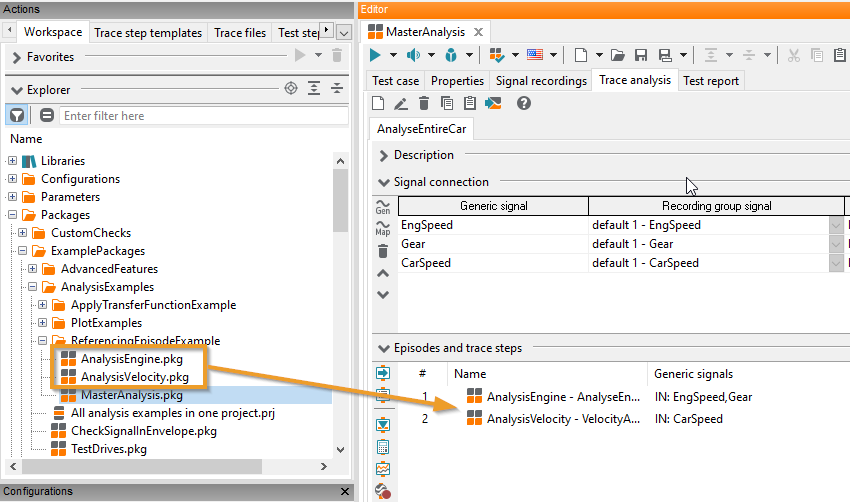
Embedding a trace analysis by means of drag-and-drop
The following dialog Parameterization of the trace analysis appears:

Parameterization of a referenced trace analysis
If the inserted package (1) contains several trace analyses, one can first decide which one should be used (2). By default, the first trace analysis is already selected when the dialog opens.
The referenced package is tied to the trace step via a package mapping (see Package references). Such a mapping is created automatically, when the trace step itself is created. It uses the package name as mapping name, unless there is already a mapping with fitting name and target, which will be used instead in this case.
In the lower half of the dialog (3) the signal association of the referenced trace analysis and the parameters passed to it can be configured.
Signals
Incoming and outgoing signals are parametrized similar to the signal association of template based trace steps, see Usage of trace step templates. The first column of the signal association table lists the used generic signals of the referenced trace analysis. The second column shows whether these signals are incoming or return values of the referenced trace analysis. Only such signals are shown as “OUT” which were saved in the referenced trace analysis by means of a signal recording. By clicking the corresponding cell of the third column one can assign a generic signal of the calling trace analysis.
Info
It is mandatory to bind generic signals written in bold face. On the other hand signals that are not written in bold face, don’t need to be assigned to a generic signal.
The last two columns of the signal association are read-only. They show, whether the generic signal of the referenced trace analysis is optional or what default unit has been specified there. Further information concerning these topics can be found in the sections Optional signals or Generic signals, respectively.
Info
If the generic signals that shall be assigned to each other share the same name in referenced analysis and calling analysis (like in the figure), one can achieve the signal binding by clicking the button
 . Hereby existing signal bindings will not be altered.
Parameter
Clicking on the tab Parameter opens the parameter management.
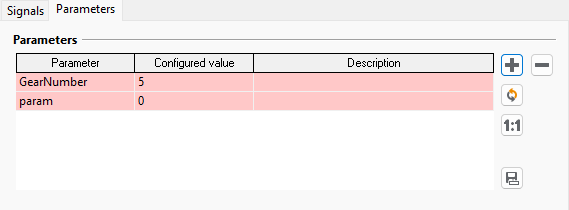
In the example illustrated by the above figure the parameter GearNumber is initialized with the value 5 in the referenced package. One can see this in the figure since the Value is gray and in brackets. By clicking on this cell one can enter a new value and overwrite the initial value. Parameters that are not overwritten here will be assigned their default value.
Manually overwritten parameters have to exist in the package or execution will lead to an ERROR. Also these errors are indicated in the parameter table by setting the background color of the corresponding rows to red. In the figure the parameter param is missing in the referenced package. By pressing the button
 the displayed parameters and those of the referenced
package are synchronized. Note that besides loading additional parameters (defined in the package)
also redundant parameters are being deleted by this command.
the displayed parameters and those of the referenced
package are synchronized. Note that besides loading additional parameters (defined in the package)
also redundant parameters are being deleted by this command.Info
Similar to the signal association, equally named parameters can be passed on to the referenced package by pressing the button
. By doing so, existing parameter assignments will not be
overwritten.
When the dialog is confirmed by OK, a newly created trace step is shown that references the embedded trace analysis. Such a step is executed like an episode. Note that all episodes and referenced trace analyses are executed consecutively - each time causing another run through the trace.
Info
Configured synchronizations in a referenced trace analysis, if any, will be ignored when the referenced trace analysis is executed.
The referenced package can be reached via Shift-doubleclick or the context menu.
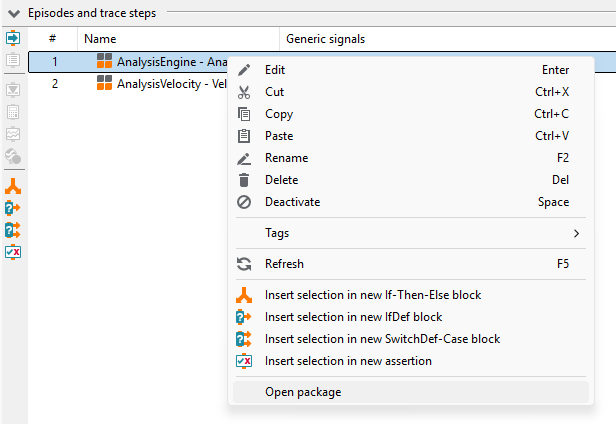
Fast navigation to a referenced package