Signals
Generic signals
Trace analyses in ecu.test use as signals throughout so-called “generic signals”. They offer the possibility of configuring trace analyses consisting of episodes, trace steps and signal recordings, and defining only in the last step which concrete signals from which sources should in fact be analyzed.
The advantages of generic signals at a glance:
generic creation of trace analyses,
central location showing the assignment of concrete signals at a glance,
possibility of quick change between test data with different signal identifiers,
structuring possibility by means of referenced trace analyses.
The management of generic signals in ecu.test is performed via the sector Signal connection in the tab Trace analysis.
Here, generic signals can be managed by generating new ones and renaming or deleting existing ones. Moreover, this sector also serves to assign concrete signals to generic ones. During signal assignment it can also be defined in what form a concrete signal should be used. The signal types to choose from are “Raw value”, “Interpreted (number)” and “Interpreted (string)”.
It is not required that a concrete signal should be assigned to generic signals. They can also be calculated by trace steps in the course of a trace analysis. For details see Signal processing with trace steps. Furthermore, it is possible to label a signal with an optional flag if it is not mandatorily required by any template-based trace step or a referenced trace analysis (see also section Optional signals).
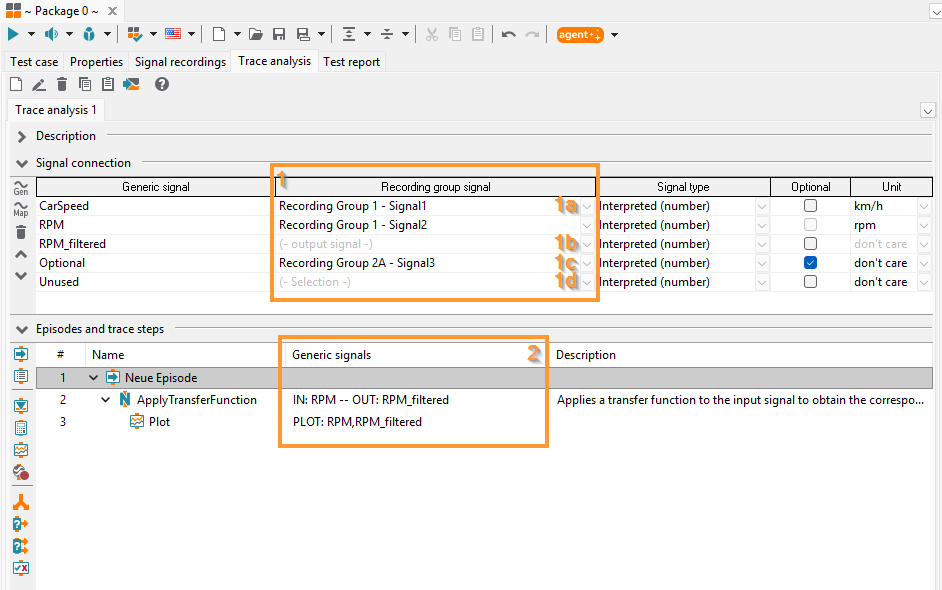
Managing generic signals
Signal connection
Signal connection in a trace analysis becomes visible in the sector signal connection where column signal (1) indicates if a generic signal has already been assigned a concrete one (1a), if it is being calculated by a trace step (1b) or is still unconnected (1d). On the other hand, the input and output signals of all trace steps and signal records are represented in a one column in the sector Episodes and trace analysis steps (2). Optional signals (1c) may be used in the trace analysis regardless of their presence or binding, see section Optional signals.
Info
Integration in ecu.test mapping concept
With its mapping concept and the possibility of arranging signals in signal groups for recording, ecu.test provides ample possibilities for generic test case creation that also serve to prepare trace analyses.
The essential factor for a trace analysis is the signals assembled in groups. The grouping is not arbitrary or subject to free choice by the user but serves to organize, in each particular case, signals from one source.
Thus, if in a trace analysis a signal A (e.g. an engine speed signal) is to be first read from a signal source (e.g. a CAN bus record) and later, instead of it, another signal B (e.g. an engine speed signal from an application tool), that requires not only a change of signals but also signal groups. This is where generic signals come in. In the cited example a generic engine speed signal can be used throughout the entire trace analysis, and in the end either signal A from one signal group or signal B from the other signal group can be assigned to it.
Optional signals
Optional signals are concepts that can boost the reusability of trace analyses and trace step templates even further. By using optional signals certain errors regarding the signal association no longer cause ecu.test to abort execution with an ERROR message for the trace analysis. Instead, the analysis may react to such events in an individual and more flexible manner.
Depending on the type of the trace step under consideration, there are several concepts that can meet such requirements and complement one another. The following table gives an overview:
Signal processing trace step |
Supported signal concepts |
Remarks |
|---|---|---|
Timing diagram |
not supported |
|
Python (event or stream based) |
optional/optionally present |
|
Trigger block |
optional (generic signal) |
|
Calculation |
optional (generic signal) |
|
Plot |
optionally present |
All connected signals are always optionally present |
Recording Step |
optionally present |
All connected signals are always optionally present |
Reference to a trace analysis |
optional (generic signal) |
Within the referenced trace analysis the other concepts may be used |
optional: An (internal) signal of a supporting template-based trace step is optional, if it is marked as such in the corresponding template. For this purpose the checkbox in the column Optional of the template’s signal association must be checked, see General approach. If a trace step based on this template is used in a trace analysis one can distinguish optional signals from non optional ones by the font style of the signal name: The names of non optional signals are written in bold face. It is not necessary to assign a generic signal to optional (internal) signals of a supporting template-based trace step. However, errors caused by the signal’s association to a generic signal still result in an abort of the trace analysis (i.e. same behavior compared with non optional signals).
optionally present: Further settings exist to provide a continuation of the trace analysis if desired. A python-based trace step can be configured in such a way, that certain errors in connection with the binding to a generic signal do no longer force the analysis to abort. More precisely, in the configuration dialog of the trace step the checkbox in the column Optional must be checked. Hereby ecu.test treats the bound signal as optionally present. The aforementioned checkbox is only shown if the corresponding internal signal is optional, see Usage of trace step templates. If the option is set, the trace analysis will start although there is a problem with the signal. It will handle the signal like it has no samples.
optional (generic signal): Trigger blocks and calculations are being configured more comfortable than a template-based trace step. In particular, no explicit signal binding is necessary. Thus, for these elements the choice optionally present is made on the level of the generic signals. This setting remains valid for all trigger blocks and calculations in the considered trace analysis. The option is set by checking the checkbox in the column Optional of the signal association table of the trace analysis, see also Generic signals. This is only possible if all template-based trace steps of this trace analysis consider this signal as optionally present and if referenced trace analyses bind this generic signal to another optional generic signal. An optional generic signal that is bound to a not existing recording signal does not generate any signal events. Its value in expressions with other signals is always “None”.
If in the parametrization dialog of referenced trace analyses the signal name of a generic signal is written in bold face, then binding this signal is mandatory. On the other hand signals that are not written in bold face, don’t need to be assigned to a generic signal. Note that a bold face generic signal may be used optionally present in any trace step (or even all trace steps) of the referenced trace analysis. The checkbox in the column Optional shows whether the assigned generic signal of the referenced trace analysis is optional.
The following table lists the results of an analysis execution affected by different events in connection with the signal association:
Event |
Mandatory signal (standard) |
Optional signal |
Optionally present signal |
Optional generic signal |
|---|---|---|---|---|
Signal without samples in trace |
Analysis execution |
Analysis execution |
Analysis execution |
Analysis execution |
Unbound internal signal of a trace step |
ERROR |
Analysis execution |
Analysis execution |
Analysis execution |
Missing signal in a recording or problems resolving the mapping or unbound incoming generic signal …used in a template-based trace step |
ERROR |
ERROR |
Analysis execution |
Analysis execution |
…used in a calculation or a trigger block |
ERROR |
ERROR |
ERROR |
Analysis execution |
Signal refers to a mapping from the “Assign automatically” signal group that could not be assigned …and the mapping is a generic mapping |
ERROR |
ERROR |
Analysis execution / ERROR |
Analysis execution |
…and the mapping references to a concrete target |
ERROR |
ERROR |
ERROR |
ERROR |
Info
If a concrete signal is required as optional and mandatory by different trace steps within the same trace analysis, one can bind this signal to two generic signals and declare one of them as optional.
Example
A generic analysis shall cover multiple test benches. A certain signal is not being recorded on a certain test bench. If some check on the corresponding generic signal is performed using a calculation trace step, then this generic signal must be marked as optional. If on the other hand the signal is being analyzed in a python-based trace step, it suffices to declare this signal optionally present.
Units of signals
In the last column of the signal connection table a standard unit for generic signals can be specified. If the default entry don’t care is chosen, the source unit will be adopted from the unit given by the recording file. If no unit is specified for the corresponding signal in the recording file, the unit given by the database (model description file, bus database, …) will be used as source unit.
Signal values are automatically converted from the source unit to the standard unit specified in the signal connection and can then be used in calculation steps and trigger blocks, for example. If no unit is given neither in the recording file nor in the data base, the unit declared in the signal connection will be used as both source and standard unit without conversion. In case the source unit cannot be converted to the standard unit, e.g. trying to convert from kilometers to Kelvin, an error will be raised and a corresponding message can be found in the report.
Moreover, the standard unit is also used for template based trace steps if the signal’s unit in the trace step configuration dialog is set to don’t care. Otherwise the standard unit is neglected and the trace step’s setting for the unit of the signal is adopted.
For instance the standard unit of the generic signal RPM in the above figure is set to rpm. If this signal is bound to a trace step without specifying a unit for it (don’t care) then it will be processed in rpm. If on the other hand the trace step configures the signal’s unit to rps then this will be the signal’s unit.