Access to signal values
How values are accessed via ecu.test can be configured in the “Read Configuration” or “Write Configuration” of each widget. Available access types depend on the widget type.
Global mapping
ecu.test lab enables access to variables of a tool via the global mapping that is active in ecu.test.
Once a variable is available as a global mapping, it can then be configured in the widget as a Read or Write Configuration of type Global mapping.

If the Read Configuration of a widget is set to a global mapping, it is updated in live mode.
If the Write Configuration of a widget is set to a global mapping, the value set by the user will be written to that mapping.
Info
As of now, only scalar values, images and jobs are supported for global mapping access.
Signal / Parameter
This option allows direct access to model, ecu or bus signals within the currently active configuration. The feature is called Signal access. It has to be explicitly enabled in the settings for ecu.test lab.
After selcting a System you can browse all its signals (model variables, measurement quantities, calibration parameters or bus signals) and select one of them.
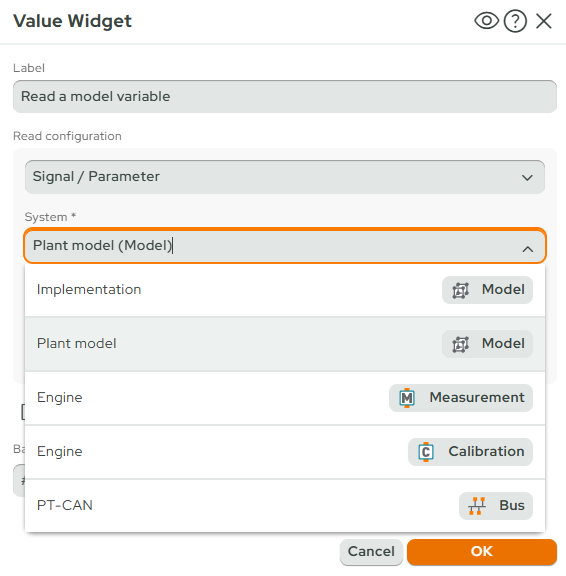
If the Read Configuration of a widget is set to a signal it is updated in live mode.
If the Write Configuration of a widget is set to a signal the value set by the user will be written to that signal.
Package
If the type Package is set in the “Read Configuration” or “Write Configuration”, a package for test case execution can be selected in the widget configuration - along with its parameter configuration. It will be executed when the execution button of the widget is clicked.
For write access, depending on the widget type, one package parameter can be marked “dynamic”, e.g. for the number widget. This parameter will be filled with the given value of the widget when the package is executed.
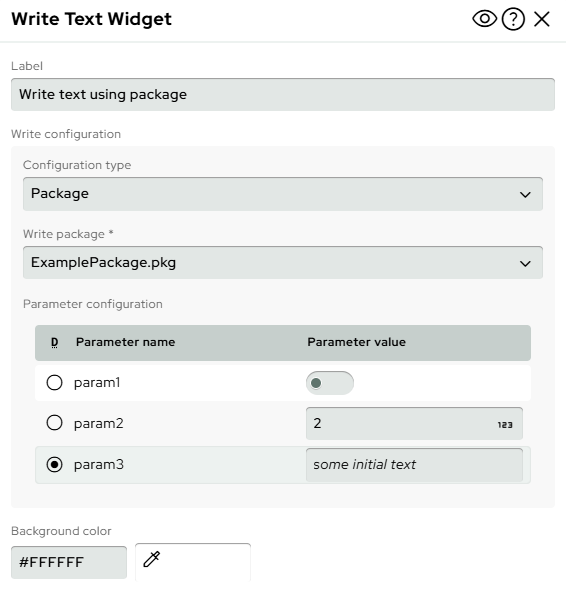
For read access, the name of a test case variable of type “return value” can be configured in the “Return” setting. After package execution, this value will be shown in the widget. When the live mode is active, the configured package will be executed periodically to update the widget - according to the acquisition rate.

The package execution in ecu.test lab uses a minimalistic, but faster execution engine. This makes it possible to include packages in the live mode. This also means that not all test steps are supported. If a package contains an unsupported test step, a warning will be displayed in ecu.test lab.
Officially not supported in this release:
Trace analysis and connected test steps
Parameterized mapping in packages in a Package Call
Parallel package references
- Temporal behaviour
Wait test steps in packages that are executed from ecu.test lab do not cause simulation time to proceed when stepwise execution in simulation time is active.
Expression
ecu.test lab can evaluate expressions. These are similar to the expressions that can be used in ecu.test calculation test steps, with the limitation that only the Internal API (api.) and UserPyModules (user.) can be accessed.
When Expression is selected in the “Read Configuration” or “Write Configuration”, the expression can be entered in the text field below. For the Write Configuration, the name of the parameter of the function can be specified. The value of the widget is then passed as a keyword argument to the function.
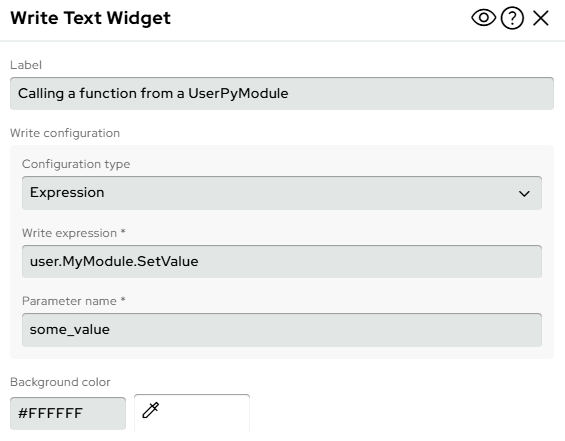
The above example with “test” as input for the widget would result in the following calls:
user.MyModule.SetValue(some_value="test")