Structuring
This chapter summarizes the test step templates that help to structure test cases, e.g. by grouping test steps or commentation.
Block
This test step template is used to group connected test steps. With this, long sequences can be designed more clearly. In the test case editor the steps that are contained in a block can be faded in by clicking on the “+” sign next to the block or blinded out by means of “-”. In the test report all test steps within a block are displayed indented. The evaluation results from the accumulation of the individual evaluations of the contained test steps.
The block test step offers the opportunity to terminate or abort the test case when the execution of any test step inside the block fails. In order to define the behavior of a block, expand the Conditional test abort section in the dialog. Specify the set of verdicts that should be interpreted as a failure, and should terminate or abort the test case. The test steps inside the block are executed and evaluated separately. If the evaluation of any test step meets the break condition, the execution of the test case (main package) will be terminated or aborted inside the block. The termination behavior is the same as for the Exit test step. When aborting, the block itself - and consequently the test case - will be evaluated as ERROR. But when terminating, the verdict of the block and the test case won’t be changed.
The cause or a qualification of a termination (e.g. in the form of an evaluation to be assessed by the test management) can be deposited as abort code. The abort code is imported to the column “value” in the test report. Predefined abort codes can be stored in the workspace file verdictmappings.xml and are then available in the drop down list. If a test management system is configured, the abort codes list can also be defined at test management settings. Additionally it is possible to define an abort comment giving more precisely information about the abort.
If existent, abort code and abort comment will be visible in the test report’s package summary. For each package there can only be one abort code and one abort comment. So if there are several nested blocks in the package, the option “Override abort information of underlying test steps” determines, which abort information will be the one displayed in the report at last. Taken there is one nested block test step inside another and the inner one defines an abort code and an abort comment. This information will only appear in the report if the overlying block’s option “Override abort information of underlying test steps” was not checked. This behaviour is not effected by the “Abort test on”-option. So any abort information will be overridden by the overlying block, regardless of the later option.
The check mark for User instruction marks the block to be read during interactive execution. In the test case view such a block will be marked with a speaker. Further information can be found in chapter Interactive Testing.
The block test step offers the possibility to store the column contents in different languages (see also Check translation package). The currently used language can be selected in the workspace settings (see Test editor) and is indicated by the flag icon.
Furthermore it is possible to use the current values of variables in the texts of Action / Name,
Parameter, and Expectation / Value. To utilize this feature the variables have to be enclosed
by curly braces as for example in {variableName}. During execution those placeholders are
substitued by the current value of the variables and are shown in the execution dialog as well as
in the test report. In case this feature is used the original texts are reported in the report
details of the block. Exeuting the test interactively the substituted texts are read loudly, thus
parametrized instructions can be used, being for example dependend of the test case up to
this point.
If several consecutive test steps are marked when inserting a block they are moved automatically into the newly inserted block.

Pre- and Postcondition
Sometimes it is necessary to run several steps before and/or after the actual test. For example if the test accesses certain values of a model, the model should be in a specific state before running the test. After the test has run, the model should be transferred to the initial state respectively, in order that no side effects occur afterwards.
For that purpose, there are two special test steps: The Precondition and the Postcondition. These special block test steps are described in more detail in the following section.
Precondition
In the precondition, all steps necessary for the preparation of the test are executed. In terms of test case specification, the Precondition actually is no part of the test itself. It simply establishes the initial condition under which the test is allowed to run. If and only if the Precondition was executed successfully, the test is allowed to run as well. Depending on the option Abort test on the test will be immediately aborted if at least one of the Precondition’s steps has been evaluated to INCONCLUSIVE (optional), FAILED or ERROR.
Caution
The test case cannot be aborted by test steps that derive their result from a trace analysis, because the trace analysis is executed only after the end of the test case and consequently the result of the test step is not known until the remaining steps of the test case have been executed.
Depending on the option Override result, the precondition is rated with ERROR as soon as the result of the contained steps is INCONCLUSIVE (optional), FAILED or ERROR. If the result of all contained test steps is NONE or SUCCESS, the Precondition is evaluated to NONE.
Alternatively, the option Override result can be set to Do not override result. In this case, the Precondition (like a normal block test step) will be rated according to the result of its child test steps (so it can also become SUCCESS, for example).
Info
The option Override result affects the propagation of revaluation in the test report. If the option is activated (i.e. it is not Do not override result), the result of the precondition can still only be NONE or ERROR if a test step was re-evaluated within the precondition. This option is documented in the test report at the precondition so that the behavior can be traced.
In contrast to the general block test step the precondition will overwrite the abort code and abort comment by default. However, this behaviour can be changed via the setting Override abort information of underlying test steps. Every valid Python expression might be used as an abort code. In addition, a list of of predefined abort codes may be available when a connection to the test management service has been set up. Further information on this can be found in the chapter Configuration.
Postcondition
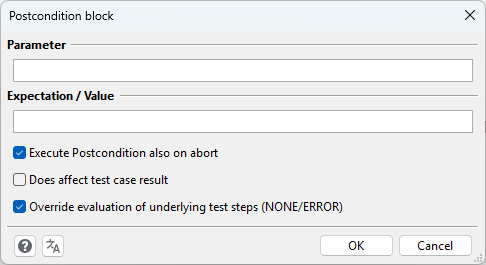
The Postcondition is a list of tasks to be executed after the test has run. If Execute Postcondition also on abort is ticked, this list will be executed even if the test was aborted explicitly either by the user or by a test step.
The evaluation of the Postcondition behaves similar to the Precondition. Depending on the option Override evaluation of underlying test steps (NONE/ERROR) the evaluation is determined regarding the contained test steps. If the option is set (default) the Postcondition will be evaluated to NONE if the result of the contained test steps is NONE or SUCCESS, else it will be evaluated to ERROR. If the option is not set, the Postcondition will be rated according to the result of its test steps. The option Affect global test result configures whether this result will influence the global test result or not. This option is activated by default, as shown in the screenshot below.
Info
The Postcondition itself can only be terminated prematurely by a manual user abort or a return test step. Exit test steps and aborts through nested block test steps will be ignored.
Restrictions
The Precondition has to be the first test step in the package. If this is not the case, the Precondition will be marked as incorrect in the test case editor. Executing such a package will result in an equivalent error message in the test report. Similar to this the Postcondition must always be the last test step in the package. Furthermore it is not allowed to reference packages containing a Precondition and/or a Postcondition.
Comment
When selecting the test step comment the dialog window comment opens.
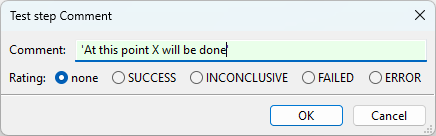
With this functioning the test sequence can be commented and divided. The comments are documented in the test report.
The entry can be made as string, via variables or by means of a combination of both. If for example
the variable “TextVar” conains the value "Hello" the expression TextVar + " World" results in
``"Hello World" in the test report.
Via the selection after evaluation you can specify if the test step comment, that usually does not have an evaluation, shall receive a (static) evaluation. This can be helpful in order to highlight the information in the test report for the user and to show him at once that this comment shall indicate an expected behaviour/a misbehaviour.
After confirming with OK the test step is imported into the test sequence.
Todo
This test step does not represent a test step in the proper sense. It shall rather be a reminder,
that something still has to be taken care of here. It therefore resembles a comment, only that it
is always evaluated with FAILED once executed, since test steps are missing at this point. A summary
of all ToDo steps of a package can be found in the Properties tab of an open package.