Measurement tab
The measurement tab serves to read out variables from different control units.
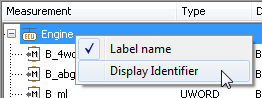
A right click on control devices opens a context menu which serves to set variable names. Variable
names can be long descriptions of variables or references across several layers. In order to display
them, in spite of that, in a short and expressive way so-called display identifiers are used. Variable
names are assigned to the display identifiers in the *.a2l file.
The context menu contains two options serving to switch between variable names and display identifiers. If a display is switched over a corresponding remark is made in the configuration, and at the next start that setting is reloaded.
A right click on a variable opens a context menu to start further actions:
- Read
If the option is chosen the input dialog is opened in which various settings can be carried out. Details can be looked up at Read / Write / Execute / Stimulus dialog.
The fields Name, Data type, Description and Conversion provide more detailed information about the variable to be read. Those data are stored in file
a2land may not be changed.The variable is inserted into the work window by means of the button OK.
- Create global mapping
Selecting this option in the context menu adds the variable path of the simulation model to the global mapping list. That can be done as well by “drag and drop” from the list of model variables. The meaning and use of mapping names is explained in the section Global mapping.
Info
Using the shortcut CTRL-F it is possible to search and show particular variables.
Supported Datatypes (Kinds)
The following Datatypes are supported by ecu.test:
MATRIX
VECTOR