Execution tab

The tab Execution allows influencing the behavior of ecu.test during execution.
Temporal behaviour
The section Temporal behaviour defines the source used to get time stamps for the test execution. Therefore it can be chosen between realtime and a port.
If a port is chosen, it is additionally possible to select whether the simulation should be stepped or if it should run continuously.
If stepped, the simulation only proceeds if the test case is waiting explicitly or a suitable test step is executed (Wait, time options or diagnostics test step). If this is not the case, the simulation is paused. This makes multiple accesses to values at exactly the same point in time possible.
In continuous mode, the simulation is always running. ecu.test receives time stamps from the simulating tool to synchronize the test case to them.
Info
If left on the default value, the configuration automatically detects a port capable of providing time stamps, and selects the preferred mode of this port. To find out about the preferred mode, take a look at the documentation of the port.
By means of Waiting time after every I/O test step it is possible to include artificial time delays in a test run.
Specifics of time modes
ecu.test supports different time modes for the test execution. The time mode specifies the time source that is used in the test case (e.g. by Wait test steps). This can be either the local system clock or the simulation time of a simulation tool. Furthermore, the time mode determines whether the simulation runs step by step, driven by the test execution or continuously and parallel to the test execution. The characteristics of the various time modes are explained below.
Real time
If a test case is executed in real time, ecu.test expects all other tools to also run under real time conditions. No synchronization of time stamps between ecu.test and the tools is executed. Wait test steps lead to an active delay of the configured duration in real time. This mode is best used in environments with real hardware which is also bound to real time.

In MiL and SiL environments it is hardly possible to achieve real time conditions. If ecu.test delayed in real time, this would result in heavily different durations in simulation time. How much faster time passes in the the running simulation compared to real time can be described with a speedup factor for a specified time range: duration in real time * speedup factor = duration in simulation time.
ecu.test offers means to execute the test case bound to simulation time instead of real time:
Stepwise execution in simulation time
This mode uses the simulation time as the time base of the test case. The simulation is constantly being paused and stepped, depending on the action in the test case. Explicit actions like Wait test steps and time option in read test steps lead to stepping of the simulation. Other actions like calculation test steps are executed while the simulation is paused.
Info
Some tools support the evaluation of “wait for condition” time options on the tool side, which results in a better performance.
I/O test steps are executed while the simulation is paused. To make sure that stimulations are effective or to achieve a system behaviour closer to real time, it might be beneficial to step the simulation after each read /write test step. This is possible using the option Waiting time after every I/O test step on the Execution tab of the test configuration.

Continuous execution in simulation time
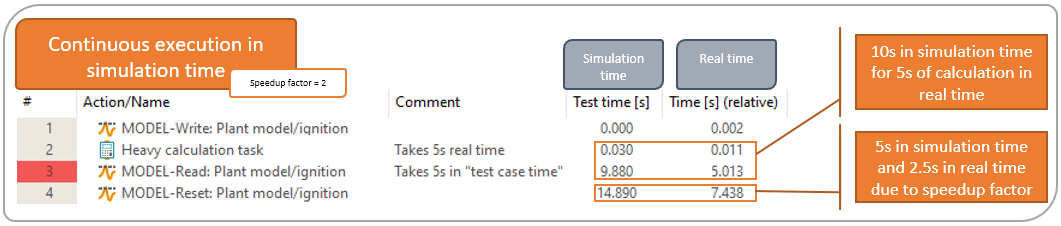
This mode uses the simulation time as the time base of the test case. ecu.test constantly reads time stamps from the configured port and uses them just like real time time stamps. In contrast to the stepwise execution, it never pauses the simulation. All actions in the test case are therefore executed while the simulation time proceeds. This can lead to very different durations of actions which are not part of the simulation, depending on the system power and load as well as the speedup factor of the simulation.
Info
It is not recommended to use the parallel package execution while using a simulation time mode.
Error handling
The section Error handling configures the behaviour in case of an error during execution. The topmost selection determines whether the test may continue after an ERROR rated test step, or whether the package execution gets aborted. If the package is being executed as part of a project, execution continues with the following project step.
Immediately below, a package can be specified for execution in case of an abort, or at the end of a faulty test case. After checking the option, a choice box allows selecting whether the package shall be executed only upon abort, also in case of ERROR, or even in case of FAILED. In the text entry below, you can type or paste the full path of the package file to be executed, or use the adjacent button to choose the package in the file system.
An abort (which leads to execution of the error recovery package, if configured) is defined as any abort of the test case execution, no matter if e.g. through the abovementioned option Abort test, by clicking the button Abort of the Execution dialog, by an abort test step, by a block with checked option Conditional test abort or through an API call.
For executing the error recovery package in case of ERROR or FAILED ratings, test step ratings changed into a better rating by means of an assertion test step are not taken into consideration.
We have a test case abort whenever the option Abort test was chosen among the radio buttons above, or the abort was carried out manually during the execution of a test case.
Automatic resetting of test quantities
In the section Automatic resetting of test quantities ecu.test can be configured to reset all written quantities to the original values, after every test carried out, possibly after confirmation only.
If the mode “Only reset test quantities from chosen ports” is used, the ports to be reset can be selected from a list. This list only contains ports that are referenced within the test configuration and which support the resetting of test quantities (Model-, Bus-, Environment-, and Application-ports).
Global pre- and postcondition
The section Global pre- and postcondition allows to deposit packages that are executed before (precondition) or after (postcondition) an executed package. The package path can be relative to the packages directory or absolute.
If there already exists a local pre- or postcondition, the global precondition will be inserted as first test step in the local precondition and the global postcondition will be inserted as the last test step in the local postcondition. Otherwise the global pre- and postcondition will be automatically added and marked like this in the report. The global pre- and postcondition will not be shown in the test case creation view. In the report they can be easily recognized by the line number PRE or POST and on the entry in the comment field.
Note: It is not possible to start recording in the global precondition and stop in a global postcondition.
Global retry settings
Using the setting in this section, it is possible to set global retry settings valid in all executed projects if those do not overwrite them locally.
Default recording configuration
Here, a package with a Default recording configuration can be specified.