Global constants tab

This tab serves to define constants with values that remain available throughout the entire test execution without changing their values.
In the upper part of the tab the global constants can be created directly.
A new constant can be added by means of the button  .
The usual conventions for Python identifiers apply (no special characters, no spaces).
.
The usual conventions for Python identifiers apply (no special characters, no spaces).
In packages, values can be accessed within expressions (e.g. comparison, calculation, evaluation, etc.) using api.GlobalConstants.Name.
Test configurations and test bench configurations can be parameterized with global constants. In particular, this allows individual fields to be populated via the REST API. To access a Global Constant in test configurations or test bench configurations, the expression ${Const.Name} can be used.
For details on using global constants in test bench configurations, see Referencing settings specified in the test configuration.
If an expression of the form ${Const.Name} cannot be resolved when starting the test configuration (e.g. constant not defined) this will result in an error message.
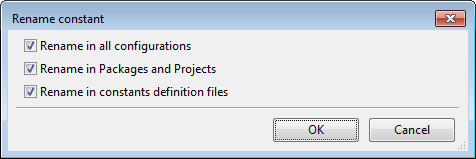
If global constants are re-named, it can be specified whether ecu.test should also re-name the constants in all packages, configurations or global constants definition files in the current workspace. For that purpose the corresponding change boxes in the changing dialog must be ticked.
Description texts may have multiple lines. A line break may be inserted with <Ctrl>-<Return> while editing the text.
The current global constants can be exported to a *.gcd file by clicking the button
 . This allows to reuse the defined constants in other test configurations or
project elements.
Editing of such constant definitions is possible in the
Constants definition editor.
. This allows to reuse the defined constants in other test configurations or
project elements.
Editing of such constant definitions is possible in the
Constants definition editor.
Constant definition files and scripts according to priority
This control allows to reference Constant Definitions Files.
By clicking the button  a file selection dialog opens and an existing
*.gcd file can be selected. By clicking  the selected file will be removed
from the list.
the selected file will be removed
from the list.
The order of the files in the list influences the evaluation priority of the constants. I.e., if the same constant is specified in two different files but with differing values, the final value will be the one from the file that is topmost.
To ensure that constant values are prioritized, the list is processed from bottom to top. It should therefore be noted that scripts can only access constants that have been defined in list entries below them.
Constants that are defined statically in the upper part of the window are represented by the entry <statically defined entries> and they are prioritized according to its position.
Another predefined entry <Constants defined via REST API> specifies the priority of constants that are set when starting the configurations via the REST API.
The priority of a selected file can be changed with the buttons  and
and  . The
shown file name is relative to the current workspace directory. Double-clicking a file name
opens the file in the Constants definition editor.
. The
shown file name is relative to the current workspace directory. Double-clicking a file name
opens the file in the Constants definition editor.
Constants generator scripts
Besides *.gcd files it is also possible to reference Python scripts, which allow to
dynamically initialize constants during configuration startup. These scripts must contain a method
named Init that receives a single parameter of type
GlobalConstantsDefinition.
The prioritization of the defined constants works similar to the prioritization when using *.gcd
files, based on the position of the file in the list.
Via the button  such a constants generator can be created from a template and saved to
disk:
such a constants generator can be created from a template and saved to
disk:
# -*- coding: utf-8 -*-

def Init(constants):
    '''
    This method can be used to dynamically create and evaluate global constants.
    By defining constants here, they are added to the configuration.

    It is also possible to throw an exception to abort the configuration start:
    raise AbortConfigError(u'Reason for the error')

    @param constants: Container for global constants
    @type constants: <GlobalConstantsDefinition> (see documentation of Object Api)
    '''
    # Example implementation
    constants.AppendConstant('ConstName', "'read from py-File'", 'Description for text value')
    constValue = constants.GetValue('AnImportantConstant')
    if constValue == 'None':
        raise AbortConfigError(u'AnImportantConstant is not set!')