Tab Environment
The tab Environment can be used to select and configure systems for environment simulation tools as well as environment communication systems.
Configuration of environment simulation access

The Environment simulation node allows to select and configure systems for evironment simulation tools.
After creating a new system with New, the online or offline access can be configured. A corresponding port is selected for online access, an offline file for offline access.
Online access
A port must be selected for online access. Available for selection are the names of the ENVSIM ports, created in the active test bench configuration.
Offline access
If the selected environment simulation software is configured for offline access, an
offline file must be specified. This file can be entered directly into the text field.
Instead of manual input, the file can be selected using a dialog that is displayed with the
following File select button ( ).
Offline files can be created by right-clicking in the Environment simulation tab.
).
Offline files can be created by right-clicking in the Environment simulation tab.
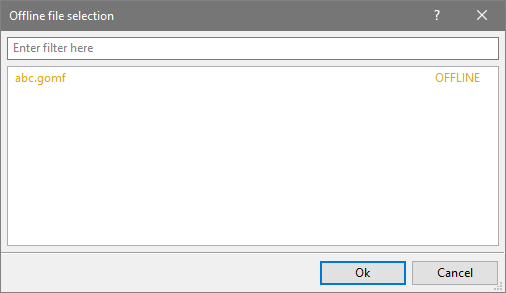
Dialog “Offline file selection”
Thid dialog shows possible files for selection. An input field allows to filter the selection list. The use of wildcards ‘?’ and “*” and the linking of filters with “and” and “or” is possible. In the selection list different colors are used for distinction:
Black entries represent files which only exist on the remote computer (on which the assigned software runs). At the start of the test environment the files are copied locally to the computer on which ecu.test was started.
Yellow entries represent files which are already present on the local computer, i.e. they have been copied already.
Info
To retrieve simulation files from the remote computer, the model path (path on remote computer) for the desired tool has to be set in the test bench configuration. If it is not set or no port has been selected only the yellow, locally available files are shown.
If a selected file is to be removed from the configuration, this can be done by deleting the entry
in the text field or by means of the delete button ( ).
).
Configuration of environment communication access
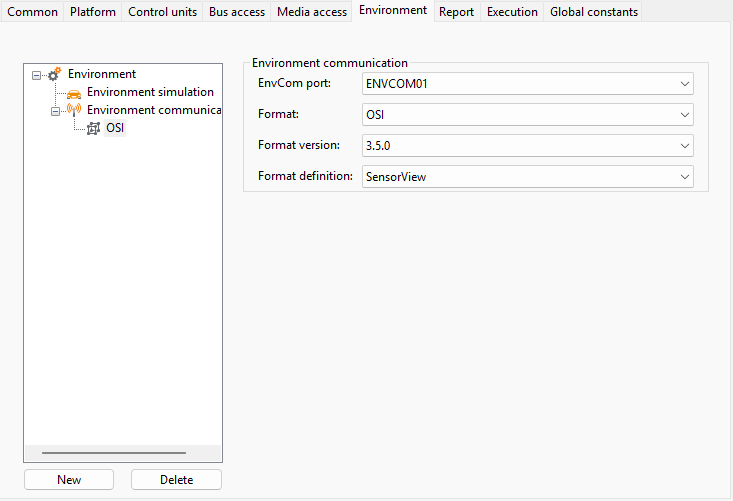
The Environment communication node allows the configuration of environment communication systems.
After creating a new system with New, a corresponding port can be selected as data source. Available for selection are the names of the ENVCOM ports, created in the active test bench configuration. ENVCOM ports can be created for the following tools:
Further configuration options allow specifying the format (e.g. OSI), format version and the specific format definition (e.g. GroundTruth for OSI) needed to extract the messages.