Package editor
Before it can be explained how to handle the test case editor it is necessary to distinguish between the terms test step and test case (package).
A test step is a simple operation in which mostly just one instruction is carried out. A test step can be, for example, reading or writing a value in an engine control device or carrying out calculations or comparisons. All test steps are described in chapter Action window.
A test case is a list of test steps. The steps of a test case are mostly connected among each other. Thus various data can be exchanged between test steps via variables. The test case itself is displayed and saved in a so-called package. That is the reason why the term package is always used in documentation and/or ecu.test itself.
Note: If rational numbers (fractional numbers, numbers with decimal places) are used, it must be ensured that a decimal point is used instead of a comma.
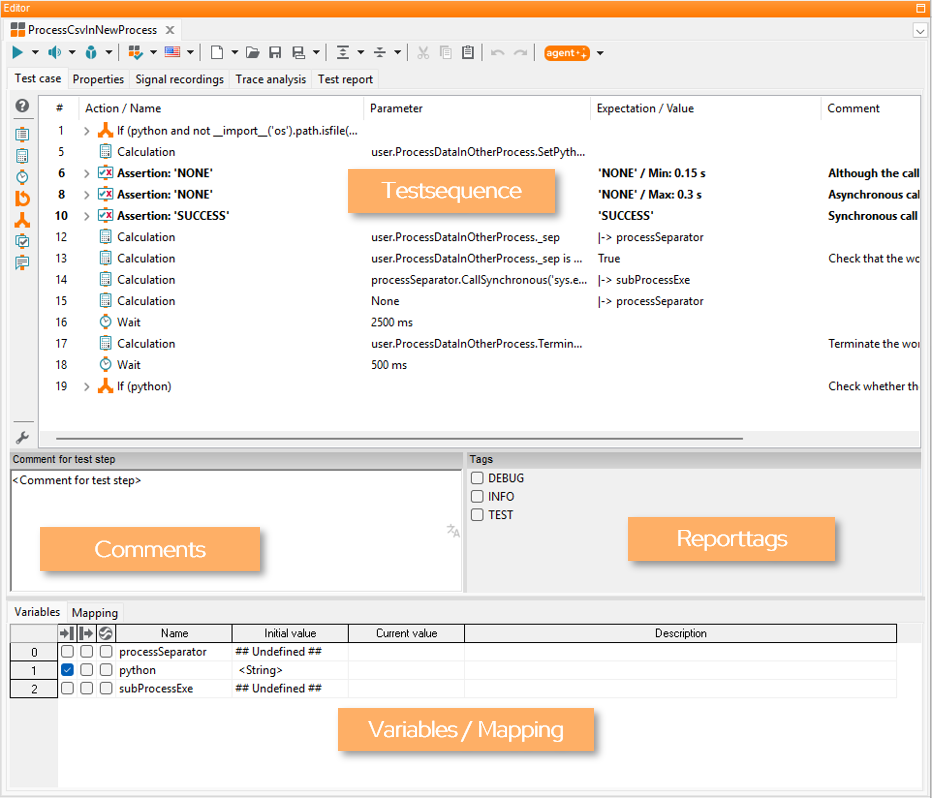
Below the package tab a menu bar and several package related tabs are shown. Among these tabs there is the work window of the currently opened package with test case, comments, tags, as well as the variables and data types and local mapping.
The work window also contains various tabs. Each tab shows the contents (e.g. the existing test steps, assigned signal records, and maybe the latest test report) of a package opened for editing.