Work window
The work window consists of the actual Package,its Properties, the Recording tabs, the Trace analysis and the last Test report.
Test case
The tab Test case shows the contents of the current package and available steps can be added, edited or moved.
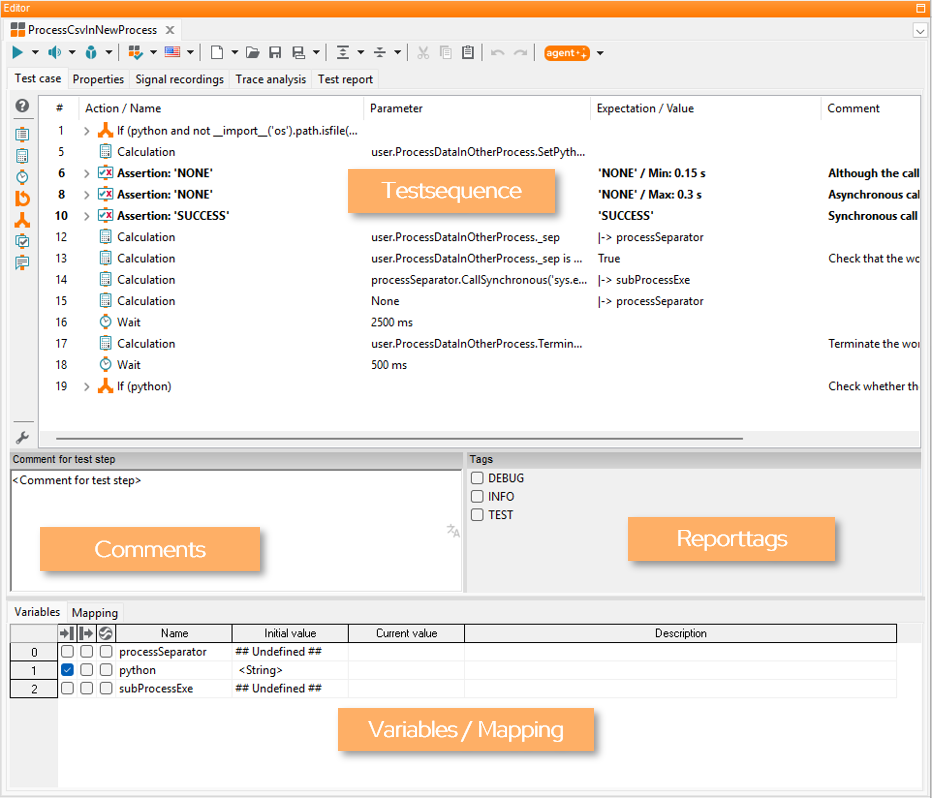
The window comprises two sectors. The upper one contains the test case, test step remarks in the column Comment as well as in the subwindow Comment for test step and the tags of a given test step. The lower one contains the variables and data types and the local mapping.
The currently used comment language can be selected in the workspace settings (see Test editor) and is indicated by the flag icon next to the comment text box.
Properties
The tab Properties shows all properties and attributes of an opened package. It is possible, for example, to insert here a description or version number.
Common
In this view the general properties of a package can be determined:
Test case: Allows to distinguish, in connection with a test management system or an evaluation tool, between “genuine” test cases and auxiliary/library packages.
Specification: Allows to mark packages as specification of a test case.
Stimulation package: Enables tagging of a package as stimulation package. If enabled, the package will be inserted as stimulation package by default when added to a test case.
Segmentation package: Means that the package itself has no pre-process or post-process, thus no access to tools is possible. In connection with INCA/CANape there is the advantage that all test values, for example, can be removed from the tool after every subpackage. This can be helpful if the available measuring acquisition rates are no longer adequate.
Note: Because of its properties a segmentation package CANNOT be referenced!
Alternate call representation: Allows to specify two alternate texts (action and expectation) that are shown in another package if this package is called. Package parameters can be referenced with curly braces. If e.g. var1=”on” is passed to this package, the text “switch {var1}” is rendered as “switch on”. The alternate call representation is also used upon export to test management (HP QualityCenter).
Warning
This functionality has been deprecated and will be removed in a future release. Alternatively, Alternative package representation can be used.
Version: Displays the version of the package. The value may be obtained from a connected test management system.
Test script Id: Shows the corresponding test management id of the package, if defined. This value should only be copied and not changed.
Activation condition: Allows to specify the activation conditions for the package. Can be used for example in generators to generate project content variant-dependent (see Object Api: IsActivationConditionFulfilled).
Attributes
Settings in this view allow the extension of a package by certain non-functional properties. When it is used for the first time, a list of some frequently used attributes is loaded. So you can store, for example:
expected time of execution
priority
development status
test level
designer
comments
version
By modifying the file pkgattr.spec, the number, kind and description of attributes can be matched with requirements in the utilization of ecu.test.
Attributes can be overwritten by parameter sets at the project level (see Parameter set).
References
This view provides an overview of:
- Links
All links to other packages that are saved in this package. This gives a good overview to which packages this package is related, for example because it is derived from another package or is the implementation of a specification package. For each link the version of the derived or implemented package is shown. If the version has since changed, it can be updated via the context menu.
- References to this package
All references within this workspace to this package are displayed here, e.g. if it is called from another package or if this package is used in a project.
- References in this package
Further references of this package, which are not links, are listed here, e.g. all packages called by this package.
Signal recordings
The tab Signal recordings serves to manage and configure recordings. During test execution, ecu.test configures the tool accordingly. The recordings so obtained can be automatically evaluated by means of the trace analysis. Examples include INCA, CANape, and ControlDesk.
For details concerning the configuration of signal recordings in ecu.test see section Signals and recordings in chapter Trace analysis.
Trace analysis
Trace analysis serves to evaluate and analyze recordings retroactively, or automatically after the end of a test – thus offline.
Detailed instructions are given in section Trace analysis.
Test report
This tab shows the test report from the newest execution of the respective package in an embedded Report viewer.