RA Consulting: DiagRA D
Legacy/internal identifier: DIAGRA
Vendor information
Vendor |
Web page |
Product name |
Version |
|---|---|---|---|
RA Consulting GmbH |
DiagRA D |
from 4.6.30.22 Beta 6849 |
|
RA Consulting GmbH |
Silver Scan-Tool |
Categories
MDL 🛈 |
APL 🛈 |
BAN 🛈 |
BMA 🛈 |
SVC 🛈 |
DGN 🛈 |
FIU 🛈 |
EES 🛈 |
FCT 🛈 |
DBG 🛈 |
IMG 🛈 |
AUDIO 🛈 |
ENVSIM 🛈 |
ENVCOM 🛈 |
|---|---|---|---|---|---|---|---|---|---|---|---|---|---|
✓ |
Platform
Operating system |
Support |
|---|---|
Windows |
✓ |
Linux |
Ports
Specifics
Configuring the WebService for remote control
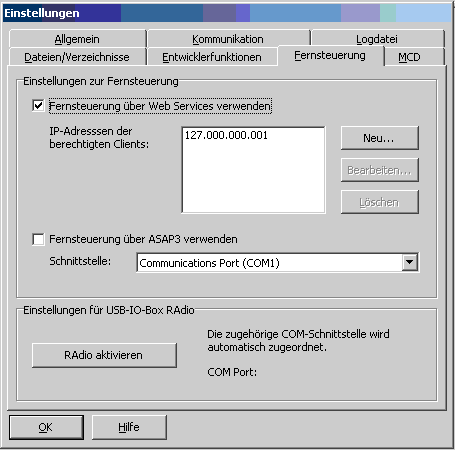
Premise: WebService remote control in DiagRA must be enabled. This can be done in DiagRA using Settings –> Remote control –> Enable remote control using web services.
Determining parameters for the test bench configuration
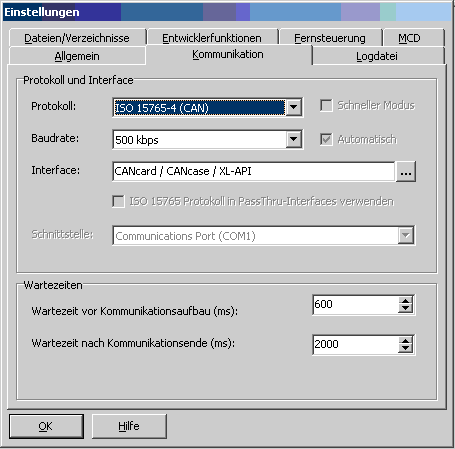
The values “baudrate”, “interface” and “protocol” needed to configure DiagRA in ecu.test can be found in DiagRA in Settings –> Communication whereas the baudrate has to be declared with no unit.
The OBD address needed for the configuration of the OBD-port can be found in the DiagRA main window. The value to enter is the first number (e.g. 33) of the text in the selection box marked in the following picture.

Controlling the Silver Scan-Tool
It is possible to control the Silver Scan-Tool of RA Consulting via the DiagRA Tool-Adapter. To do so Silver Scan-Tool has to be running before ecu.test is able to establish a connection.
Properties 🛈
Name |
Available if |
Default value |
Valid values |
Type |
Description |
|---|---|---|---|---|---|
Version |
‘<system default>’ |
string |
Used DiagRA version |
||
User |
‘diagra’ |
string |
Using given user name for the automation interface |
||
Baud rate |
string |
Baud rate |
|||
Interface |
string |
Interface |
|||
Protocol |
string |
Protocol |
|||
Check settings |
☐ |
bool |
Verified if set to ‘True’ that DiagRA settings are set correctly and abort the port start on incorrect settings. (If false, a warning message comes in the log window) |
||
Alternative DiagRA installation |
string |
Optionally, a DiagRA_D.exe can be specified here, which will be started instead of the one configured in the registry, if the DiagRA WebService is not yet running. |
|||
Language |
‘<keep>’ |
string |
Sets the program language of DiagRA, which is used for job calls and influences the language of the jobs return values. Default value “<keep>” to keep the current language. Valid values are e.g. “en” or “de”. |
||
Timeout for tool call ❲in sec.❳ |
‘600’ |
string |
Timeout after which a tool call is aborted. |
Jobs 🛈
Configure
Changes the configuration of the diagnostics interface via the DiagRA web service by using keyword-value pairs, e.g. Name “TIMEOUTVALUE” and value “20” sets the timeout awaiting an answer of the ECU to 20 seconds.
By default the language of the TBC option is used.
Information about the keywords can be found in the user documentation of DiagRA in the section “Configure”. The document can be found in the installation directory, e.g. in “C:\RA Consulting\DiagRA Automation\Samples\WebServices\Doc\WebserviceFunktionen.pdf”.
Parameterization
Parameter
Name |
Available if |
Default value |
Valid values |
Type |
Description |
|---|---|---|---|---|---|
name |
string |
Name of the configuration that is changed. |
|||
value |
string |
Setting for the configuration. Value that shall be set for the given keyword. |
ReadInterfaces
Determines all known interfaces of the specified types/standards.
Parameterization
Parameter
Name |
Available if |
Default value |
Valid values |
Type |
Description |
|---|---|---|---|---|---|
deviceTypes |
[] |
object |
List of device types, e.g. [“RP1210”]; leave empty for all devices. |
Return value
Name |
Available if |
Default value |
Valid values |
Type |
Description |
|---|---|---|---|---|---|
jobResult |
object |
List of interfaces |
SaveCurrentPage
This function saves the data of the current page.
Parameterization
Parameter
Name |
Available if |
Default value |
Valid values |
Type |
Description |
|---|---|---|---|---|---|
Name |
string |
Name of a file in which the data is stored. |
|||
Page |
string |
Name of a page in DiagRA whose data is stored. |
|||
SubPage |
string |
Name of a subpage in DiagRA whose data is stored. |
SelectInterface
Selects an interface - more flexible than Configure(‘Interface’, …). If the specification does not yield a unique result, the first matching interface is selected
Parameterization
Parameter
Name |
Available if |
Default value |
Valid values |
Type |
Description |
|---|---|---|---|---|---|
deviceType |
string |
Interface type (as in Interface Selection). May remain empty, then all types are searched. |
|||
manufacturer |
string |
Manufacturer (substrings are possible). May remain empty, then all manufacturers are searched. |
|||
name |
‘*’ |
string |
Name of an interface. May contain wildcards * and ?. |
||
version |
string |
Version (substrings are possible). May remain empty, then all versions are searched. |
Return value
Name |
Available if |
Default value |
Valid values |
Type |
Description |
|---|---|---|---|---|---|
jobResult |
string |
Selected interface (determined via ReadConfig(‘Interface’)). |