dSPACE: RTMaps
Legacy/internal identifier: RTMaps
Vendor information
Vendor |
Web page |
Product name |
Version |
|---|---|---|---|
Intempora (a dSpace Company) |
RTMaps |
4.9 |
Categories
MDL 🛈 |
APL 🛈 |
BAN 🛈 |
BMA 🛈 |
SVC 🛈 |
DGN 🛈 |
FIU 🛈 |
EES 🛈 |
FCT 🛈 |
DBG 🛈 |
IMG 🛈 |
AUDIO 🛈 |
ENVSIM 🛈 |
ENVCOM 🛈 |
|---|---|---|---|---|---|---|---|---|---|---|---|---|---|
Platform
Operating system |
Support |
|---|---|
Windows |
|
Linux |
✓ |
Specifics
RTMaps from Intempora is a component-based software development and runtime environment that allows users to acquire, time-stamp, synchronize and replay data from various sensors and vehicle buses.
This tool connection enables the replay of RTMaps diagrams as well as the editing of component properties.
Loading and replaying a diagram
A diagram (.rtd file) can be loaded with the LoadDiagram tooljob. For this purpose the path to the diagram must be specified. The diagram must be located on the tool host.
The diagram is replayed using the StartDiagramReplay tool job. The desired replay duration can be set via the wait test step. Stopping the replay is possible with the StopDiagramReplay tooljob.
Reading and writing properties
An RTMaps diagram consists of different components that have different properties.
Info
Properties of components in RTMaps may have a different name internally (propertyID) than displayed in RTMaps Studio. It is advisable to refer to the respective documentation. The corresponding propertyID can also be found via the console output in RTMaps Studio. To do this, the property must be changed for a short time. The change creates a console message that contains the propertyID. Alternatively, the propertyID can also be taken from the diagam file when it is opened with a text editor.
The properties can be read with the ReadProperty tool job. In addition to the name of the component (componentID) and the property (propertyID), the data type of the property (propertyType) must be specified. This can be found out by opening the diagram in a text editor. The value of the type specified in the diagram file for the componentID and propertyID corresponds to the data type (propertyType) as follows:
Type=”0” : ‘bool’
Type=”1” : ‘int’
Type=”2” : ‘float’
Type=”3” : ‘str’
Type=”4” : ‘enum’
Changing properties is possible with the WriteProperty tooljob. Changing an enum property is done by entering the index of the option to be selected (indexes start at 0) or the name of the option.
The changes are not persistent.
LogMonitor
To receive and process logs from RTMaps, the StartLogMonitor and StopLogMonitor tooljobs can be used.
In the following, two sample packages are used to explain how to use these tooljobs to read logs during a diagram replay and to respond to their contents accordingly (see screenshots). In this case two packages are needed, since evaluating the logs blocks a package.
The main package starts the diagram replay for a certain time. To run another package in parallel, a parallel reference of the package checkLogs has been inserted. This package evaluates the RTMaps logs and aborts the test case prematurely when the keyword “keyword123” is encountered. The communication between the packages is done via inboxes and outboxes (see Exchange of messages between parallel packages). An example of this can be seen here: Part 3: Communication between calling and called package.
If the checkLogs package does not abort the test case prematurely, it is aborted by the main package via a message in its doExitInbox. The connection between the doExitOutbox of the main package and the doExitInbox of the checkLogs package is made via the parameterization dialog of the checkLogs package.
In the checkLogs package, the “logsInbox” inbox is registered for the RTMaps logs using the StartLogMonitor tooljob. The React-On test step can be used to react to incoming messages in the inboxes (logsInbox or doExitInbox) as desired.
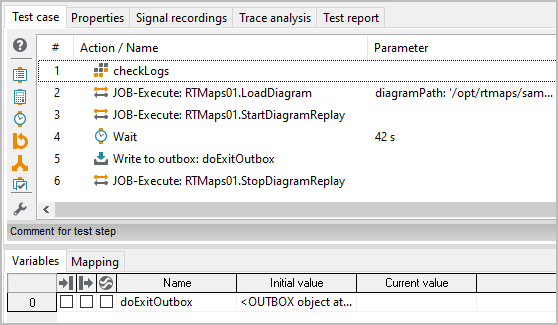
Main package: Starts and stops RTMaps diagram
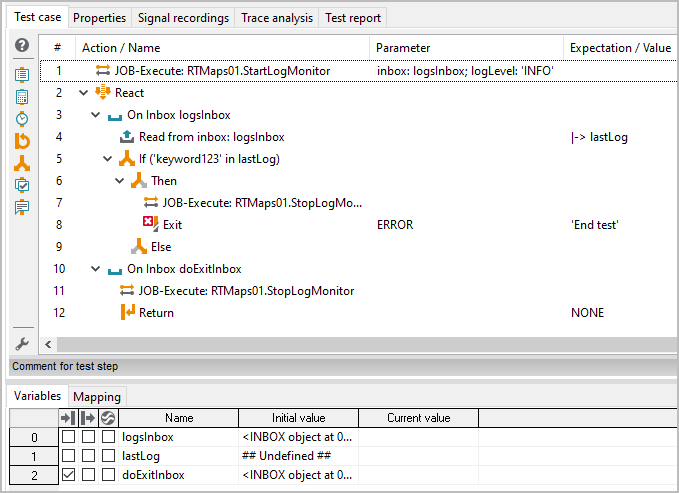
checkLogs package: Runs in parallel to the main package to evaluate RTMaps logs.
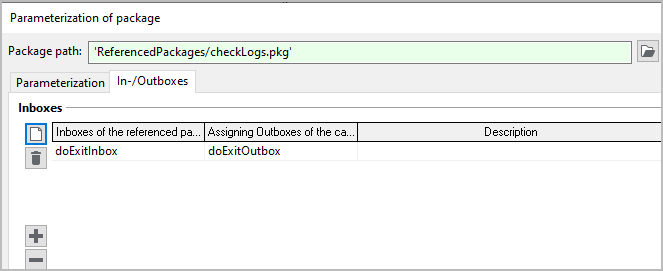
Parameterization dialog of checkLog.pkg: doExitOutbox (main package) and doExitInbox (checkLogs package) are connected.
Info
The default size of an inbox is only 50 messages. This value can be adjusted in the variable properties of the respective inbox.
Properties 🛈
Name |
Available if |
Default value |
Valid values |
Type |
Description |
|---|---|---|---|---|---|
Common |
|||||
RTMaps library |
Common |
‘/opt/rtmaps/lib/librtmaps.so’ |
string |
Path to the librtmaps.so file, e.g. /opt/rtmaps/lib/librtmaps.so |
|
Timeout for tool call ❲in sec.❳ |
‘600’ |
string |
Timeout after which a tool call is aborted. |
Jobs 🛈
LoadDiagram
Loads a diagram into RTMaps.
Parameterization
Parameter
Name |
Available if |
Default value |
Valid values |
Type |
Description |
|---|---|---|---|---|---|
diagramPath |
string |
Path to the diagram (rtd file). |
ReadProperty
Reads the value of a property of a component from an RTMaps diagram.
Parameterization
Parameter
Name |
Available if |
Default value |
Valid values |
Type |
Description |
|---|---|---|---|---|---|
componentID |
string |
Name of the component in the RTMaps diagram |
|||
propertyID |
string |
Property name |
|||
propertyType |
[‘int’, ‘bool’, ‘float’, ‘str’, ‘enum’] |
string |
Property type |
Return value
Name |
Available if |
Default value |
Valid values |
Type |
Description |
|---|---|---|---|---|---|
propertyValue |
object |
Property value |
StartDiagramReplay
Starts the reply of the diagram in RTMaps.
StartLogMonitor
Registers an inbox to receive logs from RTMaps.
Parameterization
Parameter
Name |
Available if |
Default value |
Valid values |
Type |
Description |
|---|---|---|---|---|---|
inbox |
object |
Inbox for receiving RTMaps logs |
|||
logLevel |
‘INFO’ |
[‘INFO’, ‘WARNING’, ‘ERROR’] |
string |
Minimum log level |
StopDiagramReplay
Stops the reply of the diagram in RTMaps.
StopLogMonitor
Deregisters any inboxes from the RTMaps logstream.
WriteProperty
Writes a value to a property of a component in an RTMaps diagram.
Parameterization
Parameter
Name |
Available if |
Default value |
Valid values |
Type |
Description |
|---|---|---|---|---|---|
componentID |
string |
Name of the component in the RTMaps diagram |
|||
propertyID |
string |
Property name |
|||
value |
object |
Value |