PLS: UDE
Legacy/internal identifier: UDE
Vendor information
Vendor |
Web page |
Product name |
Version |
|---|---|---|---|
PLS Development Tools |
Universal Debug Engine |
4.2 to 2023 |
Categories
MDL 🛈 |
APL 🛈 |
BAN 🛈 |
BMA 🛈 |
SVC 🛈 |
DGN 🛈 |
FIU 🛈 |
EES 🛈 |
FCT 🛈 |
DBG 🛈 |
IMG 🛈 |
AUDIO 🛈 |
ENVSIM 🛈 |
ENVCOM 🛈 |
|---|---|---|---|---|---|---|---|---|---|---|---|---|---|
✓ |
Platform
Operating system |
Support |
|---|---|
Windows |
✓ |
Linux |
Info
This tool can be configured and used multiple times in parallel.
Ports
Specifics
Info
If only an ELF file is selected for loading, its symbols will be loaded in UDE. The program on the target is not changed.
Reading/Writing enum variables
In order to read or write enum variables symbolically, the test step has to be configured to use the representation “Interpreted Text”.
By default, if the Job “ReadVariable” is used, the symbolical value is returned as text. In order to get the numerical value, the expression has to be modified in a way that UDE returns a number. This can be achieved in the following way (reading the enum variable “enumVariable”).
“0 + enumVariable”
Using a type cast, e.g., “(char) enumVariable” However, the type might have to be different (e.g., “int” instead of “char”), depending on how many bytes the enum variable uses internally. Thus, the first expression would be more secure.
Multicore debugging
When debugging multicore targets there must be one debugging port in the test bench configuration for every core of the target that is used in the test case. To access variables and registers in a symbolic way the test configuration must contain one control unit for every core. The matching port and ELF/HEX files can be selected in the Debugging section of each control unit.
Info
Some port jobs contain the deprecated core parameter which shouldn’t be used anymore. Please make sure to select the job of the corresponding core.
Multicore/Multiprogram loader
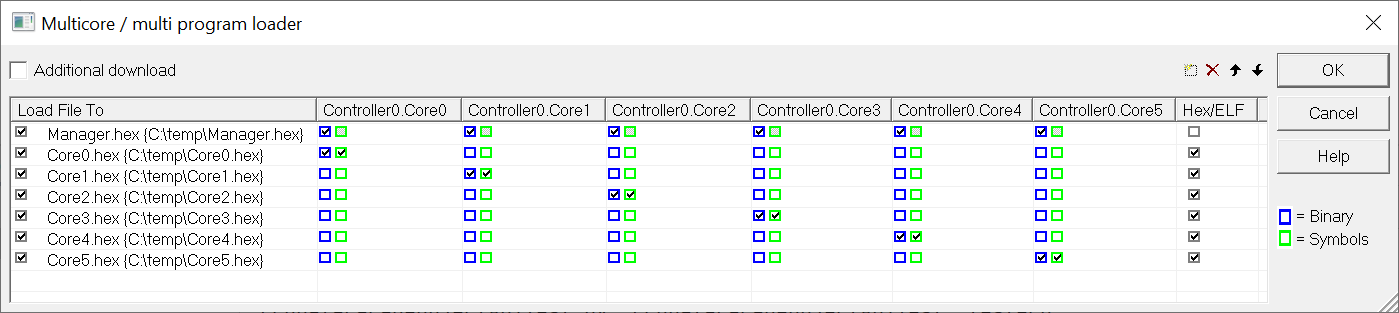
Advanced use cases may require the usage of the Multicore/Multiprogram loader to flash the target. The tool jobs MclAddFile and MclRemoveAllFiles can be used to parametrize the dialog and MclDoDownload starts the flashing process. The flashing options in the TBC can be set to their default values when using the Multicore/Multiprogram loader.
Properties 🛈
Name |
Available if |
Default value |
Valid values |
Type |
Description |
|---|---|---|---|---|---|
Rate of cyclic writing ❲Hz❳ |
10 |
int |
Sets the rate (in Hz) for cyclic writing of variables. CAUTION: High cyclic writing rates may have a negative influence on the performance of ecu.test! |
||
Version |
‘4.2’ |
string |
UDE version to use. |
||
Workspace file |
uri |
Path of the UDE workspace file on the Tool Server computer (absolute or relative to the toolhost base path). If present, the workspace file will be loaded. If undefined or nonexistent, a new workspace will be created. |
|||
Connect to running UDE instance |
☐ |
bool |
If exactly one UDE instance is running, ecu.test will connect to this one. |
||
Always close UDE instance |
☐ |
bool |
Close UDE instance, even if it was not started by ecu.test. |
||
Target configuration file |
uri |
Path to the target file on the remote host (*.cfg file). Can be left empty to reopen an existing workspace or connecting to an already running UDE instance. Path can be absolute or relative to the tool host base path. |
|||
Connect automatically at tool start |
☑ |
bool |
UDE is trying to connect with target during startup. When ‘False’ is chosen the connection need to be started manually using the port job ‘SetConnectState’. |
||
Timeout when connecting to target ❲s❳ |
20 |
float |
|||
Load program to target |
‘No’ |
[‘If different’, ‘No’, ‘Always’] |
string |
Programming the target after the port has been started |
|
Start program automatically |
☐ |
bool |
Start debugger execution after the port has been configured |
||
Query registers |
☑ |
bool |
To save time, by setting this to “False”, identification of available registers can be skipped. Access to registers is then only possible via jobs; They will not appear in the Debugging tab. |
||
Timeout for tool call ❲in sec.❳ |
‘600’ |
string |
Timeout after which a tool call is aborted. |
Jobs 🛈
GetWindowContent
Reads the contents of a window.
Parameterization
Parameter
Name |
Available if |
Default value |
Valid values |
Type |
Description |
|---|---|---|---|---|---|
contentFormat |
‘CSV’ |
[‘CSV’, ‘XML’] |
string |
Format in which the window contents are to be queried. |
|
flags |
0 |
int |
See UDEAutomation.chm, keyword “ExportWindowContent” |
||
windowTitle |
[ONLINE] |
string |
Title or description of the window. In addition to the proposed values, just the title or alternate title or just the description can be specified. If the multiple windows match, the first matching window found is used. |
Return value
Name |
Available if |
Default value |
Valid values |
Type |
Description |
|---|---|---|---|---|---|
result |
string |
Contents of the window |
MclAddFile
Adds a file to the multicore loader.
Parameterization
Parameter
Name |
Available if |
Default value |
Valid values |
Type |
Description |
|---|---|---|---|---|---|
binCores |
[] |
object |
List of core names or indices in which the file will be loaded as binary. |
||
containsSymbols |
True |
[False, True] |
bool |
Indicates whether the HEX file contains symbol data. |
|
path |
string |
Absolute path to the HEX or ELF file on the Tool Server. |
|||
symCores |
[] |
object |
List of core names or indices in which the file will be loaded as symbols. The parameter ‘containsSymbols’ must be set to True if the file is a HEX file. |
MclDoDownload
Starts the flashing process with the selected option.
Parameterization
Parameter
Name |
Available if |
Default value |
Valid values |
Type |
Description |
|---|---|---|---|---|---|
option |
[‘LoadAndFlash’, ‘VerifyOnly’, ‘ProgramAndVerify’] |
string |
Options for the flashing process. See UDEAutomation.chm, keyword ‘DoDownload’. |
Return value
Name |
Available if |
Default value |
Valid values |
Type |
Description |
|---|---|---|---|---|---|
result |
[False, True] |
bool |
Indicates whether the flashing process was successful. |
MclRemoveAllFiles
Removes all files from the multicore loader.
SetUserConfigParam
Sets the referenced configuration parameter.
Parameterization
Parameter
Name |
Available if |
Default value |
Valid values |
Type |
Description |
|---|---|---|---|---|---|
name |
string |
Name of the configuration parameter |
|||
section |
string |
Name of the containing section. Can be empty or none. |
|||
value |
object |
Value of type char, string, int, float or bool. |