EA: UTA 12
Legacy/internal identifier: UTA12
Vendor information
Vendor |
Web page |
Product name |
Version |
|---|---|---|---|
EA Elektro-Automatik GmbH & Co. KG |
UTA 12 |
Categories
MDL 🛈 |
APL 🛈 |
BAN 🛈 |
BMA 🛈 |
SVC 🛈 |
DGN 🛈 |
FIU 🛈 |
EES 🛈 |
FCT 🛈 |
DBG 🛈 |
IMG 🛈 |
AUDIO 🛈 |
ENVSIM 🛈 |
ENVCOM 🛈 |
|---|---|---|---|---|---|---|---|---|---|---|---|---|---|
✓ |
Platform
Operating system |
Support |
|---|---|
Windows |
✓ |
Linux |
Ports
Specifics
Precondition for usage
Installation of the currently available UTA12 drivers of Elektroautomatik, to be found at https://elektroautomatik.com/shop/en/service/downloads/uta-12/.
In addition, the VCP must be activated in the driver settings of the “USB serial converter” in the hardware manager. The setting can be found at .
Should you not be able to find that option, a new connection of the hardware will solve the problem. Take into account that no other software should use the hardware, otherwise the setting possibility may disappear.
The correct configuration is shown in the following figure.
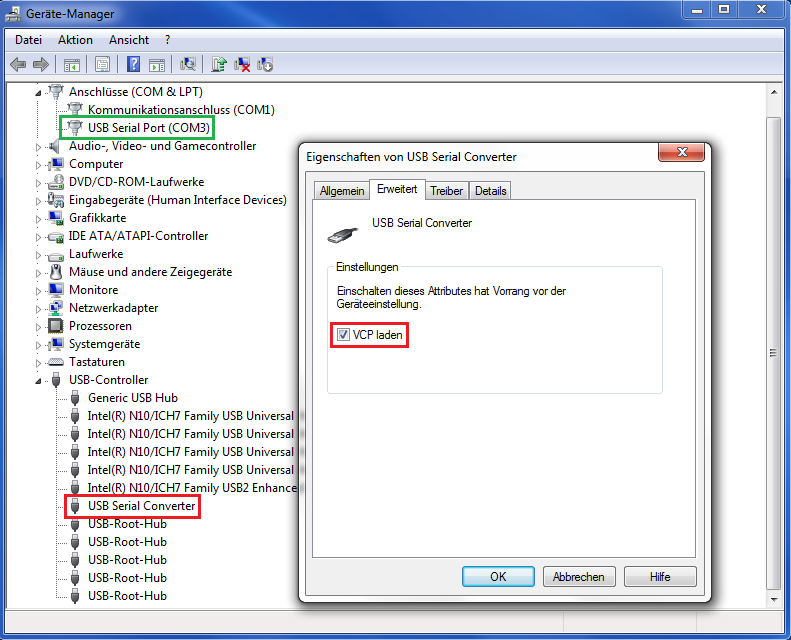
After configuration as shown above at “connections” the “USB serial port (COM3)” is determined which is relevant for further utilization with ecu.test.
Model quantities
Status
- Constant current or constant voltage
Depending on the current status of the laboratory power supply the signal is “CC” or “CV”.
Constant power
Error
- IDNumber
Value range: Integer 1 … 255
- IDString
Value range: String (max. 18 characters long)
- Imax
Maximum current of the laboratory power supply (indicated at configuration of UTA12)
Over-temperature protection
Over-voltage protection
- Remote
Value range: True or false
Must be set on “true” before further use; otherwise remote control of the laboratory power supply is not possible.
To be considered: Logic can also be inverted depending on the terminal used.
- Standby
Value range: True or false
Switches the laboratory power supply into standby condition.
To be considered: Logic can also be inverted depending on the terminal used.
- Umax
Maximum voltage of the laboratory power supply (indicated at configuration of UTA12)
- UserText
Value range: String (max. 18 characters long)
- Current
Value range: Float (0.0 … Imax) in amps
Output current of the laboratory power supply
- Voltage
Value range: Float (0.0 … Umax) in volts
Output voltage of the laboratory power supply
Properties 🛈
Name |
Available if |
Default value |
Valid values |
Type |
Description |
|---|---|---|---|---|---|
Timeout for tool call ❲in sec.❳ |
‘600’ |
string |
Timeout after which a tool call is aborted. |