Agentic Multimedia
This dialog is displayed when you add an Agentic Multimedia test step within the media access tab (via the context menu on an image or a mask) to your test case.
The test step uses ecu.test agent to plan, perform, and evaluate a sequence of actions based on a prompt. It is particularly useful for complex or dynamic interactions for which fixed coordinates and a fixed sequence are not reliable.
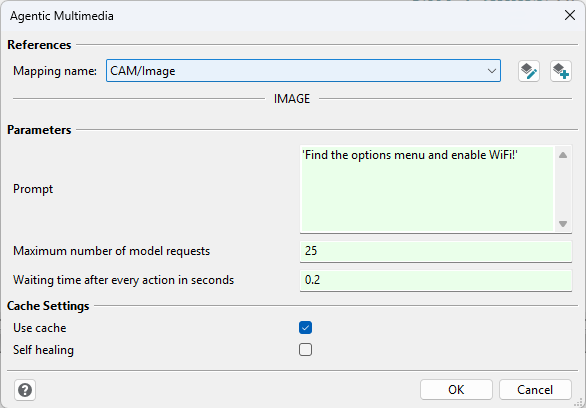
The dialog contains three sections:
Reference
Here you can specify or change the referenced mapping item. The Agent uses this mapping item to read current images and perform the determined actions.
Parameters
Prompt
Describe the goal of the test step in natural language. The prompt can contain the initial situation, the desired actions, and the expected final state. For example: “Open the settings, enable Wi-Fi, and verify that Wi-Fi is enabled.”
The Agent interprets the prompt during test execution. It separates the actions to perform from the final evaluation. During execution, it analyzes current images and uses the available actions to navigate to the described goal. After the last action, an evaluation Agent checks whether the expected final state has been reached.
Maximum number of model requests
This value limits the number of model requests used to interpret, execute, and evaluate the prompt.
Longer or more difficult interactions can require a higher value. The default is 25.
Waiting time after every action in seconds
After every action, the test step waits for the specified time before it captures the next image.
This allows animations or delayed state changes to finish before the Agent sees the result of the
action. The waiting time also applies to actions read from the cache. The default is 0.2 seconds.
The value must not be negative.
Cache settings
Use cache
When this option is enabled, the test step searches for a previous successful execution. A cache entry is used only if values including the evaluated prompt, the model instructions, the waiting time, and the position of the test step match.
If a matching entry is found, the stored actions are initially performed “blindly”. This means that the Agent does not plan each action again based on the intermediate images. The current image is then used to check whether the goal described in the prompt has been reached.
If no matching cache entry exists, the Agent interprets the prompt again and navigates to the goal based on current images. Only a successful execution is stored in the cache. If the option is disabled, cache entries are neither read nor written.
You can delete all multimedia cache entries in the multimedia settings.
Self-healing
This option is available only if Use cache is enabled. If the goal is not reached after performing the stored actions, the test step deletes the invalid cache entry. The Agent then interprets the prompt again and navigates to the goal based on current images. The test step does not write a new cache entry for this self-healing run.
If self-healing is disabled, a failed evaluation after the cached execution directly results in FAILED.
Test execution flow
In simplified form, the test step performs the following steps:
The prompt is interpreted for the actions and the final evaluation.
If a matching cache entry exists, the stored actions are performed. Otherwise, the Agent navigates to the goal based on current images.
After the actions, the Agent checks whether the final state described in the prompt has been reached.
If a cached execution failed and self-healing is enabled, the cache entry is deleted and the prompt is performed again by the Agent.
Finally, the Agent evaluates the reached state as SUCCESS or FAILED.
The performed actions are added to the report as child test steps. The report also contains a summary of the evaluation and information about the model requests used.
Further information