Reading and comparing audio recordings
This dialog is shown when you add a read test step for an audio device or audio channel in the Media Access Tab.
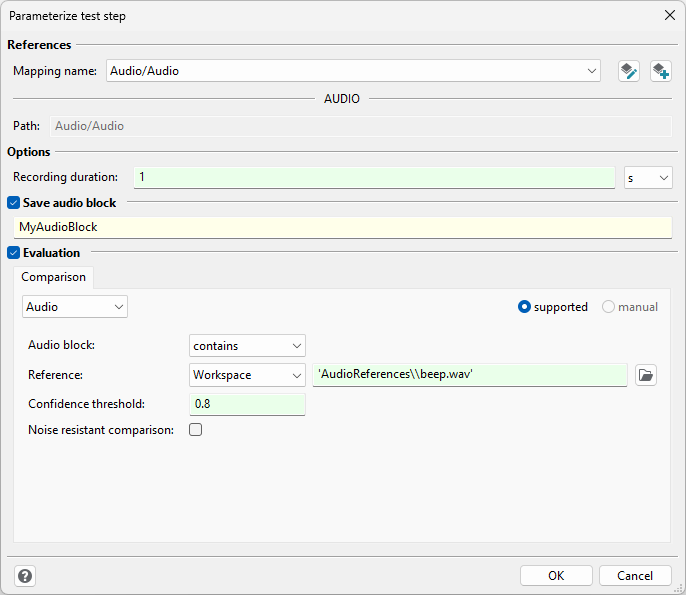
The dialog consists of four sections:
Reference
The referenced mapping item can be viewed or changed here.
Options
The duration for the audio recording for this test step can be entered here.
Save audio block
Optionally, a test case variable’s name can be entered here. The audio recording will be saved in that variable as an AudioBlock.
Evaluation
In this section you can set an expectation that will be evaluated when executing the test case. There are different types of expectations that can be selected using the drop down menu in the top left corner of this section.
Expectation type Audio
The test step’s recording is compared to a reference recording. With the dropdown next Audio block: it can be specified if the reference is expected in the recording or if it is not expected.
Reference recordings can be of the following types:
Reference type |
Valid input types |
Examples |
|---|---|---|
Object |
|
|
Workspace |
Path to a file in the workspace as String. Supported file types are WAV, FLAC, MP3, OGG or further formats supported by the Python library “soundfile”. |
|
The algorithm for evaluation can be parameterized:
Confidence threshold: It can be defined with which confidence the reference must have been recognized in the audio recording. The value must be between 0 and 1. For example, if the comparison algorithm recognizes the reference recording with a confidence of 0.7, the reference is considered as not contained for a confidence threshold of 0.8.
Noise resistant comparison: If the recording contains noise, the recognition can be improved with this settings. For setups without noise it is recommended not to use this option.
Evaluation type String
A spoken text can be recognized in an audio stream and compared to the reference string. The speech-to-text service can be configured in the test configuration. It is possible to include speech-to-text services with user code. These services will also be listed in the test configuration. Further information are available on the help section on user defined speech recognition.
Evaluation type Unspecific
The evaluation can be entered directly here. “value” represents the test step’s recording as an AudioBlock. The interface for AudioBlock object can be found in AudioBlock.